Representational state transfer (REST) API
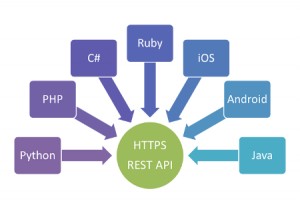
Representational state transfer (REST) is an architectural style consisting of a coordinated set of constraints applied to components, connectors, and data elements, within a distributed hypermedia system. REST ignores the details of component implementation and protocol syntax in order to focus on the roles of components, the constraints upon their interaction with other components, and their interpretation of significant data elements.
REST has been applied to describe desired web architecture, to identify existing problems, to compare alternative solutions, and to ensure that protocol extensions would not violate the core constraints that make the Web successful. Fielding used REST to design HTTP 1.1 and Uniform Resource Identifiers (URI).
The REST architectural style is also applied to the development of Web services as an alternative to other distributed-computing specifications such as SOAP.
The properties of the REST API
• Performance
• Scalability of component interactions
• Simplicity of interfaces
• Modifiability of components to meet changing needs (even while the application is running)
• Visibility of communication between components by service agents
• Portability of component deployment
• Reliability
Aspects of RESTful API
Web Service APIs that adhere to the REST constraints are called RESTful. RESTful APIs are defined with these aspects:
• base URI, such as http://example.com/resources/
• an Internet media type for the data. This is often JSON but can be any other valid Internet media type (e.g. XML, Atom, microformats, images, etc.)
• standard HTTP methods (e.g., GET, PUT, POST, or DELETE)
• hypertext links to reference state
• hypertext links to reference related resources
C# REST API Examples
1. Simple REST API Example
This example creates:
• GET endpoint
• POST endpoint
• in-memory data storage
Project Creation
Create a new API project:
dotnet new webapi -n MyApi
Run:
dotnet run
2. Simple Product Model
Product.cs
public class Product
{
public int Id { get; set; }
public string Name { get; set; }
public decimal Price { get; set; }
}
3. Controller Example
Controllers/ProductController.cs
using Microsoft.AspNetCore.Mvc;
[ApiController]
[Route("api/[controller]")]
public class ProductController : ControllerBase
{
private static List<Product> products =
new List<Product>
{
new Product
{
Id = 1,
Name = "Laptop",
Price = 1200
}
};
[HttpGet]
public IActionResult GetAll()
{
return Ok(products);
}
[HttpGet("{id}")]
public IActionResult GetById(int id)
{
var product =
products.FirstOrDefault(p => p.Id == id);
if(product == null)
return NotFound();
return Ok(product);
}
[HttpPost]
public IActionResult Create(Product product)
{
products.Add(product);
return CreatedAtAction(
nameof(GetById),
new { id = product.Id },
product
);
}
[HttpDelete("{id}")]
public IActionResult Delete(int id)
{
var product =
products.FirstOrDefault(p => p.Id == id);
if(product == null)
return NotFound();
products.Remove(product);
return NoContent();
}
}
4. Example Requests
GET all products
GET /api/product
Response:
[
{
"id": 1,
"name": "Laptop",
"price": 1200
}
]
POST new product
POST /api/product
Content-Type: application/json
{
"id": 2,
"name": "Phone",
"price": 800
}
5. Minimal API Example (.NET 6+)
Modern ASP.NET Core supports Minimal APIs.
Program.cs
var builder = WebApplication.CreateBuilder(args);
var app = builder.Build();
List<Product> products =
[
new Product
{
Id = 1,
Name = "Laptop",
Price = 1200
}
];
app.MapGet("/products", () =>
{
return products;
});
app.MapGet("/products/{id}", (int id) =>
{
return products.FirstOrDefault(p => p.Id == id);
});
app.MapPost("/products", (Product product) =>
{
products.Add(product);
return Results.Created(
$"/products/{product.Id}",
product
);
});
app.Run();
6. JSON Response Example
REST APIs usually exchange JSON:
{
"id": 1,
"name": "Laptop",
"price": 1200
}
7. Database Example with Entity Framework
Using Entity Framework Core:
builder.Services.AddDbContext<AppDbContext>(
options => options.UseSqlServer(connectionString)
);
8. Calling REST APIs from C#
Use HttpClient.
HttpClient client = new HttpClient();
string json =
await client.GetStringAsync(
"https://api.howcsharp.com/products"
);
Console.WriteLine(json);
9. HTTPS Support
REST APIs should use HTTPS/TLS.
ASP.NET Core enables HTTPS automatically.
Example:
https://localhost:5001/api/product
10. Swagger/OpenAPI
ASP.NET Core includes Swagger support.
Enable:
builder.Services.AddEndpointsApiExplorer();
builder.Services.AddSwaggerGen();
Use UI:
https://localhost:5001/swagger
11. Authentication Example (JWT)
REST APIs often use JWT authentication.
builder.Services
.AddAuthentication("Bearer")
.AddJwtBearer();
Used for:
• login systems
• APIs
• mobile apps
12. Best REST API Practices
Use nouns in URLs
Good:
/api/products
Bad:
/api/getProducts
Core Principles of REST
1. Stateless
• Each request contains all the information needed.
• The server does not store client session state.
2. Client–Server Separation
Client and server evolve independently.
3. Uniform Interface
Consistent way of interacting with resources (URLs + HTTP methods).
4. Cacheable
Responses can be cached to improve performance.
5. Layered System
Client doesn’t need to know if it’s talking to the final server or an intermediary.
Advantages
• Simple and intuitive
• Stateless → scalable
• Widely supported (browsers, tools, frameworks)
• Flexible (works with many data formats)
Disadvantages
• No strict standard (unlike some protocols)
• Can lead to over-fetching or under-fetching of data
• Not ideal for real-time communication
• Versioning APIs can be tricky
Common REST API Use Cases
REST APIs are widely used for:
• e-commerce backends
• mobile applications
• SPA frontends
• cloud services
• microservices
• SaaS platforms
• authentication systems