How to implement a Snake game in C#?
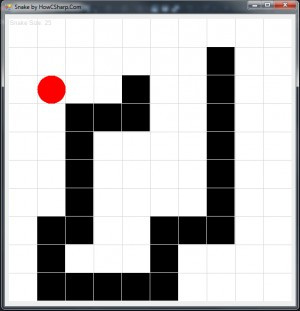
In this page, we are sharing the source code of a "simple snake game" developed on C# programming language as a windows form application. Here are the most relevant keywords about this game: Graphics, Timer, Double Buffering, First Game, Game Loop.
You can download the source code of the snake game from here. Please download the project, and build it with Visual Studio to run the application.
Note that, the application is written in C# programming language, using old style Windows Form Applications as UI components. Try to use WPF (windows presentation foundation) for better development and maintainability experiences.

Core elements
Direction
public enum Direction
{
Up,
Down,
Right,
Left
}
Point
public class Point
{
public int X { get; set; }
public int Y { get; set; }
public Point(int x, int y)
{
X = x;
Y = y;
}
public void Set(Point p)
{
X = p.X;
Y = p.Y;
}
public Boolean Equals(Point p)
{
return p.X == X && p.Y == Y;
}
public override string ToString()
{
return String.Format("Point (X: {0}, Y: {1})", X, Y);
}
}
Snake7
public class Snake7
{
Direction Direction;
Boolean canChangeDirection = true;
int NumX;
int NumY;
Random rand;
public List<Point> Points;
public Point Food;
public Snake7(int numX, int numY)
{
NumX = numX;
NumY = numY;
rand = new Random();
Points = new List<Point>();
Food = new Point(0, 0);
CreateNewFood();
Points.Add(new Point(NumX / 2 + 1, numY / 2));
Points.Add(new Point(NumX / 2 + 0, numY / 2));
Points.Add(new Point(NumX / 2 - 1, numY / 2));
Points.Add(new Point(NumX / 2 - 2, numY / 2));
Direction = Direction.Right;
}
...
}
Methods
public void Move()
{
var count = Points.Count;
for (int i = count - 1; i > 0; --i)
Points[i].Set(Points[i - 1]);
switch (Direction)
{
case Direction.Left:
Points[0].X = (Points[0].X + NumX - 1) % NumX;
break;
case Direction.Right:
Points[0].X = (Points[0].X + 1) % NumX;
break;
case Direction.Up:
Points[0].Y = (Points[0].Y + NumY - 1) % NumY;
break;
case Direction.Down:
Points[0].Y = (Points[0].Y + 1) % NumY;
break;
}
if (CanEat())
FinishEating();
canChangeDirection = true;
}
private Boolean CanEat()
{
if (Points[0].Equals(Food))
return true;
return false;
}
private void FinishEating()
{
var count = Points.Count;
var last = Points[count - 1];
Points.Add(new Point(last.X, last.Y));
CreateNewFood();
}
How to improve the game?
1. Level: Update timer1.Interval to be 20 smaller when the size of the snake reaches multiplicatives of 10.
2. Walls: Add 3-5 blue points that represent walls. When snake hit them, it is gameover.
3. Score: Eating a food should have an award. Actually, reaching the food faster should be rewarded. When a food appears, you can start countnig from 20 to 1 in each step and add the value to the score.
4. Bonus food: Sometimes you may create other colors of foods that have bonus snake size and points.
5. Scores: Save the best scores and create a Top 10 list.