How to POST and GET url with parameters in C#?

In C#, the standard way to send GET and POST HTTP requests is using HttpClient from System.Net.Http.
What is POST and GET?
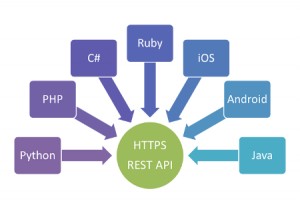
REST API (RESTful API, REpresentational State Transfer) is one of the most frequently used technologies in communicating between websites, APIs (Application Programming Interface) and services.
4 different commands are used when transferring data with the REST API: GET, POST, PUT, DELETE. In most cases, the function of the PUT and DELETE commands are performed by the other two commands.
When making a request with the GET command, all the attached parameters are written in the address section. It is not suitable for sending to many parameters or large data.
Whereas, when making a request with the POST command, parameters are added as attachments to the request package. When the number of parameters increases or when sending files, you should prefer the POST method.
GET request with parameters
Option A: Build query string manually
using System;
using System.Net.Http;
using System.Threading.Tasks;
class Program
{
static async Task Main()
{
using HttpClient client = new HttpClient();
string baseUrl = "https://api.howcsharp.com/search";
string url = $"{baseUrl}?q=dotnet&page=1";
HttpResponseMessage response = await client.GetAsync(url);
string result = await response.Content.ReadAsStringAsync();
Console.WriteLine(result);
}
}
Option B: Safer way (recommended for multiple params)
using System;
using System.Net.Http;
using System.Web;
class Program
{
static async Task Main()
{
using HttpClient client = new HttpClient();
var builder = new UriBuilder("https://api.howcsharp.com/search");
var query = HttpUtility.ParseQueryString(string.Empty);
query["q"] = "dotnet";
query["page"] = "1";
builder.Query = query.ToString();
var response = await client.GetAsync(builder.ToString());
string result = await response.Content.ReadAsStringAsync();
Console.WriteLine(result);
}
}
2. POST request with parameters
A) JSON body (most common)
using System;
using System.Net.Http;
using System.Text;
using System.Text.Json;
using System.Threading.Tasks;
class Program
{
static async Task Main()
{
using HttpClient client = new HttpClient();
var data = new
{
username = "john",
password = "1234"
};
string json = JsonSerializer.Serialize(data);
var content = new StringContent(json, Encoding.UTF8, "application/json");
HttpResponseMessage response = await client.PostAsync("https://api.howcsharp.com/login", content);
string result = await response.Content.ReadAsStringAsync();
Console.WriteLine(result);
}
}
Form-urlencoded POST (like HTML forms)
using System;
using System.Collections.Generic;
using System.Net.Http;
using System.Threading.Tasks;
class Program
{
static async Task Main()
{
using HttpClient client = new HttpClient();
var values = new Dictionary<string, string>
{
{ "username", "john" },
{ "password", "1234" }
};
var content = new FormUrlEncodedContent(values);
var response = await client.PostAsync("https://api.howcsharp.com/login", content);
string result = await response.Content.ReadAsStringAsync();
Console.WriteLine(result);
}
}
Important best practices
1. Don’t create HttpClient repeatedly
Reuse a single instance or use DI (otherwise socket exhaustion).
2. Always use async/await
Avoid blocking calls like .Result.
3. Handle errors
if (!response.IsSuccessStatusCode)
{
Console.WriteLine($"Error: {response.StatusCode}");
}
Another HTTPClient Example
Single function to POST and GET with parameters
public static async Task<String> CallApi(String uri,
Dictionary<string, string> parameters = null, Boolean isPost = true)
{
using (HttpClient client = new HttpClient())
{
var content = new FormUrlEncodedContent(parameters);
if (isPost)
{
var response = await client.PostAsync(uri, content);
return await response.Content.ReadAsStringAsync();
}
if (parameters != null && parameters.Count > 0)
uri = uri + "?" + content.ReadAsStringAsync().Result;
return await client.GetStringAsync(uri);
}
}
var parameters = new Dictionary<string, string>()
{ { "username", "How" }, { "password", "C#" } };
var result = CallApi("http://www.howcsharp.com", parameters, false);
Console.WriteLine(result.Result);