C# Async/Await Tutorial: How to Use Asynchronous Programming in C#
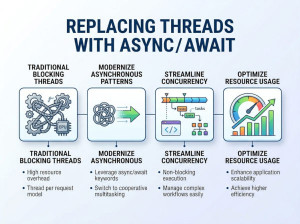
Async/Await in C# is a feature that enables writing asynchronous, non-blocking code in a readable, sequential style.
Asynchronous programming allows your application to perform long-running operations without freezing or blocking the main thread. The async keyword is used to define a method that contains asynchronous operations, while await pauses the execution of that method until the awaited task completes. This makes code easier to read compared to traditional callback-based or thread-based approaches. Async/Await is widely used in I/O-bound operations such as file handling, database queries, and API calls.
When is Async/Await Needed?
You should use Async/Await when:
• Performing I/O-bound operations (API calls, file access, database queries)
• Keeping UI applications responsive
• Improving scalability in web applications
• Handling operations that take noticeable time to complete
How to Use Async/Await?
To use Async/Await:
• Mark the method with the async keyword
• Use await with a method that returns a Task or Task
• Ensure proper return types (Task, Task, or void for event handlers only)
Sample Code Snippets
Basic Example
using System;
using System.Threading.Tasks;
class Program
{
static async Task Main(string[] args)
{
Console.WriteLine("Start");
await DoWorkAsync();
Console.WriteLine("End");
}
static async Task DoWorkAsync()
{
await Task.Delay(2000); // Simulates a delay
Console.WriteLine("Work completed");
}
}
Returning a Value
using System;
using System.Threading.Tasks;
class Program
{
static async Task Main(string[] args)
{
int result = await GetNumberAsync();
Console.WriteLine(result);
}
static async Task<int> GetNumberAsync()
{
await Task.Delay(1000);
return 42;
}
}
Calling Async Method from Non-Async Method
In some cases, you may need to call an async method from a method that is not marked as async. This commonly happens in older codebases or entry points that do not support async directly. The safest approach is to avoid blocking, but if necessary, you can use .GetAwaiter().GetResult() to retrieve the result synchronously.
using System;
using System.Threading.Tasks;
class Program
{
static void Main(string[] args)
{
Console.WriteLine("Start");
var result = GetDataAsync().GetAwaiter().GetResult();
Console.WriteLine(result);
Console.WriteLine("End");
}
static async Task<string> GetDataAsync()
{
await Task.Delay(1000);
return "Data received";
}
}
Important note: Using .Result or .Wait() instead can cause deadlocks, especially in UI or web applications. Prefer async all the way whenever possible.
Calling Only Non-Async Methods from an Async Method
If your async method only calls synchronous (non-async) methods, you have two options depending on the situation. If the work is lightweight, you should keep it synchronous and remove async. If the operation is CPU-bound and time-consuming, you can offload it to a background thread using Task.Run.
using System;
using System.Threading.Tasks;
class Program
{
static async Task Main(string[] args)
{
int result = await CalculateAsync();
Console.WriteLine(result);
}
static async Task<int> CalculateAsync()
{
return await Task.Run(() => Calculate());
}
static int Calculate()
{
// Simulates CPU-bound work
int sum = 0;
for (int i = 0; i < 1000000; i++)
{
sum += i;
}
return sum;
}
}
Advantages and Disadvantages
| Approach | Description | When to Use |
|---|---|---|
| Thread | Manually creates a new thread for execution | Low-level control over threading |
| Task (without async/await) | Uses Task-based asynchronous pattern | When chaining tasks manually |
| BackgroundWorker | Older pattern for background operations | Legacy applications |
| Parallel Programming | Runs multiple operations simultaneously | CPU-bound operations |
Common Mistakes
• Using async void instead of async Task (except for event handlers)
• Forgetting to use await when calling async methods
• Blocking async code with .Result or .Wait(), which can cause deadlocks
• Mixing synchronous and asynchronous code incorrectly
• Not handling exceptions properly in async methods
• Overusing async for CPU-bound tasks instead of using parallel processing