Differences of C# Task and Thread
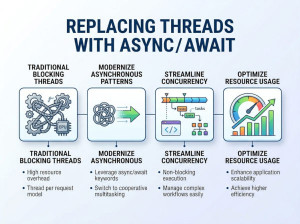
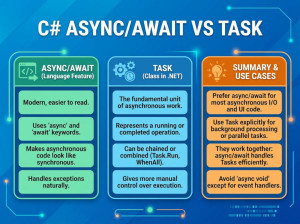
A Thread is a low-level unit of execution managed by the operating system, while a Task is a higher-level abstraction used to manage asynchronous and parallel operations more efficiently.
Threads give you direct control over execution but require manual management, which can be complex and resource-intensive. Tasks, part of the Task Parallel Library (TPL), simplify concurrency by using thread pooling and scheduling under the hood. This allows developers to write scalable and maintainable asynchronous code without worrying about thread lifecycle management. In modern C# development, Tasks are generally preferred over manually working with Threads.
When is Task vs Thread Needed?
Use Thread when:
• You need full control over execution
• Working with long-running, dedicated operations
• You require specific thread configurations (priority, apartment state)
Use Task when:
• Performing asynchronous or parallel operations
• Building scalable applications (especially web apps)
• You want simpler, cleaner, and maintainable code
• Leveraging thread pool for better performance
How to Use Task and Thread?
Thread Example
using System;
using System.Threading;
class Program
{
static void Main()
{
Thread thread = new Thread(DoWork);
thread.Start();
Console.WriteLine("Main thread continues...");
}
static void DoWork()
{
Thread.Sleep(2000);
Console.WriteLine("Work done on separate thread");
}
}
Task Example
using System;
using System.Threading.Tasks;
class Program
{
static async Task Main()
{
await Task.Run(() => DoWork());
Console.WriteLine("Work completed using Task");
}
static void DoWork()
{
Task.Delay(2000).Wait();
Console.WriteLine("Task work finished");
}
}
Task vs Thread Comparison
| Feature | Thread | Task |
|---|---|---|
| Level | Low-level (OS-managed) | High-level abstraction |
| Ease of Use | Complex | Easy and developer-friendly |
| Performance | Higher overhead | Optimized via thread pool |
| Scalability | Limited | Highly scalable |
| Error Handling | Manual | Built-in support |
| Recommended Usage | Rare (special cases) | Preferred in modern C# |
Advantages and Disadvantages
| Approach | Advantages | Disadvantages |
|---|---|---|
| Thread | Full control over execution, suitable for dedicated tasks | Hard to manage, high resource consumption |
| Task | Easy to use, efficient, integrates with async/await | Less control over low-level behavior |
Similar and Alternative Options
| Option | Description | Use Case |
|---|---|---|
| Parallel.For | Executes loops in parallel | CPU-bound operations |
| async/await | Simplifies asynchronous programming | I/O-bound operations |
| ThreadPool | Manages reusable threads | Background short tasks |
| BackgroundWorker | Legacy async pattern | Older applications |
Common Mistakes
• Creating too many threads instead of using Tasks
• Blocking Tasks with .Wait() or .Result
• Using Threads for simple async operations
• Not understanding CPU-bound vs I/O-bound scenarios
• Ignoring exception handling in Tasks
• Overusing Task.Run for already asynchronous operations