C# JSON Serialization: Complete Guide with Examples and Best Practices
JSON serialization in C# is the process of converting an object into a JSON string, while deserialization is the process of converting JSON back into a C# object.
JSON (JavaScript Object Notation) is a lightweight data format commonly used in APIs, configuration files, and data exchange between systems. In C#, the System.Text.Json namespace provides built-in support for serialization and deserialization. This allows developers to easily convert complex objects into a readable format and reconstruct them when needed. It is widely used in web applications, especially when working with REST APIs.
When is JSON Serialization Needed?
Use JSON serialization when:
• Communicating with web APIs
• Saving structured data to files
• Sending data between client and server
• Storing configuration settings
• Working with microservices or distributed systems
How to Use JSON Serialization?
Object to JSON (Serialization)
using System;
using System.Text.Json;
class Person
{
public string Name { get; set; }
public int Age { get; set; }
}
class Program
{
static void Main()
{
Person person = new Person { Name = "Alice", Age = 25 };
string json = JsonSerializer.Serialize(person);
Console.WriteLine(json);
}
}
JSON to Object (Deserialization)
using System;
using System.Text.Json;
class Person
{
public string Name { get; set; }
public int Age { get; set; }
}
class Program
{
static void Main()
{
string json = "{\"Name\":\"Alice\",\"Age\":25}";
Person person = JsonSerializer.Deserialize<Person>(json);
Console.WriteLine(person.Name);
}
}
Sample Code Snippet
using System;
using System.Text.Json;
using System.Collections.Generic;
class Program
{
static void Main()
{
List<string> names = new List<string> { "Alice", "Bob", "Charlie" };
string json = JsonSerializer.Serialize(names);
Console.WriteLine(json);
var result = JsonSerializer.Deserialize<List<string>>(json);
Console.WriteLine(result[0]);
}
}
JSON Serialization Options Comparison
| Feature | Serialization | Deserialization |
|---|---|---|
| Purpose | Object → JSON | JSON → Object |
| Direction | Output generation | Input parsing |
| Use Case | Sending data to API | Receiving data from API |
| Method | JsonSerializer.Serialize() | JsonSerializer.Deserialize() |
Advantages and Disadvantages
| Advantages | Disadvantages |
|---|---|
| Easy data exchange between systems | Can increase payload size |
| Human-readable format | Requires proper type mapping |
| Built-in support in C# | Performance overhead for large data |
| Works well with web APIs | Errors possible with invalid JSON structure |
Similar and Alternative Options
| Option | Description | When to Use |
|---|---|---|
| XML Serialization | Converts objects to XML format | Legacy systems |
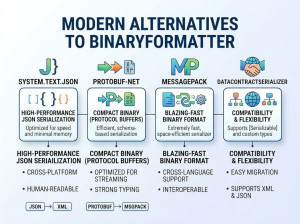
| Binary Serialization | Converts objects to binary format | Performance-critical apps |
| Manual Mapping | Custom conversion logic | Special formatting needs |
| Newtonsoft.Json | Popular third-party JSON library | Advanced JSON features |
Common Mistakes
• Missing public getters/setters in model classes
• Incorrect JSON property names causing mapping issues
• Not handling null values during deserialization
• Forgetting generic type in Deserialize()
• Using wrong data types in class structure
• Ignoring exception handling for invalid JSON