Event Sourcing Pattern in C#
Event Sourcing is a software design pattern in C# where all changes to an application's state are stored as a sequence of immutable events instead of saving only the current state.
Event Sourcing stores every state change in the system as a separate event such as OrderCreated, ProductAdded, or PaymentCompleted. Instead of updating database rows directly, the application rebuilds the current state by replaying stored events in chronological order. In C#, Event Sourcing is commonly used together with CQRS, Domain-Driven Design (DDD), and microservices architectures. This pattern provides a complete audit trail because every change is permanently recorded and never deleted. Event Sourcing is especially useful in systems that require historical tracking, debugging, event replay, and high scalability.
Why We Use Event Sourcing in C#?
We use Event Sourcing because it provides complete historical tracking and better flexibility for complex systems.
Main reasons include:
• Full audit history of all changes
• Ability to replay events and rebuild state
• Better debugging and troubleshooting
• Supports temporal queries
• Works well with CQRS
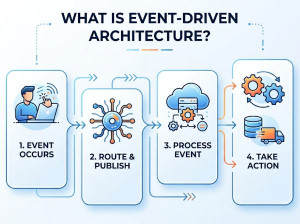
• Enables event-driven architectures
• Improves scalability in distributed systems
• Facilitates integration between microservices
• Simplifies tracking business workflows
• Supports eventual consistency models
When Should We Use Event Sourcing?
Event Sourcing should be used when preserving historical changes is important.
Typical programming problems where Event Sourcing is beneficial:
• Financial systems
• Banking applications
• Order processing systems
• Inventory management
• Booking systems
• Audit-heavy enterprise applications
• Real-time analytics systems
• Event-driven microservices
• Applications requiring rollback or replay
• Systems with complex business workflows
Avoid Event Sourcing for:
• Simple CRUD applications
• Small projects
• Systems with minimal business logic
• Applications where audit history is unnecessary
• Teams unfamiliar with distributed architectures
Core Concepts of Event Sourcing
Main components:
• Event
• Event Store
• Aggregate
• Projection
• Snapshot
• Replay Mechanism
Example event flow:
User Action -> Event Created -> Event Store -> Replay Events -> Current State
How Event Sourcing Works?
Traditional systems save only the latest data:
Balance = 500
Event Sourcing saves all changes:
AccountCreated(1000)
MoneyWithdrawn(200)
MoneyDeposited(300)
MoneyWithdrawn(600)
Current balance is calculated by replaying all events.
Event Sourcing Pattern Examples in C#
Example 1: Basic Event Sourcing in C#
// Event Base Interface
public interface IEvent
{
DateTime OccurredOn { get; }
}
// Events
public class MoneyDepositedEvent : IEvent
{
public decimal Amount { get; set; }
public DateTime OccurredOn => DateTime.UtcNow;
}
public class MoneyWithdrawnEvent : IEvent
{
public decimal Amount { get; set; }
public DateTime OccurredOn => DateTime.UtcNow;
}
// Aggregate Root
public class BankAccount
{
private readonly List _events = new();
public decimal Balance { get; private set; }
public void Deposit(decimal amount)
{
var @event = new MoneyDepositedEvent
{
Amount = amount
};
Apply(@event);
_events.Add(@event);
}
public void Withdraw(decimal amount)
{
var @event = new MoneyWithdrawnEvent
{
Amount = amount
};
Apply(@event);
_events.Add(@event);
}
private void Apply(MoneyDepositedEvent @event)
{
Balance += @event.Amount;
}
private void Apply(MoneyWithdrawnEvent @event)
{
Balance -= @event.Amount;
}
public IEnumerable GetEvents()
{
return _events;
}
}
// Usage
var account = new BankAccount();
account.Deposit(1000);
account.Withdraw(200);
account.Deposit(300);
Console.WriteLine(account.Balance); // Output: 1100
Example 2: Rebuilding State from Events
// Replay Events
public class BankAccountProjection
{
public decimal Balance { get; private set; }
public void Replay(IEnumerable events)
{
foreach (var @event in events)
{
switch (@event)
{
case MoneyDepositedEvent deposited:
Balance += deposited.Amount;
break;
case MoneyWithdrawnEvent withdrawn:
Balance -= withdrawn.Amount;
break;
}
}
}
}
// Usage
var events = new List
{
new MoneyDepositedEvent { Amount = 1000 },
new MoneyWithdrawnEvent { Amount = 400 },
new MoneyDepositedEvent { Amount = 200 }
};
var projection = new BankAccountProjection();
projection.Replay(events);
Console.WriteLine(projection.Balance); // Output: 800
Example 3: Event Sourcing with CQRS and MediatR
// Command
using MediatR;
public class CreateOrderCommand : IRequest<Guid>
{
public string CustomerName { get; set; }
}
// Event
public class OrderCreatedEvent
{
public Guid OrderId { get; set; }
public string CustomerName { get; set; }
}
// Command Handler
public class CreateOrderCommandHandler
: IRequestHandler<CreateOrderCommand, Guid>
{
private readonly IEventStore _eventStore;
public CreateOrderCommandHandler(IEventStore eventStore)
{
_eventStore = eventStore;
}
public async Task<Guid> Handle(
CreateOrderCommand request,
CancellationToken cancellationToken)
{
var orderId = Guid.NewGuid();
var @event = new OrderCreatedEvent
{
OrderId = orderId,
CustomerName = request.CustomerName
};
await _eventStore.SaveAsync(@event);
return orderId;
}
}
Example 4: Simple In-Memory Event Store
// Event Store Interface
public interface IEventStore
{
Task SaveAsync(IEvent @event);
Task<List> GetAllAsync();
}
// In-Memory Event Store Implementation
public class InMemoryEventStore : IEventStore
{
private readonly List _events = new();
public Task SaveAsync(IEvent @event)
{
_events.Add(@event);
return Task.CompletedTask;
}
public Task<List> GetAllAsync()
{
return Task.FromResult(_events);
}
}
Advantages of Event Sourcing in C#
| Advantage | Description |
|---|---|
| Complete Audit Trail | Every state change is permanently stored. |
| Replay Capability | Application state can be rebuilt from historical events. |
| Temporal Queries | Allows viewing system state at any point in time. |
| Better Debugging | Historical event logs simplify troubleshooting. |
| Scalability | Works efficiently in distributed architectures. |
| Integration Friendly | Events can be consumed by multiple systems. |
| Supports CQRS | Naturally complements CQRS architecture. |
Disadvantages (Weak Points) of Event Sourcing in C#
| Disadvantage | Description |
|---|---|
| High Complexity | Architecture becomes significantly more complex. |
| Event Versioning Problems | Changing event structures over time is difficult. |
| Storage Growth | Event stores continuously grow in size. |
| Harder Queries | Reading current state may require projections. |
| Steep Learning Curve | Requires understanding distributed system concepts. |
| Eventual Consistency | Read models may temporarily lag behind writes. |
| Difficult Debugging | Event chains can become complicated to trace. |
Event Sourcing vs Similar Patterns
| Feature | Event Sourcing | Traditional CRUD | CQRS | Repository Pattern | State-Based Persistence |
|---|---|---|---|---|---|
| Data Storage Style | Stores events | Stores current state | Separate reads/writes | Abstracts data access | Stores latest object state |
| Audit History | Complete | Limited | Partial | Depends on implementation | Limited |
| Complexity | Very High | Low | High | Medium | Low |
| Performance | Excellent for writes | Balanced | Excellent scalability | Balanced | Balanced |
| Historical Reconstruction | Excellent | Poor | Limited | Depends on storage | Poor |
| Best For | Audit-heavy systems | Simple applications | Complex enterprise systems | Layered architectures | Simple persistence needs |
| Scalability | Excellent | Moderate | Excellent | Good | Moderate |
Common Real-World Use Cases
Banking Systems
Every transaction is stored as an immutable event:
• MoneyDeposited
• MoneyWithdrawn
• TransferCompleted
E-Commerce Platforms
Track all order lifecycle events:
• OrderCreated
• OrderPaid
• OrderShipped
• OrderDelivered
Inventory Systems
Track stock changes over time:
• StockAdded
• StockReserved
• StockRemoved
Snapshot Concept in Event Sourcing
Replaying thousands of events can become slow.
A snapshot stores the current state at a certain point in time.
Example:
Snapshot at Event #5000
Replay Events #5001 - #5100
This improves performance significantly.
Summary
Event Sourcing is an advanced architectural pattern in C# where application state is reconstructed from immutable historical events instead of storing only the latest data. It provides complete auditability, replay capabilities, scalability, and deep business insight. Event Sourcing works especially well with CQRS, Domain-Driven Design, microservices, and event-driven systems. However, it introduces considerable complexity and should only be used when the business requirements justify its architectural overhead.
Data Management Patterns in C#
23. CQRS (Command Query Responsibility Segregation) in C#
24. Event Sourcing in C#
25. Saga Pattern in C#
26. Outbox Pattern in C#
Microservice Patterns in C#
27. Circuit Breaker Pattern in C#
28. Bulkhead Pattern in C#
29. Retry with Backoff Pattern in C#