BFF (Backend for Frontend) Pattern in C#

The BFF (Backend for Frontend) pattern in C# is an architectural pattern where a dedicated backend service is created for each frontend application to optimize APIs, security, and data delivery for that specific client.
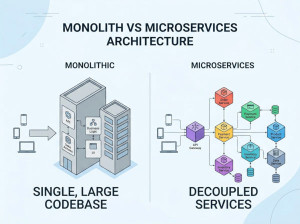
The Backend for Frontend (BFF) pattern is commonly used in ASP.NET Core microservice architectures where multiple frontend applications, such as web apps, mobile apps, and desktop clients, require different data structures and communication flows. Instead of forcing all clients to consume the same generic backend APIs, each frontend receives its own tailored backend service. The BFF acts as an intermediary between frontend clients and downstream microservices, aggregating data and simplifying client communication. This approach improves frontend performance, reduces over-fetching or under-fetching of data, and enables frontend-specific security and orchestration logic. In modern .NET systems, BFF services are typically implemented using ASP.NET Core Web API, Minimal APIs, GraphQL, or YARP reverse proxy solutions.
Why We Use the BFF Pattern in C#?
We use the BFF pattern in C# to provide frontend-specific APIs that simplify client development and optimize communication with backend systems.
Common reasons include:
• Reducing frontend complexity
• Aggregating data from multiple microservices
• Optimizing payloads for different devices
• Supporting frontend-specific authentication flows
• Improving mobile application performance
• Preventing over-fetching and under-fetching
• Isolating frontend requirements from core services
• Simplifying API evolution
• Enabling independent frontend deployments
The pattern is especially valuable in microservice and cloud-native ASP.NET Core applications.
When Should We Use the BFF Pattern in C#?
The BFF pattern should be used when multiple frontend applications have significantly different requirements.
Typical programming and architectural problems include:
• Mobile and web clients needing different payloads
• Frontends calling too many microservices directly
• Complex API orchestration inside JavaScript clients
• Excessive frontend networking requests
• Device-specific optimization requirements
• Frontend-specific authentication and authorization
• Slow mobile performance due to large payloads
• Frontend teams requiring independent backend evolution
• UI aggregation from multiple services
• Preventing direct exposure of internal microservices
It is particularly useful when:
• Multiple frontend applications exist
• APIs are becoming difficult for frontend teams to consume
• Frontends require different response models
• Security requirements differ by client type
• Client-side orchestration is becoming complex
Example Use Cases of BFF Pattern in C#
1. Aggregating Data for a Web Dashboard
A dashboard frontend needs data from multiple microservices through a single optimized endpoint.
// Product Service
var builder = WebApplication.CreateBuilder(args);
var app = builder.Build();
app.MapGet("/products", () =>
{
return new[]
{
new { Id = 1, Name = "Laptop" },
new { Id = 2, Name = "Keyboard" }
};
});
app.Run("http://localhost:5001");
// Order Service
var builder = WebApplication.CreateBuilder(args);
var app = builder.Build();
app.MapGet("/orders", () =>
{
return new[]
{
new { Id = 100, Total = 1200 },
new { Id = 101, Total = 400 }
};
});
app.Run("http://localhost:5002");
// BFF Service
var builder = WebApplication.CreateBuilder(args);
builder.Services.AddHttpClient();
var app = builder.Build();
app.MapGet("/dashboard", async (IHttpClientFactory factory) =>
{
var client = factory.CreateClient();
var products =
await client.GetFromJsonAsync<object>(
"http://localhost:5001/products");
var orders =
await client.GetFromJsonAsync<object>(
"http://localhost:5002/orders");
return Results.Ok(new
{
Products = products,
Orders = orders
});
});
app.Run("http://localhost:7000");
Benefits
• Single API call for frontend
• Reduced frontend complexity
• Centralized aggregation logic
2. Mobile-Specific Optimized Backend
A mobile application requires smaller payloads and simplified responses.
// Main Product API
var builder = WebApplication.CreateBuilder(args);
var app = builder.Build();
app.MapGet("/products/{id}", (int id) =>
{
return Results.Ok(new
{
Id = id,
Name = "Laptop",
Description = "High performance gaming laptop",
Price = 2500,
Stock = 15,
Supplier = "TechSupplier"
});
});
app.Run("http://localhost:5100");
// Mobile BFF
var builder = WebApplication.CreateBuilder(args);
builder.Services.AddHttpClient();
var app = builder.Build();
app.MapGet("/mobile/products/{id}",
async (int id, IHttpClientFactory factory) =>
{
var client = factory.CreateClient();
dynamic product =
await client.GetFromJsonAsync<dynamic>(
$"http://localhost:5100/products/{id}");
return Results.Ok(new
{
product.Id,
product.Name,
product.Price
});
});
app.Run("http://localhost:7100");
Benefits
• Smaller mobile payloads
• Faster response times
• Better mobile performance
3. Frontend-Specific Authentication Handling
A BFF manages authentication tokens and hides internal services from the frontend.
// Authentication BFF
using Microsoft.AspNetCore.Authentication.Cookies;
var builder = WebApplication.CreateBuilder(args);
builder.Services.AddAuthentication(
CookieAuthenticationDefaults.AuthenticationScheme)
.AddCookie();
var app = builder.Build();
app.UseAuthentication();
app.UseAuthorization();
app.MapPost("/login", async (HttpContext context) =>
{
// Authentication logic here
context.Response.Cookies.Append(
"session-token",
"secure-token");
await context.Response.WriteAsync("Logged in");
});
app.MapGet("/profile", async context =>
{
var token = context.Request.Cookies["session-token"];
if (string.IsNullOrEmpty(token))
{
context.Response.StatusCode = 401;
return;
}
await context.Response.WriteAsync("User Profile");
});
app.Run();
Benefits
• Improved frontend security
• Tokens hidden from browser JavaScript
• Centralized authentication flow
Advantages of Using BFF Pattern in C#
1. Frontend-Specific APIs: Each frontend receives APIs tailored to its needs.
2. Reduced Frontend Complexity: Complex orchestration logic moves to the backend.
3. Improved Performance: Responses can be optimized for specific devices.
4. Better Security: Internal microservices remain hidden from clients.
5. Independent Frontend Evolution: Frontend teams can evolve APIs independently.
6. Reduced Network Calls: The BFF aggregates multiple backend requests.
7. Easier API Versioning: Frontend-specific changes become easier to manage.
8. Improved Maintainability: Frontend concerns remain isolated from core services.
Disadvantages (Weak Points) of Using BFF Pattern in C#
1. Increased Number of Services: Each frontend may require its own backend.
2. Higher Operational Complexity: More services must be deployed and monitored.
3. Potential Code Duplication: Different BFFs may contain similar logic.
4. Additional Network Hop: Requests pass through another layer.
5. Maintenance Overhead: BFFs require ongoing updates and support.
6. Risk of Business Logic Leakage: Business rules may accidentally move into the BFF.
7. Scaling Challenges: Large frontend traffic can overload the BFF.
8. Coordination Complexity: Frontend and BFF deployments may require synchronization.
BFF Pattern vs Similar Patterns
| Pattern | Main Purpose | Client Focus | Typical Usage | Complexity Level | Difference from BFF |
|---|---|---|---|---|---|
| BFF (Backend for Frontend) | Provide frontend-specific APIs | Specific frontend | Web, mobile, SPA clients | Medium | Dedicated backend per frontend type |
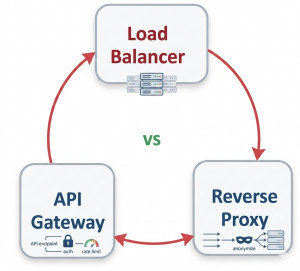
| API Gateway | Centralized request routing | All clients | Microservice entry point | Medium | Usually generic rather than frontend-specific |
| GraphQL Gateway | Flexible client-driven querying | All clients | Complex data querying | High | Clients define requested data dynamically |
| Facade Pattern | Simplify subsystem usage | Application internals | Object-oriented abstraction | Low | Focuses on code abstraction rather than frontend optimization |
| API Composition | Aggregate data from services | Backend systems | Microservice orchestration | Medium | BFF includes frontend-specific behavior beyond aggregation |
| Sidecar Pattern | Add supporting infrastructure services | Service instance | Logging, monitoring, security | Medium | Enhances infrastructure instead of frontend communication |
Summary
The BFF (Backend for Frontend) pattern in C# is a highly effective architectural approach for modern ASP.NET Core and microservice-based systems that support multiple frontend applications. By creating dedicated backend services for each frontend, teams can optimize APIs, improve security, simplify frontend development, and reduce unnecessary network traffic. Although the pattern introduces additional services and operational complexity, it significantly improves scalability, maintainability, and frontend performance when applied correctly.
Cloud / Distributed Architecture Patterns in C#
30. Sidecar pattern in C#
31. Strangler Fig pattern in C#
32. Backend for Frontend pattern in C#
Enterprise Application Patterns in C#
33. Repository and Unit of Work pattern in C#
34. Dependency Injection pattern in C#