SQL Indexing Best Practices: Improve Database Performance with Real Examples
What Is an SQL Index?
An SQL index is a data structure that improves the speed of data retrieval operations in a database table. Instead of scanning every row in a table, the database engine can use an index to locate matching records much faster. Indexes work similarly to a book index: instead of reading every page, the database jumps directly to the relevant data location.
Indexes are critical for database performance, especially in large-scale applications handling millions of records. Without proper indexing, queries can become slow, consume excessive CPU and memory resources, and negatively impact application responsiveness.
Why SQL Indexing Matters?
Databases constantly perform operations such as filtering, sorting, joining, grouping, and searching. When tables grow large, full table scans become expensive because the database must inspect every row. Indexes reduce this workload significantly by organizing data into searchable structures such as B-Trees or hash indexes.
Good indexing can reduce query execution time from seconds to milliseconds. However, excessive or poorly designed indexes can slow down insert, update, and delete operations because indexes themselves must also be maintained whenever data changes.
The goal of indexing is balance: improve read performance without introducing unnecessary overhead.
How SQL Indexes Work?
Most relational databases use B-Tree indexes by default. A B-Tree stores indexed values in sorted order, allowing the database engine to efficiently search ranges and exact matches.
For example, if a Users table contains millions of rows and you frequently search by email address, an index on the Email column allows the database to quickly locate matching rows instead of scanning the entire table.
Types of SQL Indexes
1. Clustered Index
A clustered index determines the physical order of data stored in the table. Because the data itself is sorted according to the clustered index key, each table can have only one clustered index.
Clustered indexes work best for columns frequently used in range queries or sorting operations, such as primary keys or timestamps. Since the table rows are physically ordered, retrieving sequential data becomes highly efficient.
Example
CREATE CLUSTERED INDEX IX_Orders_OrderDate
ON Orders(OrderDate);
This index physically organizes the Orders table by OrderDate.
2. Non-Clustered Index
A non-clustered index stores indexed values separately from the actual table data. It contains pointers referencing the original rows.
Non-clustered indexes are commonly used for search columns, filters, joins, and lookup operations. Unlike clustered indexes, tables can contain multiple non-clustered indexes.
Example
CREATE NONCLUSTERED INDEX IX_Users_Email
ON Users(Email);
This index improves searches by email address.
3. Composite Index
A composite index includes multiple columns in a single index. These indexes are useful when queries commonly filter or sort using several columns together.
Column order matters significantly in composite indexes. Databases efficiently use the index starting from the leftmost column.
Example
CREATE INDEX IX_Orders_Customer_Date
ON Orders(CustomerId, OrderDate);
This index is effective for queries filtering by CustomerId and OrderDate.
4. Unique Index
A unique index guarantees that indexed column values remain unique across the table. This not only improves performance but also enforces data integrity.
Unique indexes are frequently applied to email addresses, usernames, or external identifiers.
Example
CREATE UNIQUE INDEX IX_Users_Email
ON Users(Email);
This prevents duplicate email addresses.
5. Full-Text Index
Full-text indexes are designed for advanced text searching rather than exact matches. They support keyword searches, ranking, stemming, and language-aware querying.
These indexes are commonly used in search engines, article platforms, and documentation systems.
Example
CREATE FULLTEXT INDEX
ON Articles(Content);
6. Covering Index
A covering index includes all columns required by a query so the database can retrieve results directly from the index without accessing the table itself.
This significantly improves performance for high-frequency queries.
Example
CREATE INDEX IX_Orders_Covering
ON Orders(CustomerId)
INCLUDE (OrderDate, TotalAmount);
The included columns reduce table lookups.
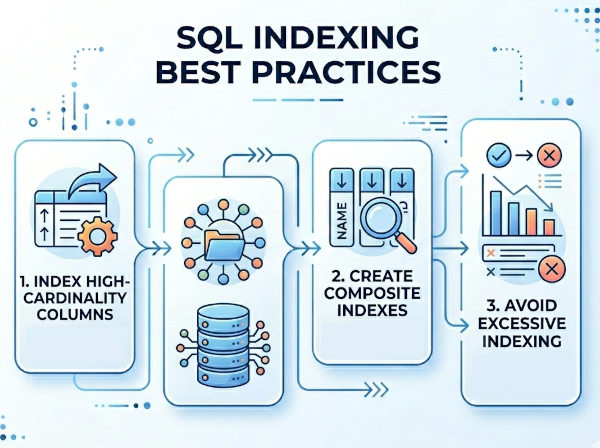
SQL Indexing Best Practices
1. Index Frequently Queried Columns
Columns frequently used in WHERE, JOIN, ORDER BY, and GROUP BY clauses are excellent indexing candidates. These operations benefit most from faster lookups.
For example, customer IDs, email addresses, timestamps, and foreign keys are commonly indexed because applications search and join on them regularly.
Example
SELECT *
FROM Orders
WHERE CustomerId = 1001;
An index on CustomerId dramatically improves this query.
2. Avoid Over-Indexing
Every index adds storage overhead and increases write costs. Whenever rows are inserted, updated, or deleted, the database must also update related indexes.
Too many indexes can degrade write-heavy systems significantly. Instead of indexing every column, focus on queries that truly need optimization.
3. Use Composite Indexes Carefully
Composite indexes should reflect actual query patterns. The column order should match how queries filter data.
For example:
WHERE CustomerId = 10
AND OrderDate > '2026-01-01'
A composite index on (CustomerId, OrderDate) works well because filtering begins with CustomerId.
However, reversing the order may reduce effectiveness depending on the query structure.
4. Index Foreign Keys
Foreign key columns are heavily used during joins and relationship lookups. Without indexing, joins can become expensive on large tables.
Example
SELECT *
FROM Orders o
JOIN Customers c
ON o.CustomerId = c.Id;
Indexing Orders.CustomerId improves join performance substantially.
5. Avoid Indexing Low-Cardinality Columns
Columns with very few unique values often provide little indexing benefit. For example, indexing a boolean column such as IsActive may not help because many rows share the same value.
Databases may choose full table scans instead of using such indexes.
6. Use Covering Indexes for Hot Queries
If a query executes frequently and retrieves only a few columns, a covering index can eliminate costly table lookups.
This is especially useful in high-traffic APIs and reporting systems.
7. Monitor Query Execution Plans
Execution plans show how the database processes queries and whether indexes are being used effectively. They help identify missing indexes, table scans, and inefficient joins.
Regularly reviewing execution plans is one of the most important database optimization practices.
8. Remove Unused Indexes
Unused indexes consume storage and slow writes unnecessarily. Many databases provide tools to identify indexes rarely or never used.
Cleaning unused indexes reduces maintenance overhead and improves overall database efficiency.
9. Keep Indexes Small
Smaller indexes are faster to search and maintain. Avoid indexing large text columns unless absolutely necessary.
Whenever possible, index compact and selective columns.
10. Consider Write vs Read Tradeoffs
Read-heavy systems benefit from more indexes because queries execute frequently. Write-heavy systems require more caution because inserts and updates become slower as indexes increase.
Applications such as analytics dashboards prioritize read performance, while transaction-heavy systems must carefully balance both.
Common SQL Indexing Mistakes
Indexing Every Column
Beginners often assume more indexes always improve performance. In reality, unnecessary indexes create overhead without meaningful benefits.
Indexes should be created based on actual query patterns, not assumptions.
Ignoring Query Patterns
Indexes must align with real application behavior. A theoretically correct index may still be useless if queries rarely use it.
Database monitoring and query analysis are essential.
Wrong Composite Index Order
Column order strongly affects composite index efficiency. Databases primarily optimize searches starting from the leftmost indexed column.
Improper ordering can make an index nearly useless.
Not Updating Statistics
Databases rely on statistics to choose optimal execution plans. Outdated statistics may cause the query optimizer to ignore useful indexes.
Regular maintenance tasks should refresh statistics automatically.
SQL Indexing Example Scenario
Imagine an e-commerce platform with millions of orders.
Without indexes:
SELECT *
FROM Orders
WHERE CustomerId = 500;
The database scans the entire table.
After adding an index:
CREATE INDEX IX_Orders_CustomerId
ON Orders(CustomerId);
The database jumps directly to matching rows, dramatically reducing execution time.
Indexing Strategies for Different Systems
OLTP Systems (Transactional Databases)
Transactional systems prioritize fast inserts, updates, and deletes. Over-indexing can hurt performance significantly because every write operation updates indexes.
These systems usually maintain only essential indexes for primary keys, foreign keys, and critical searches.
Data Warehouses and Analytics
Analytics systems perform complex reporting queries across large datasets. Read performance is more important than write speed.
Such systems often use extensive indexing, partitioning, and columnstore indexes to accelerate aggregations and scans.
Microservices Databases
Microservices often use smaller databases focused on specific domains. Proper indexing remains critical because APIs require predictable low-latency responses.
Indexes should reflect actual API query patterns rather than generic database assumptions.
C# Example Using SQL Indexes
Querying Indexed Data
using System;
using System.Data.SqlClient;
string connectionString =
"Server=localhost;Database=ShopDb;Trusted_Connection=True;";
using var connection =
new SqlConnection(connectionString);
connection.Open();
string query =
@"SELECT *
FROM Orders
WHERE CustomerId = @CustomerId";
using var command =
new SqlCommand(query, connection);
command.Parameters.AddWithValue(
"@CustomerId",
1001);
using var reader = command.ExecuteReader();
while (reader.Read())
{
Console.WriteLine(
reader["OrderId"]);
}
This query performs efficiently when CustomerId is indexed.
Clustered vs Non-Clustered Example
Clustered Index Scenario
A clustered index on OrderDate helps queries retrieving recent orders because rows are physically stored in chronological order.
Non-Clustered Index Scenario
A non-clustered index on Email speeds up customer lookups without changing physical row storage.
SQL Index Maintenance Best Practices
Rebuild Fragmented Indexes
Over time, indexes become fragmented due to inserts and deletes. Fragmented indexes reduce performance because data becomes physically disorganized.
Regular index rebuilding improves lookup efficiency.
Reorganize Large Indexes
For moderate fragmentation levels, reorganizing indexes is less expensive than rebuilding them completely.
Monitor Slow Queries
Slow query logs help identify missing or inefficient indexes. Performance tuning should always be data-driven.
Comparison of SQL Indexes
| Index Type | Main Purpose | Best For | Main Limitation |
|---|---|---|---|
| Clustered Index | Physical row ordering | Range queries and sorting | Only one per table |
| Non-Clustered Index | Fast lookups | Search and filtering | Additional storage overhead |
| Composite Index | Multi-column optimization | Complex filters | Column order matters |
| Unique Index | Data integrity | Unique identifiers | Restricts duplicates |
| Full-Text Index | Text searching | Search engines and content systems | Higher maintenance complexity |