Design a Scalable Notification System in C#
A notification system is a distributed platform responsible for delivering messages to users across multiple channels such as email, SMS, push notifications, in-app alerts, and real-time updates. Modern applications rely heavily on notifications to improve engagement, provide operational alerts, and communicate important events instantly.
Examples include:
• Order confirmation emails
• Mobile push alerts
• Password reset messages
• Real-time chat notifications
• Fraud detection alerts
• System monitoring events
At small scale, notifications seem simple. At large scale, they become complex distributed systems involving queues, retries, scheduling, rate limiting, delivery guarantees, and failure recovery.
Why Do We Need a Scalable Notification System?
A monolithic notification implementation works initially, but it quickly becomes unreliable as traffic increases. Sending emails or push notifications synchronously inside API requests slows down applications and creates bottlenecks.
A scalable notification system solves several critical problems:
• Prevents API latency spikes
• Handles traffic bursts safely
• Retries failed deliveries automatically
• Supports multiple delivery channels
• Processes millions of notifications asynchronously
• Improves fault tolerance
For example, during Black Friday sales or large marketing campaigns, a system may need to deliver millions of notifications within minutes. Without queues and distributed workers, the platform can become unstable very quickly.
Core Components of a Notification System
Notification API
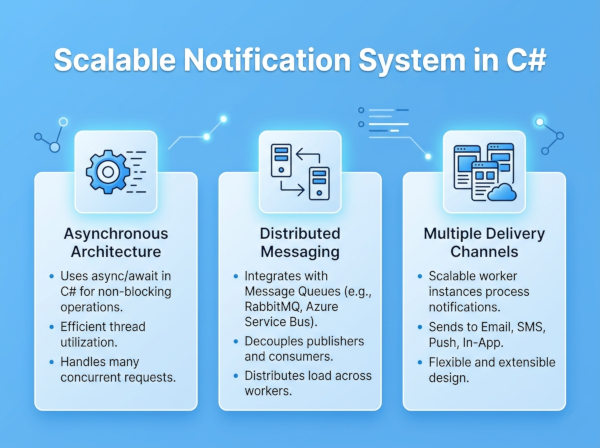
The API receives notification requests from other services. Instead of sending notifications immediately, it validates the request and publishes a message into a queue.
This decouples user-facing APIs from slow external providers such as SMTP servers or SMS gateways.
Queue System
Queues are the backbone of scalable notification systems. They absorb traffic spikes and distribute workload gradually to background workers.
Common technologies include:
• RabbitMQ
• Apache Kafka
• Azure Service Bus
The relationship typically looks like this:
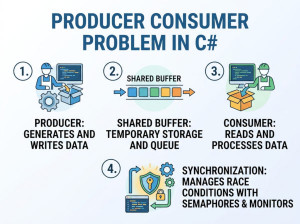
Producer → Queue → Consumer
Worker Services
Background workers consume messages from queues and process notification delivery asynchronously.
Workers usually handle:
Email sending
SMS delivery
Push notifications
Retry processing
Failure logging
Analytics tracking
Provider Integration Layer
Most systems integrate with external delivery providers such as:
• Twilio
• SendGrid
• Firebase
This layer abstracts provider-specific APIs and simplifies future provider replacement.
High-Level Architecture
A scalable notification platform generally includes:
• API Gateway
• Authentication Layer
• Notification Service
• Queue Infrastructure
• Worker Cluster
• Retry Service
• Analytics Pipeline
• Monitoring System
• Template Engine
• Provider Adapters
This separation improves reliability and horizontal scalability.
Notification Flow
A simplified flow works like this:
• User action triggers notification.
• API validates request.
• Notification event stored.
• Queue message published.
• Worker consumes message.
• Provider API called.
• Success or failure logged.
• Failed notifications retried automatically.
This asynchronous approach prevents notification delays from impacting application performance.
Database Design Example
A simplified schema might conceptually contain:
| Table | Purpose |
|---|---|
| Notifications | Stores notification metadata |
| NotificationTemplates | Stores reusable templates |
| DeliveryAttempts | Tracks retries and failures |
| UserPreferences | Stores opt-in/out settings |
| ScheduledNotifications | Stores delayed notifications |
C# Notification System Implementation
Notification Model
public class NotificationMessage
{
public Guid Id { get; set; }
public string UserId { get; set; }
public string Channel { get; set; }
public string Subject { get; set; }
public string Content { get; set; }
public DateTime CreatedAt { get; set; }
}
This model represents a notification event stored or published into queues.
Notification API Example
// ASP.NET Core Controller
[ApiController]
[Route("api/notifications")]
public class NotificationController : ControllerBase
{
private readonly INotificationPublisher _publisher;
public NotificationController(INotificationPublisher publisher)
{
_publisher = publisher;
}
[HttpPost]
public async Task<IActionResult> Send(NotificationMessage message)
{
await _publisher.PublishAsync(message);
return Accepted();
}
}
Instead of sending notifications directly, this API publishes events asynchronously.
RabbitMQ Publisher Example
// Publishing Notifications
public class RabbitMqNotificationPublisher : INotificationPublisher
{
private readonly IConnection _connection;
public RabbitMqNotificationPublisher(IConnection connection)
{
_connection = connection;
}
public Task PublishAsync(NotificationMessage message)
{
using var channel = _connection.CreateModel();
channel.QueueDeclare(
queue: "notifications",
durable: true,
exclusive: false,
autoDelete: false);
var json = JsonSerializer.Serialize(message);
var body = Encoding.UTF8.GetBytes(json);
channel.BasicPublish(
exchange: "",
routingKey: "notifications",
basicProperties: null,
body: body);
return Task.CompletedTask;
}
}
This publisher pushes notification messages into RabbitMQ for asynchronous processing.
RabbitMQ Consumer Example
// Background Worker
public class NotificationWorker : BackgroundService
{
private readonly IServiceProvider _provider;
private readonly IConnection _connection;
public NotificationWorker(
IServiceProvider provider,
IConnection connection)
{
_provider = provider;
_connection = connection;
}
protected override Task ExecuteAsync(
CancellationToken stoppingToken)
{
var channel = _connection.CreateModel();
channel.QueueDeclare(
queue: "notifications",
durable: true,
exclusive: false,
autoDelete: false);
var consumer = new EventingBasicConsumer(channel);
consumer.Received += async (sender, args) =>
{
var json = Encoding.UTF8.GetString(args.Body.ToArray());
var message = JsonSerializer.Deserialize<NotificationMessage>(json);
using var scope = _provider.CreateScope();
var service = scope.ServiceProvider
.GetRequiredService<IEmailService>();
await service.SendAsync(message);
channel.BasicAck(args.DeliveryTag, false);
};
channel.BasicConsume(
queue: "notifications",
autoAck: false,
consumer: consumer);
return Task.CompletedTask;
}
}
This worker consumes queued notifications independently from the main application.
Email Delivery Example
// SMTP Email Service
public class SmtpEmailService : IEmailService
{
public async Task SendAsync(NotificationMessage message)
{
using var client = new SmtpClient("smtp.example.com");
var mail = new MailMessage(
from: "noreply@example.com",
to: "user@example.com",
subject: message.Subject,
body: message.Content);
await client.SendMailAsync(mail);
}
}
This service handles actual email delivery.
Retry Mechanism Example
// Retry Policy Using Polly
public class ResilientEmailService
{
private readonly AsyncRetryPolicy _retryPolicy;
public ResilientEmailService()
{
_retryPolicy = Policy
.Handle<Exception>()
.WaitAndRetryAsync(
3,
retryAttempt => TimeSpan.FromSeconds(retryAttempt * 2));
}
public async Task SendAsync(NotificationMessage message)
{
await _retryPolicy.ExecuteAsync(async () =>
{
await DeliverEmail(message);
});
}
private Task DeliverEmail(NotificationMessage message)
{
Console.WriteLine("Email sent");
return Task.CompletedTask;
}
}
Retries are essential because external notification providers occasionally fail or throttle requests.
Real-Time Notifications with SignalR
// SignalR Hub
public class NotificationHub : Hub
{
public async Task SendToUser(
string userId,
string notification)
{
await Clients.User(userId)
.SendAsync("ReceiveNotification", notification);
}
}
This enables instant in-app notifications.
Registering SignalR
builder.Services.AddSignalR();
app.MapHub<NotificationHub>("/notifications");
Redis Caching Example
Frequently accessed notification preferences can be cached using Redis.
public class UserPreferenceCache
{
private readonly IDatabase _database;
public UserPreferenceCache(IConnectionMultiplexer redis)
{
_database = redis.GetDatabase();
}
public async Task SetPreferenceAsync(
string userId,
string preference)
{
await _database.StringSetAsync(
$"prefs:{userId}",
preference);
}
public async Task<string> GetPreferenceAsync(string userId)
{
return await _database.StringGetAsync($"prefs:{userId}");
}
}
Caching reduces database load significantly.
Best Real-World Use Cases
E-Commerce Platforms
Online stores rely heavily on notifications for order confirmations, shipping updates, inventory alerts, and promotional campaigns. These notifications improve customer experience while reducing support requests.
A scalable architecture becomes essential during seasonal traffic spikes where millions of events may occur within short time windows.
Banking and Financial Systems
Financial applications send fraud alerts, transaction confirmations, OTP codes, and payment notifications in real time. Reliability and delivery guarantees are extremely important because delays can affect security and user trust.
These systems usually prioritize redundancy, retries, and provider failover mechanisms.
Social Media Platforms
Social platforms generate enormous notification traffic from likes, comments, follows, mentions, and direct messages. Notification pipelines must process high event throughput while avoiding notification spam.
Most platforms introduce batching and prioritization strategies to prevent overwhelming users.
Scalability Challenges
Notification Storms
Sudden viral activity can generate millions of notifications rapidly. Without queues and rate limiting, systems may overload providers or crash entirely.
Queue buffering and autoscaling workers help stabilize traffic spikes.
Provider Rate Limits
External services like SMS or email providers enforce request limits. Notification systems must throttle requests intelligently and retry safely.
Ignoring provider limits can result in temporary account suspension.
Duplicate Deliveries
Distributed systems sometimes retry messages after partial failures, causing duplicate notifications.
Idempotency mechanisms are critical to avoid sending repeated alerts to users.
Advantages of This Architecture
High Throughput
Queue-based systems process massive notification volumes efficiently without blocking frontend APIs.
This architecture supports horizontal scaling naturally.
Fault Tolerance
Failures in email providers or worker nodes do not immediately break the entire system. Queues preserve pending notifications safely until processing resumes.
This greatly improves reliability.
Better User Experience
Asynchronous delivery ensures applications remain fast and responsive while notifications continue processing in the background.
Users experience lower latency during normal application usage.
Disadvantages and Challenges
Increased Complexity
Distributed notification systems require queues, retries, monitoring, caching, worker orchestration, and provider management.
This operational complexity increases infrastructure and maintenance costs.
Eventual Consistency
Notifications may sometimes arrive slightly delayed due to asynchronous processing.
For most systems this trade-off is acceptable, but real-time alerts may require additional optimization.
Operational Monitoring Requirements
Notification systems require detailed observability because silent failures can damage business operations significantly.
Metrics, tracing, and alerting become essential production requirements.
Alternative Architectures
Kafka-Based Event Streaming
Some large-scale systems use Apache Kafka instead of traditional queues. Kafka improves scalability and event replay capabilities for extremely high throughput systems.
This approach works especially well for analytics-heavy platforms.
Serverless Notification Systems
Cloud-native architectures increasingly use serverless functions triggered by events.
This reduces infrastructure management overhead but may introduce cold-start latency under low traffic conditions.
Managed Notification Platforms
Some companies outsource notification infrastructure entirely to third-party services.
This reduces operational complexity but limits customization and increases vendor dependency.
Common Mistakes When Designing Notification Systems
Sending Notifications Synchronously
Directly calling SMTP or SMS APIs during HTTP requests creates slow APIs and cascading failures.
Asynchronous queues should almost always be used instead.
Ignoring Retry Policies
External providers fail occasionally. Without retries, notifications are silently lost during transient outages.
Retry handling is one of the most important production requirements.
Missing Idempotency
Retries can accidentally create duplicate notifications if systems do not track processed events carefully.
Idempotent processing prevents duplicate deliveries safely.