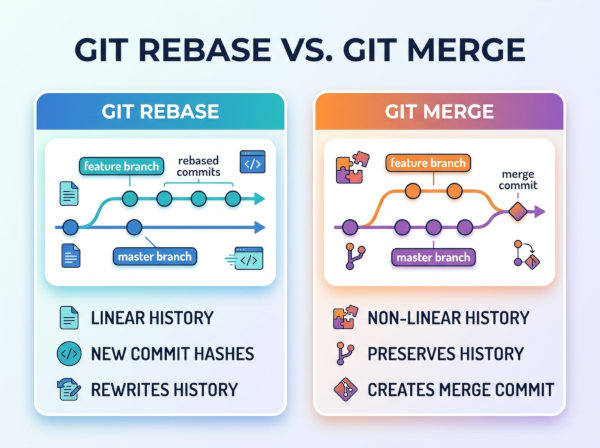
Git Rebase vs Merge
What is Git Merge?
Git merge combines changes from one branch into another while preserving the complete branch history.
When you use merge, Git creates a new “merge commit” that connects both development histories together. This approach keeps the timeline fully accurate and shows exactly when branches diverged and rejoined.
Example workflow:
• A developer creates a feature-login branch.
• Work continues independently from the main branch.
• Later, the feature branch is merged back into main.
The merge operation preserves every historical commit exactly as it originally happened.
What is Git Rebase?
Git rebase moves or reapplies commits from one branch onto another branch.
Instead of creating a merge commit, rebase rewrites commit history so the branch appears to have been built directly from the latest version of the target branch. The result is a cleaner and more linear project history.
Example workflow:
main branch receives new updates.
A developer rebases feature-login onto main.
Git reapplies the feature commits on top of the updated branch.
This makes the commit history look cleaner and easier to read.
Main Conceptual Difference
The biggest difference is how history is handled.
• Merge preserves the real historical timeline.
• Rebase rewrites history to create a cleaner timeline.
Merge prioritizes historical accuracy.
Rebase prioritizes readable commit history.
How Git Merge Works?
Suppose this history exists:
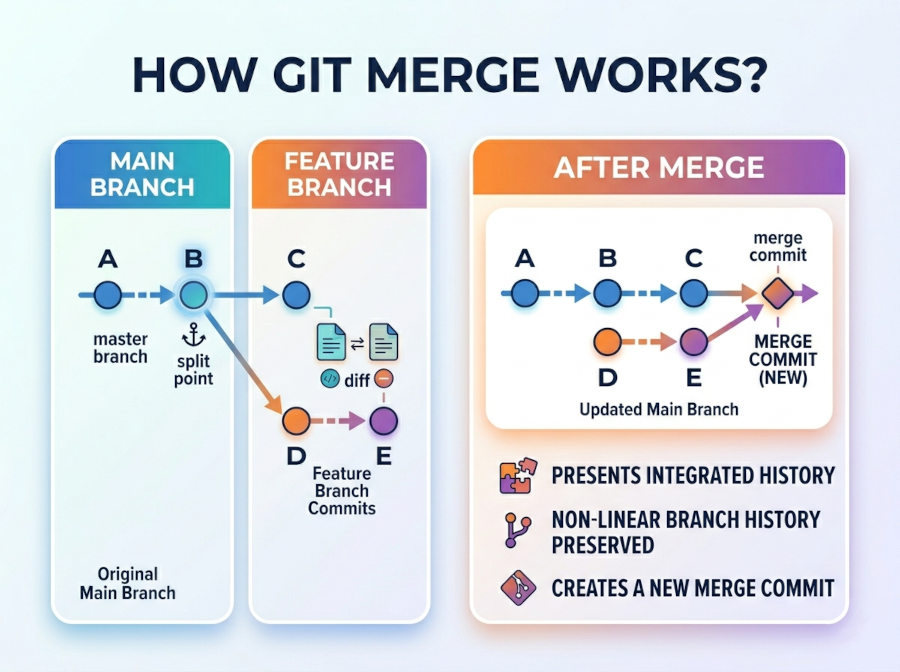
Git creates a new merge commit (M) connecting both branches.
This clearly shows:
• when branching happened
• when branches were merged
• independent development history
How Git Rebase Works?
Initial state:
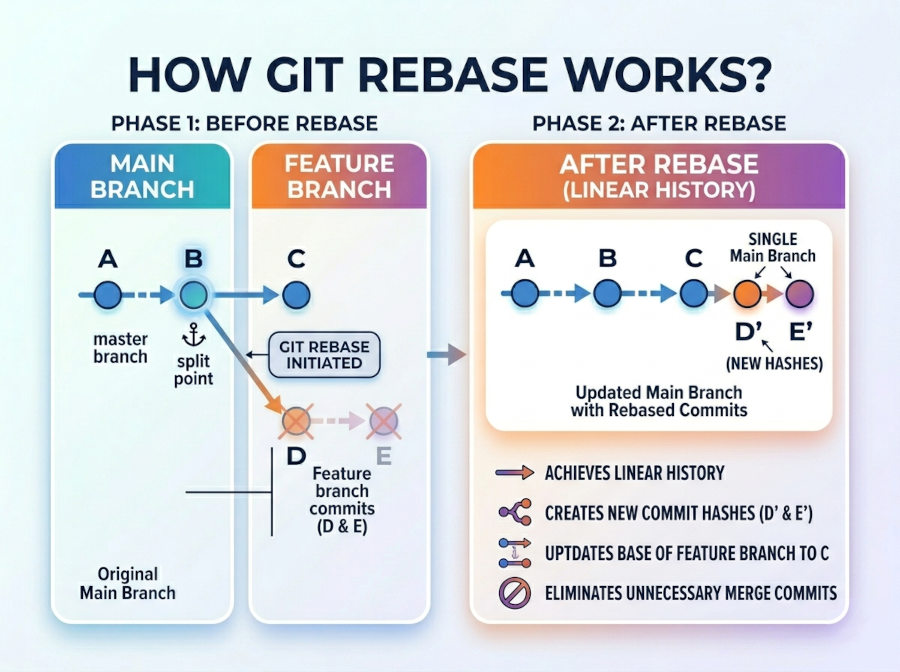
Git reapplies the commits (D and E) onto the latest main branch.
The original commits are replaced with new rewritten commits (D' and E').
This creates a straight and linear history.
Similar Features Between Rebase and Merge
Both Combine Branch Changes
Both operations integrate changes from one branch into another. Their core purpose is the same: bringing different lines of development together into a unified codebase.
Whether using merge or rebase, the final source code can end up functionally identical.
Both Help Collaborative Development
In team environments, multiple developers often work on separate branches simultaneously. Both merge and rebase help synchronize work between contributors.
Without these operations, integrating parallel feature development would become extremely difficult.
Both Can Produce Conflicts
If two branches modify the same file or same lines differently, both merge and rebase may generate conflicts.
Developers must manually resolve these conflicts to determine which changes should remain in the final version.
Both Are Essential in Modern Git Workflows
Professional Git workflows usually use both strategies depending on the scenario.
For example:
• Rebase is often used during feature development.
• Merge is often used when finalizing pull requests.
Experienced teams rarely use only one approach exclusively.
Key Differences Between Git Rebase and Merge
Commit History
Merge preserves original history exactly as it happened. Every branch and merge point remains visible.
Rebase rewrites history into a cleaner linear structure. This makes logs easier to read but changes original commit identities.
Merge Commits
Merge creates an additional merge commit.
Rebase does not create merge commits because it reapplies commits sequentially.
Projects with heavy merge usage can develop complex branch graphs over time.
Safety
Merge is generally safer because it does not rewrite commit history.
Rebase can become risky if used incorrectly on shared branches because rewritten commits may conflict with other developers’ histories.
Readability
Rebase creates cleaner and more readable commit logs.
Merge can produce noisy histories in large projects with many parallel branches.
Collaboration Impact
Merge works very well for shared branches and team collaboration because history remains stable.
Rebase is safer when used on private local branches before sharing code publicly.
Git Rebase vs Merge Differences
| Feature | Git Merge | Git Rebase |
|---|---|---|
| History Handling | Preserves complete branch history | Rewrites commit history |
| Commit Structure | Creates merge commits | Creates linear history |
| Safety | Safer for shared branches | Riskier on public/shared branches |
| Readability | Can become visually complex | Cleaner and easier to follow |
| History Accuracy | Fully preserves actual development timeline | Simplifies historical structure |
| Conflict Handling | Conflicts resolved once during merge | Conflicts may appear per commit during replay |
| Best For | Team collaboration and production branches | Local branch cleanup and linear history |
| CI/CD Visibility | Shows exact integration points | Simplifies deployment history |
Git Merge Example
Basic Merge Workflow
git checkout main
git merge feature-login
This command merges the feature-login branch into main.
Git creates a merge commit if necessary and preserves the entire branch structure.
Git Rebase Example
Basic Rebase Workflow
git checkout feature-login
git rebase main
This command moves the feature branch commits on top of the latest main branch commits.
The result is a cleaner and more linear project history.
Conflict Resolution Difference
Merge Conflict Handling
During merge, Git combines all branch changes at once. If conflicts exist, they are resolved in a single operation.
This approach is often easier for beginners because conflicts appear one time during integration.
Example:
git merge feature-login
If conflicts occur:
• edit conflicted files
• resolve differences
• commit the merge
Rebase Conflict Handling
During rebase, Git reapplies commits one by one. A conflict may appear for each replayed commit.
This provides more granular conflict control but may require multiple resolution steps.
Example:
git rebase main
If conflicts occur:
git add .
git rebase --continue
This process repeats until all commits are replayed successfully.
Best Use Cases for Git Merge
Large Team Collaboration
Merge is ideal for teams where many developers share branches simultaneously. Since merge does not rewrite history, it avoids synchronization problems between contributors.
Enterprise environments usually prefer merge strategies for long-lived branches such as:
• main
• develop
• release
Audit and Compliance Requirements
Some organizations require exact historical visibility for auditing and debugging.
Merge preserves:
• branch origins
• integration timing
• parallel development history
This historical accuracy can help during incident investigations and production debugging.
Open Source Projects
Many open-source projects prefer merge commits because they clearly show how features entered the project over time.
This visibility becomes useful when reviewing complex community contributions.
Best Use Cases for Git Rebase
Cleaning Local Feature Branches
Rebase is excellent for organizing local commits before opening a pull request.
Developers often:
• squash unnecessary commits
• reorder commits
• remove temporary debugging commits
This creates cleaner reviewable histories.
Maintaining Linear Histories
Projects wanting highly readable logs often encourage rebasing before merges.
Linear history simplifies:
• git log
• git bisect
• release tracking
• deployment debugging
Short-Lived Feature Branches
Rebase works especially well for small temporary branches maintained by a single developer.
Since collaboration risks are lower, history rewriting becomes much safer.
When Should You Use Merge vs Rebase?
Use Merge When
Use merge if:
• the branch is shared by multiple developers
• preserving exact history matters
• auditability is important
• you want maximum safety
• the team prefers stable commit IDs
Merge minimizes the risk of accidental history corruption.
Use Rebase When
Use rebase if:
• you want clean linear history
• the branch is private/local
• you are preparing commits before PR review
• your team values readable commit logs
• you want simpler release history
Rebase helps keep repositories visually clean and easier to navigate.
Recommended Professional Workflow
A very common professional workflow looks like this:
• Create a feature branch.
• Work locally with small commits.
• Rebase onto latest main before PR creation.
• Merge PR into main.
This combines:
• clean feature history
• safe shared branch integration
• readable production logs
Alternative Git Strategies
Squash Merge
Squash merge combines all feature commits into one single commit before merging.
This keeps the main branch extremely clean while still avoiding history rewriting after merge.
Example:
git merge --squash feature-login
This strategy is popular in repositories where commit history simplicity is highly valued.
Cherry-Pick
git cherry-pick copies individual commits from one branch to another.
This is useful when only specific fixes or features should move between branches without merging everything.
Example:
git cherry-pick a1b2c3
This approach is commonly used for hotfixes and selective production patches.
Final Recommendation
Git merge and Git rebase are complementary tools rather than direct competitors.
Merge prioritizes:
• safety
• historical accuracy
• collaboration stability
Rebase prioritizes:
• clean history
• readability
• streamlined commit logs
A practical guideline used by many professional teams is:
• Rebase local/private branches.
• Merge shared/public branches.
This balance provides both clean development workflows and reliable collaboration.