Async/Await vs Multithreading vs Parallel.For in C#: Concurrency, Performance and Use Cases
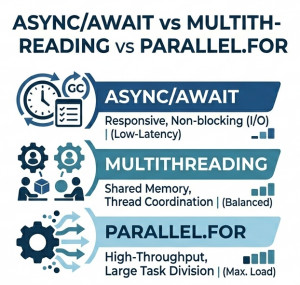
Modern C# applications often need to handle multiple operations at the same time to improve performance, responsiveness, and scalability.
The three most common approaches are Async/Await, Multithreading, and Parallel.For. Although they are related to concurrency, they solve different types of problems.
These techniques are widely used in:
• ASP.NET Core APIs
• Background services
• High-performance computing
• Data processing pipelines
• Real-time applications
High-Level Overview
Async/Await is used for asynchronous I/O operations such as database calls, file access, and network requests.
Multithreading is used to run multiple threads concurrently for CPU-bound or long-running tasks.
Parallel.For is used to execute data-parallel workloads across multiple CPU cores efficiently.
Core Concept Differences
Async/Await:
• Non-blocking I/O operations
• Uses Tasks instead of threads directly
• Improves scalability in server applications
• Does NOT necessarily create new threads
Multithreading:
• Explicit thread creation and management
• True parallel execution
• Higher control but more complexity
• Risk of race conditions and deadlocks
Parallel.For:
• Data parallel execution model
• Automatically splits work across threads
• Uses Thread Pool internally
• Best for CPU-bound loops
Execution Model Comparison
Async/Await does not block threads while waiting for I/O operations. Instead, it frees the thread and resumes execution later.
Multithreading creates multiple threads that run in parallel, each executing independently.
Parallel.For distributes iterations of a loop across multiple threads automatically.
Async/Await Example
public async Task GetDataAsync() {using var client = new HttpClient();var result = await client.GetStringAsync("https://api.howcsharp.com/data");return result; }
This approach is ideal for I/O-bound operations where waiting time is significant.
Multithreading Example
public void RunMultipleThreads() {Thread t1 = new Thread(() =>{Console.WriteLine("Thread 1 running");});Thread t2 = new Thread(() =>{Console.WriteLine("Thread 2 running");});t1.Start();t2.Start(); }
This model provides full control over thread execution but increases complexity.
Parallel.For Example
Parallel.For(0, 10, i =>
{
    Console.WriteLine($"Processing item {i}");
});
Parallel.For automatically distributes iterations across multiple threads for CPU-intensive tasks.
Performance Comparison
Async/Await:
• Best for I/O-bound workloads
• High scalability
• Low thread usage
Multithreading:
• Best for fine-grained control
• Higher overhead
• Risk of synchronization issues
Parallel.For:
• Best for CPU-bound loops
• Efficient CPU utilization
• Automatic workload distribution
When to Use Which?
Use Async/Await when:
• Calling APIs or databases
• Reading/writing files
• Performing network operations
• Building scalable web services
Use Multithreading when:
• You need explicit thread control
• Running long background operations
• Handling specialized concurrency logic
Use Parallel.For when:
• Processing large datasets
• CPU-intensive computations
• Image processing or transformations
• Loop-based parallel workloads
Common Mistakes
• Using multithreading for simple async I/O
• Blocking async code with .Result or .Wait()
• Using Parallel.For for I/O-bound tasks
• Ignoring thread safety in shared resources
Thread Pool Behavior
Both Async/Await and Parallel.For rely heavily on the .NET Thread Pool.
However, Async/Await releases threads during waiting periods, while Parallel.For actively consumes threads during execution.
Real-World Scenario Comparison
Web API Request Handling:
Async/Await is ideal because it avoids blocking threads while waiting for database or external API calls.
Image Processing Pipeline:
Parallel.For is ideal for processing pixels or frames in parallel.
Custom Background Worker:
Multithreading may be used when precise control over execution lifecycle is required.
Advantages and Disadvantages
Async/Await:
• Highly scalable
• Efficient resource usage
• Not suitable for CPU-heavy work
Multithreading:
• Full control over execution
• Complex to manage
• Risk of concurrency bugs
Parallel.For:
• Simple parallel execution
• Good CPU utilization
• Less flexible than manual threading
Conclusion
Async/Await, Multithreading, and Parallel.For are complementary concurrency tools in C#.
Async/Await is best for I/O-bound scalability, Multithreading is best for low-level control, and Parallel.For is best for CPU-bound data parallelism.
Choosing the right model is essential for building efficient, scalable, and high-performance .NET applications.