SMTP vs IMAP vs POP3: Email Protocols Explained in Modern Systems
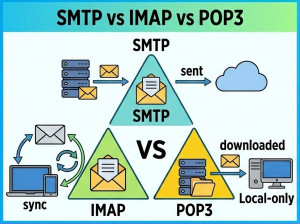
Email communication systems rely on different protocols to send, receive, and store messages efficiently across networks.
SMTP, IMAP, and POP3 are the three core protocols used in email architecture, each serving a different role in the email lifecycle.
Although they work together, they handle distinct responsibilities such as sending, syncing, and downloading emails.
These protocols are widely used in:
• Corporate email systems
• Webmail services
• Email clients (Outlook, Thunderbird)
• Backend notification systems
• Enterprise communication platforms
What is SMTP?
SMTP (Simple Mail Transfer Protocol) is responsible for sending emails from a client to a mail server or between mail servers.
It is strictly used for outgoing email delivery.
What is IMAP?
IMAP (Internet Message Access Protocol) allows users to access and synchronize emails stored on a mail server without downloading them permanently.
It keeps emails on the server and syncs changes across multiple devices.
What is POP3?
POP3 (Post Office Protocol version 3) is used to download emails from a server to a local device, often deleting them from the server afterward.
It is designed for offline email access on a single device.
Core Concept Differences
SMTP:
• Used for sending emails
• Works between client and server or server-to-server
• Does not handle email retrieval
IMAP:
• Keeps emails on server
• Supports multi-device synchronization
• Requires constant internet connection
POP3:
• Downloads emails locally
• Works offline after download
• Typically used on a single device
Comparison Table
| Feature | SMTP | IMAP | POP3 |
|---|---|---|---|
| Purpose | Send emails | Access & sync emails | Download emails |
| Direction | Outgoing | Two-way sync | Incoming download |
| Data Storage | N/A | Server-side | Local device |
| Multi-device support | No | Yes | No |
| Offline access | No | Limited | Yes |
| Best Use Case | Email sending systems | Multi-device email access | Single-device offline email |
Execution Model Differences
SMTP handles the transmission of emails from sender to recipient mail servers.
IMAP synchronizes email state between server and multiple clients in real time.
POP3 retrieves emails from the server and stores them locally for offline use.
SMTP Example (Conceptual C#)
var client = new SmtpClient("smtp.server.com") { Port = 587,Credentials = new NetworkCredential("user", "password"),EnableSsl = true }; var message = new MailMessage("from@howcsharp.com", "to@howcsharp.com") {Subject = "Test Email",Body = "Hello from SMTP" }; client.Send(message);
SMTP is used for sending emails programmatically from applications.
IMAP Example (Conceptual)
using MailKit.Net.Imap; var client = new ImapClient(); client.Connect("imap.server.com", 993, true); client.Authenticate("user", "password"); var inbox = client.Inbox; inbox.Open(FolderAccess.ReadOnly); for (int i = 0; i < inbox.Count; i++) {var message = inbox.GetMessage(i);Console.WriteLine(message.Subject); }
IMAP is ideal for syncing emails across multiple devices.
POP3 Example (Conceptual)
using MailKit.Net.Pop3; var client = new Pop3Client(); client.Connect("pop.server.com", 995, true); client.Authenticate("user", "password"); for (int i = 0; i < client.Count; i++) {var message = client.GetMessage(i);Console.WriteLine(message.Subject); }
POP3 downloads emails locally for offline usage.
Performance Considerations
SMTP: Lightweight and optimized for message delivery.
IMAP: Efficient for multi-device synchronization but requires constant server connection.
POP3: Fast for single-device usage but lacks synchronization features.
When to Use Each?
Use SMTP when:
• Sending emails from applications
• Notification systems
• Transactional email services
Use IMAP when:
• Accessing emails on multiple devices
• Cloud-based email usage
• Real-time synchronization is needed
Use POP3 when:
• Offline email access is required
• Single device usage
• Minimal server dependency is preferred
Common Mistakes
• Using POP3 for multi-device environments
• Confusing SMTP with email retrieval protocols
• Not enabling SSL/TLS for secure email communication
• Misconfiguring IMAP sync behavior
Advantages and Disadvantages
SMTP:
• Reliable email delivery
• Only handles sending
IMAP:
• Multi-device sync
• Requires constant connectivity
POP3:
• Simple and fast
• No synchronization support
Conclusion
SMTP, IMAP, and POP3 are foundational email protocols that work together to enable modern email communication systems.
SMTP handles sending, IMAP manages synchronized access, and POP3 focuses on offline email retrieval.
Choosing the right protocol depends on device usage patterns, synchronization needs, and system architecture.