Serialization vs Binary Formats vs Text Formats: Data Representation in C# Systems
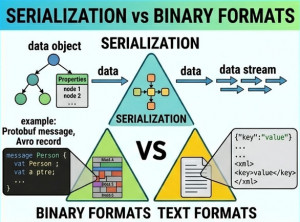
Data serialization is a fundamental concept in software engineering that defines how objects are converted into a format suitable for storage or transmission.
Serialization, Binary Formats, and Text Formats represent different approaches to encoding structured data in applications.
Each approach has unique trade-offs in terms of performance, readability, and efficiency.
These formats are widely used in:
• REST and gRPC APIs
• Distributed systems
• File storage systems
• Messaging queues
• Cloud-native applications
What is Serialization?
Serialization is the process of converting an object into a transferable format such as JSON, XML, or binary representation.
It enables data to be sent over networks or stored in persistent storage.
What are Text Formats?
Text Formats represent data in human-readable form, typically using JSON, XML, or YAML.
They are easy to debug and widely supported across systems.
What are Binary Formats?
Binary Formats encode data in a compact, machine-readable form such as Protocol Buffers, MessagePack, or custom binary schemas.
They are optimized for performance and reduced payload size.
Core Concept Differences
Serialization:
• General process of encoding data
• Can produce text or binary output
• Used in all modern systems
Text Formats:
• Human-readable structure
• Easy debugging and logging
• Larger payload size
Binary Formats:
• Compact and efficient encoding
• Faster parsing and transmission
• Not human-readable
Comparison Table
| Feature | Serialization (General) | Text Formats (JSON/XML) | Binary Formats (Protobuf/MsgPack) |
|---|---|---|---|
| Readability | Varies | High | Very Low |
| Performance | Medium | Medium to Low | Very High |
| Payload Size | Varies | Large | Small |
| Debugging | Depends | Easy | Difficult |
| Compatibility | High | Very High | Medium |
| Best Use Case | All systems | Public APIs | High-performance systems |
Execution Model Differences
Serialization is the overarching process that transforms objects into transferable formats.
Text formats encode data in readable structures that prioritize interoperability over performance.
Binary formats encode data in compact structures optimized for speed and bandwidth efficiency.
JSON Example (Text Format)
public class User { public string Name { get; set; }public int Age { get; set; } } var user = new User { Name = "Alice", Age = 30 }; string json = JsonSerializer.Serialize(user); Console.WriteLine(json);
JSON is widely used in REST APIs due to its readability and simplicity.
XML Example (Text Format)
var serializer = new XmlSerializer(typeof(User));

using var writer = new StringWriter();
serializer.Serialize(writer, user);

Console.WriteLine(writer.ToString());
XML is verbose but highly structured and still used in enterprise systems.
Binary Format Example (Conceptual Protobuf)
syntax = "proto3"; message User {string name = 1;int32 age = 2; }
Protocol Buffers provide compact and efficient binary serialization.
Performance Considerations
Serialization: Depends on format but essential for all systems.
Text Formats: Easy to debug but slower and larger in size.
Binary Formats: Fast and compact but harder to inspect manually.
When to Use Each?
Use Serialization when:
• Transferring or storing structured data
• Working with APIs or messaging systems
• Building distributed architectures
Use Text Formats when:
• Building public APIs
• Debugging or logging data
• Interoperability is critical
Use Binary Formats when:
• High-performance systems are required
• Reducing network bandwidth is important
• Working with microservices or gRPC
Common Mistakes
• Using JSON in high-throughput systems without optimization
• Choosing binary formats without tooling support
• Overusing XML in modern APIs
• Ignoring serialization overhead in performance-critical paths
Advantages and Disadvantages
Serialization:
• Universal concept
• Depends on implementation
Text Formats:
• Easy to use and debug
• Inefficient for large-scale systems
Binary Formats:
• High performance
• Hard to inspect manually
Conclusion
Serialization, Text Formats, and Binary Formats are fundamental to modern software communication and storage.
Text formats prioritize readability and interoperability, while binary formats prioritize performance and efficiency.
Choosing the right approach depends on system requirements, performance constraints, and debugging needs.