Unit Testing in C#: Complete Guide with Examples, Tools, Advantages & Best Practices
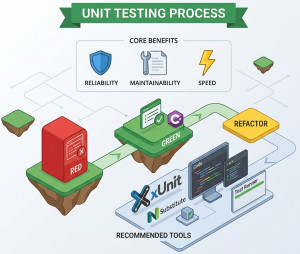
Unit testing in C# is one of the core practices that separates “it works on my machine” code from reliable, production-ready software. Let’s break it down clearly and practically.
Unit testing is the practice of testing small, isolated pieces of code (called units, usually methods or classes) to verify they behave as expected.
Example:
public int Add(int a, int b)
{
return a + b;
}
A unit test checks:
Assert.Equal(5, Add(2, 3));
The idea: test logic in isolation without dependencies like databases, APIs, or file systems.
Why do we use Unit Testing?
1. Catch bugs early
Finding a bug during development is far cheaper than in production.
2. Safe refactoring
You can change code confidently because tests will break if something goes wrong.
3. Better design
Testable code = loosely coupled, clean code.
4. Documentation
Tests show how code is supposed to behave.
Key Features of Unit Testing
• Isolation → Tests one unit at a time
• Repeatability → Same result every run
• Fast execution → Runs in milliseconds
• Automated → Runs in CI/CD pipelines
• Deterministic → No randomness or external dependency
Key Components of Unit Testing
1. Test Framework
Provides structure and assertions.
Examples:
• xUnit
• NUnit
• MSTest
2. Assertions
Used to verify expected results:
Assert.Equal(expected, actual);
3. Test Runner
Executes tests (Visual Studio, CLI, CI tools).
4. Mocking Framework
Used to fake dependencies.
Examples:
• Moq
• NSubstitute
5. System Under Test (SUT)
The actual class/method being tested.
Available Libraries (C# Ecosystem)
Popular choices:
• xUnit → modern, widely used
• NUnit → feature-rich, classic
• MSTest → built into Visual Studio
• FluentAssertions → readable assertions
• Moq → mocking dependencies
Unit Test Examples
1. Basic Unit Test
Code:
public class Calculator
{
public int Add(int a, int b) => a + b;
}
Test (xUnit):
public class CalculatorTests
{
[Fact]
public void Add_ShouldReturnCorrectSum()
{
var calc = new Calculator();
var result = calc.Add(2, 3);
Assert.Equal(5, result);
}
}
2. Testing with Dependency (Mocking)
Code:
public interface IRepository
{
int GetData();
}
public class Service
{
private readonly IRepository _repo;
public Service(IRepository repo)
{
_repo = repo;
}
public int Process()
{
return _repo.GetData() * 2;
}
}
Test:
[Fact]
public void Process_ShouldDoubleRepositoryValue()
{
var mockRepo = new Mock<IRepository>();
mockRepo.Setup(r => r.GetData()).Returns(5);
var service = new Service(mockRepo.Object);
var result = service.Process();
Assert.Equal(10, result);
}
Best Use Cases for Unit Testing
Unit testing is most effective when applied to:
• Business logic
- Pricing calculations
- Validation rules
- Data transformations
• Utility functions
- String manipulation
- Date calculations
• Services (with mocked dependencies)
Not ideal for:
• UI testing
• Database integration
• External API calls
(These belong to integration or end-to-end testing)
Advantages of Unit Testing
• High confidence in code: Changes don’t break existing functionality silently.
• Faster debugging: You know exactly which unit failed.
• Encourages clean architecture: Loose coupling and dependency injection become natural.
• Supports CI/CD: Automated pipelines rely on tests.
Disadvantages of Unit Testing
• Initial time investment: Writing tests takes time.
• Maintenance cost: Tests must be updated when code changes.
• False sense of security: Bad tests ≠ real coverage.
• Not suitable for everything: You can’t unit test UI or full workflows effectively.
Alternatives / Complementary Approaches
Unit testing is not the only testing strategy:
1. Integration Testing
Tests multiple components together (e.g., service + database)
2. End-to-End (E2E) Testing
Simulates real user scenarios (e.g., login → checkout)
3. Manual Testing
Human validation for UX and edge cases
4. Behavior-Driven Development (BDD)
Tools like: SpecFlow
Focus on business-readable scenarios.
5. TDD (Test-Driven Development)
Write tests before writing code.
Big Picture about Unit Testing
Unit testing in C# is not just about testing—it’s about:
• Writing better-designed code
• Reducing long-term bugs
• Enabling safe changes
If clean code is about readability, unit testing is about reliability.