C# Memory Management Explained: Garbage Collector, Generations, and Performance Tips
What is Memory Management in C#?
Memory management in C# is the process of allocating, using, and releasing memory for your application. In the .NET ecosystem (.NET), this is largely handled automatically so developers don’t need to manually allocate and free memory like in C or C++.
C# uses managed memory, meaning:
• Objects are allocated on the managed heap
• The runtime tracks object usage
• Unused objects are cleaned up automatically
What is the Garbage Collector (GC)?
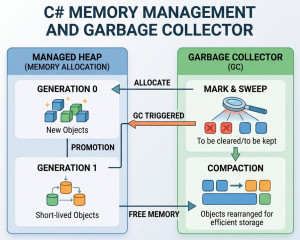
The Garbage Collector (GC) is a component of the .NET runtime that automatically frees memory occupied by objects that are no longer in use.
Instead of manually freeing memory, the GC:
• Finds objects that are no longer referenced
• Reclaims their memory
• Compacts the heap for efficiency
Why do we use GC?
Without GC:
• Developers must manually free memory
• High risk of memory leaks and crashes
With GC:
• Less manual work
• Safer memory usage
• Fewer bugs related to memory
Key Features of Memory Management in C#
1. Automatic Memory Allocation
var user = new User();
Memory is automatically allocated on the heap.
2. Garbage Collection
Automatically removes unused objects.
3. Generational GC
Objects are grouped by lifetime:
• Generation 0 → short-lived objects
• Generation 1 → medium-lived
• Generation 2 → long-lived
This improves performance by focusing on likely-to-die objects.
4. Managed Heap
All reference types are stored in a managed memory area.
5. Finalization
Objects can define cleanup logic using destructors:
~MyClass()
{
// cleanup
}
6. IDisposable Pattern
Used for manual cleanup of unmanaged resources:
public class FileManager : IDisposable
{
public void Dispose()
{
// release resources
}
}
Key Components of GC
1. Managed Heap
Where objects are stored.
2. Garbage Collector (GC)
Core engine that reclaims memory.
3. Stack
Stores:
• Method calls
• Value types
4. Finalizer Queue
Holds objects waiting for cleanup before GC removes them.
5. Large Object Heap (LOH)
Stores large objects (typically > 85KB).
Available Libraries / Tools
While GC is built-in, some tools help manage or analyze memory:
• dotMemory → memory profiling
• PerfView → GC analysis
• BenchmarkDotNet → performance testing
• CLR Profiler → memory insights
Examples of GC
1. Basic Memory Allocation
var person = new Person();
When person is no longer referenced, GC will clean it up.
2. Forcing Garbage Collection (not recommended normally)
GC.Collect();
Used only in special scenarios (testing, diagnostics).
3. IDisposable Example
using (var file = new StreamWriter("file.txt"))
{
file.WriteLine("Hello");
}
Here:
• Resource is released immediately after use
• Not waiting for GC
4. Memory Leak Scenario (Common Mistake)
static List<object> cache = new List<object>();
cache.Add(new object()); // never removed
Objects stay referenced → GC cannot collect them → memory leak.
Best Use Cases of GC
Applications with heavy object creation
• Web APIs
• Real-time data processing
Enterprise systems
• Large-scale apps using .NET
Long-running applications
• Background services
• Microservices
Not ideal scenarios
• Extremely low-level systems (e.g., embedded systems)
• Real-time systems requiring strict timing (GC pauses can matter)
Advantages of GC
• Automatic memory management: No need for manual allocation/deallocation.
• Reduces memory leaks: GC handles cleanup safely (if no references remain).
• Improves developer productivity: Focus on logic, not memory handling.
• Optimized performance: Generational GC reduces overhead.
Disadvantages of GC
• Non-deterministic cleanup: You don’t know exactly when GC will run.
• Performance pauses: GC can briefly pause application execution.
• Memory leaks still possible: If references are held unintentionally.
• Less control: Compared to unmanaged languages like C++.
Alternatives / Complementary Approaches
1. Manual Memory Management (C/C++)
Full control, but high risk.
2. IDisposable Pattern
Used alongside GC for:
• File handles
• Database connections
3. Span / Stack Allocation
For high-performance scenarios:
Span<int> numbers = stackalloc int[10];
4. Object Pooling
Reuse objects instead of allocating repeatedly: Reduces GC pressure
5. Unmanaged Memory (Interop)
Using Marshal for direct memory control when needed.
Big Picture about Garbage Collection
In C#, memory management is mostly automatic thanks to the Garbage Collector—but understanding how it works helps you:
• Avoid hidden memory leaks
• Improve performance
• Write scalable applications
Think of GC as a smart assistant, not magic—you still need to write memory-efficient code.