Docker Explained for C# Developers
Docker is a containerization platform that packages applications and their dependencies into lightweight, portable containers that run consistently across different environments.
Docker helps developers package applications together with everything they need to run, such as libraries, runtime versions, and system dependencies. Instead of saying “it works on my machine,” teams can run the same container on laptops, servers, cloud platforms, or CI/CD pipelines with identical behavior. Docker containers are lightweight compared to virtual machines because they share the host operating system kernel. This makes deployment faster, easier to scale, and more reliable across development and production environments.
Why We Use Docker?
Docker solves one of the most common software development problems: environment inconsistency. A project may work perfectly on one developer’s computer but fail in testing or production because of different operating systems, package versions, or missing dependencies. Docker removes this uncertainty by packaging the application and its environment together.
Another major reason developers use Docker is deployment speed. Instead of manually configuring servers and installing dependencies step by step, teams can deploy prebuilt containers in seconds. This becomes especially valuable in cloud-native applications, microservices architectures, and CI/CD pipelines where rapid deployment and scaling are important.
Docker also improves collaboration between developers, testers, and operations teams. Everyone works with the same container image, which reduces setup time and debugging effort. New team members can start a project quickly without spending hours configuring local environments.
When Should We Use Docker?
Docker is most useful when applications need consistency, portability, scalability, or simplified deployment. If your software runs across multiple environments such as development, staging, QA, and production, Docker helps ensure behavior remains identical everywhere.
Docker is especially valuable in microservices architectures. For example, an e-commerce platform may separate authentication, payments, inventory, and notifications into independent services. Each service can run in its own container with isolated dependencies, making updates and scaling much easier.
You should also consider Docker when working with cloud infrastructure or automated CI/CD pipelines. Build servers, test environments, and production deployments become reproducible and predictable because every stage uses the same container image.
However, Docker may not always be necessary for very small desktop applications or simple scripts where containerization adds unnecessary complexity. In such cases, traditional deployment methods can be simpler and faster.
C# Examples to Use Docker
Example 1: Dockerizing an ASP.NET Core Web API
Suppose you have a simple ASP.NET Core API project. Docker can package the application into a portable container.
FROM mcr.microsoft.com/dotnet/aspnet:8.0 AS base
WORKDIR /app
EXPOSE 8080
FROM mcr.microsoft.com/dotnet/sdk:8.0 AS build
WORKDIR /src
COPY . .
RUN dotnet publish -c Release -o /app/publish
FROM base AS final
WORKDIR /app
COPY --from=build /app/publish .
ENTRYPOINT ["dotnet", "MyApi.dll"]
Build the Docker Image
docker build -t myapi .
Run the Container
docker run -p 8080:8080 myapi
This approach allows the same ASP.NET Core application to run consistently on Windows, Linux, macOS, cloud servers, or Kubernetes clusters.
Example 2: Running SQL Server for Local Development
C# developers frequently use Docker to avoid installing databases directly on their machines.
docker run -e "ACCEPT_EULA=Y" \
-e "SA_PASSWORD=StrongPassword123!" \
-p 1433:1433 \
--name sqlserver \
-d mcr.microsoft.com/mssql/server:2022-latest
Instead of manually configuring SQL Server, developers can instantly create isolated database environments. This is especially useful for testing and team collaboration.
Example 3: Using Docker Compose with ASP.NET and Redis
A .NET application may require multiple services such as Redis, PostgreSQL, or RabbitMQ. Docker Compose allows developers to manage everything together.
// docker-compose.yml
version: '3.9'
services:
webapi:
build: .
ports:
- "8080:8080"
depends_on:
- redis
redis:
image: redis:latest
ports:
- "6379:6379"
This setup creates a complete development environment with a single command:
docker compose up
Best Use Cases of Docker
Microservices Architecture
Docker is widely used in microservices systems where applications are split into smaller independent services. Each service can run in its own container with isolated dependencies and runtime versions. This makes updates safer because modifying one service usually does not affect others.
For example, a banking platform may separate customer management, payment processing, notifications, and fraud detection into different containers. Teams can scale only the services experiencing high traffic instead of scaling the entire application.
CI/CD Pipelines
Continuous integration and deployment pipelines benefit heavily from Docker because builds become reproducible and predictable. Every test environment uses the same image, reducing “works on my machine” problems during deployment.
A development team may run automated tests inside containers before releasing code to production. If tests pass inside the container, the exact same image can later be deployed to production with confidence.
Local Development Environments
Docker simplifies onboarding and local setup for developers. Instead of installing databases, message queues, caching systems, and runtime dependencies manually, developers can start everything using Docker Compose.
This is particularly useful for complex enterprise applications where setting up a local environment traditionally takes hours or even days. Docker reduces this process to a few commands.
Cloud-Native Applications
Modern cloud platforms such as Kubernetes and managed container services are designed around containerized workloads. Docker allows applications to move easily between local development, testing servers, and cloud infrastructure.
For example, a SaaS platform may run the same Docker image locally during development and later deploy it to Kubernetes clusters in AWS, Azure, or Google Cloud.
Testing and Isolation
Docker containers create isolated environments for testing software safely. Developers can test different runtime versions, databases, or operating system configurations without affecting the host machine.
This is extremely useful for QA teams who need repeatable testing environments for automated integration and regression testing.
Advantages of Using Docker
Environment Consistency
Docker ensures applications behave the same across different environments. The container includes all required dependencies, reducing compatibility issues between developer machines and production servers.
This consistency significantly reduces deployment bugs and troubleshooting time. Teams spend less effort fixing environment-related problems and more time building features.
Faster Deployment
Containers start much faster than traditional virtual machines because they share the host operating system kernel. Applications can be deployed, restarted, or scaled within seconds.
This speed is valuable in modern cloud systems where applications need rapid scaling during traffic spikes or quick recovery after failures.
Better Resource Utilization
Docker containers are lightweight and consume fewer resources compared to virtual machines. Multiple containers can run efficiently on the same host machine without requiring separate operating systems.
This reduces infrastructure costs and improves hardware utilization, especially in large-scale production systems.
Improved Scalability
Docker works extremely well with orchestration platforms such as Kubernetes. Containers can scale horizontally by creating additional instances automatically during high traffic periods.
For example, an online shopping platform can automatically launch more checkout containers during a major sale event and reduce them later when traffic decreases.
Easier Collaboration
Developers, testers, and DevOps engineers can all use the same container image. This minimizes differences between environments and simplifies project onboarding.
New team members can clone a repository, run Docker commands, and start working immediately without complex setup instructions.
Disadvantages of Using Docker
Additional Complexity
Docker introduces new concepts such as images, containers, networking, volumes, orchestration, and registries. Small projects may become unnecessarily complicated if containerization is not truly needed.
Teams unfamiliar with Docker may initially spend significant time learning container management and debugging container-related issues.
Persistent Data Challenges
Containers are designed to be temporary and disposable. Managing persistent data for databases and file storage requires proper volume configuration and backup strategies.
If developers misunderstand this concept, important data may be lost when containers are removed or recreated.
Security Concerns
Containers share the host operating system kernel, which creates different security considerations compared to fully isolated virtual machines. Poorly configured containers may expose vulnerabilities.
Organizations must apply security best practices such as minimal base images, non-root users, vulnerability scanning, and proper access control.
Networking Complexity
Multi-container systems can become difficult to manage as networking requirements grow. Service discovery, load balancing, DNS resolution, and inter-container communication may introduce complexity in large applications.
Without proper architecture and orchestration tools, debugging networking issues can become challenging.
Performance Overhead in Some Scenarios
Although containers are lightweight, certain workloads such as high-performance computing or heavily I/O-intensive applications may experience some overhead compared to native execution.
In these cases, teams should benchmark workloads carefully before adopting Docker in production.
Common Mistakes When Using Docker
Using Large Base Images
Many developers start with oversized images that contain unnecessary tools and packages. This increases build times, storage usage, and attack surface.
Smaller base images such as Alpine Linux or optimized runtime images improve performance, security, and deployment speed.
Running Containers as Root
Running containers with root privileges creates unnecessary security risks. If a container becomes compromised, attackers may gain elevated permissions on the host system.
Using non-root users inside containers is a safer and recommended production practice.
Storing Data Inside Containers
Containers are temporary by design, yet beginners sometimes store important files directly inside containers. When the container is removed, the data disappears.
Persistent data should instead be stored using Docker volumes or external storage systems.
Ignoring Image Layer Optimization
Poorly structured Dockerfiles can create unnecessarily large images and slow builds. Developers often copy entire projects before restoring dependencies, causing inefficient rebuilds.
Proper layer caching strategies significantly improve build performance and CI/CD efficiency.
Putting Too Many Services in One Container
A common anti-pattern is combining databases, APIs, schedulers, and background jobs into a single container. This makes scaling and maintenance difficult.
Docker works best when containers follow the “one service per container” principle whenever practical.
Alternatives of Docker
Podman
Podman is a container engine designed as a daemonless alternative to Docker. It supports many Docker-compatible commands, making migration relatively easy for developers already familiar with Docker workflows.
One major advantage of Podman is security. Containers can run rootless by default, which reduces security risks in development and production environments.
Kubernetes
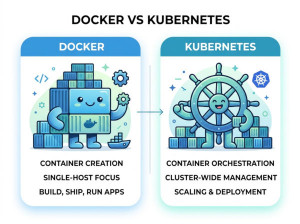
Kubernetes is not a direct Docker replacement but an orchestration platform used to manage containers at scale. While Docker focuses on creating and running containers, Kubernetes handles deployment, scaling, networking, and container orchestration across clusters.
Large enterprises often combine Kubernetes with container runtimes to manage cloud-native infrastructure efficiently.
containerd
containerd is a lightweight container runtime originally developed as part of Docker. Many modern Kubernetes environments use containerd directly instead of the full Docker engine.
It focuses on core container execution features and removes higher-level developer tooling that Docker provides.
CRI-O
CRI-O is a Kubernetes-focused container runtime designed specifically for Kubernetes environments. It is lightweight, optimized for orchestration, and follows Kubernetes standards closely.
Organizations heavily invested in Kubernetes sometimes prefer CRI-O because of its simplicity and reduced overhead.
Virtual Machines
Traditional virtual machines using platforms such as VMware or Hyper-V remain alternatives when strong isolation is required. Unlike containers, virtual machines include full guest operating systems.
Although VMs consume more resources, they provide stronger separation and may be preferred for legacy systems, highly regulated environments, or applications requiring complete OS isolation.
Conclusion
Docker has become one of the most important technologies in modern software development because it simplifies deployment, improves consistency, and enables scalable cloud-native architectures. It is especially valuable for microservices, CI/CD pipelines, development environments, and distributed systems.
However, Docker is not automatically the best solution for every project. Teams should evaluate complexity, security requirements, operational overhead, and application architecture before adopting containerization. When used correctly, Docker can dramatically improve development speed, deployment reliability, and infrastructure efficiency.