Kubernetes Explained for C# Developers
Kubernetes is an open-source container orchestration platform that automates the deployment, scaling, management, and networking of containerized applications.
Kubernetes helps developers manage containers across multiple servers automatically. Instead of manually starting, monitoring, and scaling containers, Kubernetes handles these tasks using declarative configurations and intelligent scheduling. It is commonly used with Docker containers in cloud-native applications and microservices architectures. Kubernetes improves reliability, scalability, and high availability for modern distributed systems.
What is the Relationship Between Docker and Kubernetes?
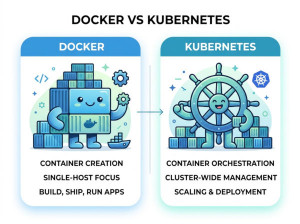
Docker and Kubernetes solve different but related problems. Docker focuses on creating and running containers, while Kubernetes focuses on managing containers at scale across clusters of machines.
A simple way to think about it is this:
• Docker creates the container.
• Kubernetes manages thousands of containers.
For example, a small application may run perfectly with Docker alone on a single server. However, a large-scale platform with hundreds of services and millions of users needs Kubernetes to handle scaling, failover, networking, rolling updates, and orchestration automatically.
Why We Use Kubernetes?
Kubernetes is used because managing containers manually becomes extremely difficult as applications grow. A company may run hundreds or thousands of containers across many servers, and manually monitoring them would be unreliable and time-consuming.
Kubernetes automates operational tasks such as:
• restarting failed containers,
• distributing traffic,
• scaling applications,
• rolling out updates,
• service discovery,
• load balancing.
This automation improves system reliability and reduces operational overhead for DevOps and infrastructure teams.
Another important reason companies adopt Kubernetes is cloud portability. Applications deployed on Kubernetes can run consistently across AWS, Azure, Google Cloud, or on-premise infrastructure with minimal changes.
When Should We Use Kubernetes?
Kubernetes is most useful when applications are large, distributed, or expected to scale dynamically. If an application consists of many microservices running across multiple servers, Kubernetes becomes highly valuable.
For example, a streaming platform may have separate services for authentication, recommendations, video processing, analytics, notifications, and billing. Kubernetes helps coordinate all these services while handling traffic spikes and failures automatically.
Kubernetes is also beneficial when high availability is important. If one server crashes, Kubernetes can automatically recreate containers on healthy nodes without manual intervention.
However, Kubernetes may be unnecessary for small projects, simple internal tools, or applications running on a single server. In those cases, the operational complexity may outweigh the benefits.
Core Kubernetes Concepts
Cluster
A Kubernetes cluster is a group of machines working together to run containerized applications. Some machines act as control nodes managing the cluster, while others run application workloads.
Clusters allow applications to scale horizontally across multiple servers rather than relying on a single machine.
Pod
A Pod is the smallest deployable unit in Kubernetes. It usually contains one container, although multiple tightly coupled containers can share a pod.
Pods provide networking and storage sharing between containers inside the same pod. Kubernetes creates, replaces, and scales pods automatically.
Deployment
A Deployment defines how applications should run and scale. It specifies the desired number of pod replicas, update strategy, and container image version.
Deployments make rolling updates and rollback operations safer and easier in production environments.
Service
A Service exposes pods to internal or external traffic. Since pods can be created and destroyed dynamically, services provide stable networking endpoints.
Without services, applications would struggle to communicate reliably in changing environments.
Node
A Node is a machine inside the Kubernetes cluster. Nodes can be physical servers or virtual machines.
Each node runs workloads assigned by the Kubernetes scheduler and reports status information back to the control plane.
Namespace
Namespaces help organize resources inside Kubernetes clusters. Large organizations use namespaces to separate teams, environments, or projects.
For example, development, staging, and production workloads can exist independently within the same cluster.
Kubernetes Architecture
Control Plane
The control plane is the brain of Kubernetes. It manages scheduling, cluster state, API communication, and orchestration decisions.
Key components include:
• API Server,
• Scheduler,
• Controller Manager,
• etcd database.
These components coordinate the entire cluster and ensure the desired system state is maintained.
Worker Nodes
Worker nodes execute the actual application workloads. Each node runs containers through a container runtime such as containerd.
Nodes also run agents that communicate with the control plane and maintain pod health.
Real Kubernetes Example
Suppose you have an ASP.NET Core application running inside Docker containers. During normal traffic, the application runs with three pods.
When traffic increases during a sales campaign, Kubernetes automatically scales the application to ten pods. If one pod crashes, Kubernetes creates a replacement automatically. During deployment, Kubernetes gradually replaces old versions with new ones without downtime.
This automation is one of the main reasons Kubernetes became the industry standard for container orchestration.
Example Kubernetes YAML for ASP.NET Core
Deployment Configuration
apiVersion: apps/v1
kind: Deployment
metadata:
name: myapi
spec:
replicas: 3
selector:
matchLabels:
app: myapi
template:
metadata:
labels:
app: myapi
spec:
containers:
- name: myapi
image: myapi:latest
ports:
- containerPort: 8080
This configuration tells Kubernetes to maintain three replicas of the ASP.NET Core application automatically.
Service Configuration
apiVersion: v1
kind: Service
metadata:
name: myapi-service
spec:
selector:
app: myapi
ports:
- protocol: TCP
port: 80
targetPort: 8080
type: LoadBalancer
This service exposes the application externally through a load balancer.
Best Use Cases of Kubernetes
Microservices Platforms
Kubernetes is ideal for microservices architectures where many independent services must communicate and scale separately. Each service can run in isolated pods while Kubernetes manages networking and orchestration.
This approach improves deployment flexibility and fault isolation in large distributed systems.
High-Traffic Applications
Applications with unpredictable or rapidly changing traffic patterns benefit greatly from Kubernetes auto-scaling capabilities.
For example, e-commerce platforms experience massive traffic spikes during promotional campaigns. Kubernetes can automatically allocate additional resources during peak demand and reduce them afterward.
Multi-Cloud Infrastructure
Organizations using multiple cloud providers often adopt Kubernetes because it provides a consistent deployment model across environments.
Applications can move between AWS, Azure, Google Cloud, and on-premise systems without major architectural changes.
CI/CD Automation
Kubernetes integrates well with DevOps pipelines and automated deployment strategies. Teams can perform rolling updates, canary releases, and blue-green deployments efficiently.
This reduces downtime and deployment risk during frequent software releases.
Machine Learning and Data Platforms
Many AI and data processing systems use Kubernetes to manage distributed workloads efficiently. Training jobs, inference services, and data pipelines can scale dynamically based on computational demand.
Kubernetes also simplifies GPU resource allocation for machine learning workloads.
Advantages of Kubernetes
Automatic Scaling
Kubernetes automatically adjusts application capacity based on CPU usage, memory consumption, or custom metrics.
This allows applications to handle traffic spikes efficiently without manual infrastructure management.
Self-Healing
If a container crashes or becomes unhealthy, Kubernetes automatically replaces it. This improves system reliability and minimizes downtime.
Applications remain available even during failures or infrastructure problems.
Rolling Updates and Rollbacks
Kubernetes supports controlled deployments where new versions are released gradually. If problems occur, deployments can be rolled back quickly.
This reduces operational risk during software releases.
Infrastructure Portability
Applications can run consistently across cloud providers and on-premise environments. This reduces vendor lock-in and improves deployment flexibility.
Organizations gain more control over infrastructure decisions and migration strategies.
Resource Efficiency
Kubernetes schedules workloads intelligently across nodes to maximize hardware utilization.
This improves cost efficiency compared to manually managed infrastructure.
Disadvantages of Kubernetes
Steep Learning Curve
Kubernetes introduces many concepts such as pods, deployments, services, ingress, namespaces, and operators. Beginners often find the ecosystem overwhelming initially.
Teams usually need dedicated learning and operational experience before managing production clusters effectively.
Operational Complexity
Managing Kubernetes clusters requires monitoring, logging, networking, security, backups, upgrades, and capacity planning.
Without proper tooling and expertise, operational overhead can become significant.
Resource Consumption
Kubernetes itself consumes infrastructure resources. Small projects may not justify the overhead of running full Kubernetes clusters.
For lightweight applications, simpler deployment methods may be more cost-effective.
Debugging Challenges
Distributed systems are inherently more difficult to debug than monolithic applications.
Networking issues, pod crashes, configuration problems, and orchestration failures may require advanced troubleshooting skills.
Security Misconfigurations
Improper RBAC permissions, exposed dashboards, insecure secrets management, or weak network policies can create security risks.
Kubernetes environments require strong security practices and continuous monitoring.
Common Kubernetes Mistakes
Running Everything in One Namespace
Beginners often place all applications into the default namespace, making management and access control difficult.
Namespaces should separate environments, teams, or projects logically.
Ignoring Resource Limits
Without CPU and memory limits, containers may consume excessive resources and affect cluster stability.
Proper resource requests and limits improve scheduling reliability and prevent noisy-neighbor issues.
Using Latest Tags in Production
Using latest image tags creates unpredictability because deployments may pull different versions unexpectedly.
Versioned image tags provide safer and reproducible deployments.
Poor Monitoring Setup
Kubernetes clusters generate massive operational data. Without centralized logging and monitoring, identifying failures becomes difficult.
Production systems should include observability tools such as Prometheus, Grafana, and centralized log management.
Storing Secrets Incorrectly
Sensitive data such as API keys or database passwords should not be hardcoded in YAML files or container images.
Kubernetes Secrets or external secret-management systems should be used securely.
Alternatives to Kubernetes
Docker Swarm
Docker Swarm is Docker’s native orchestration solution. It is simpler to learn and manage than Kubernetes, making it suitable for smaller environments.
However, it lacks the advanced ecosystem and scalability features Kubernetes provides.
Nomad
Nomad by HashiCorp is a lightweight workload orchestrator designed for simplicity and flexibility.
Nomad supports containers, virtual machines, and non-containerized applications, making it attractive for hybrid environments.
OpenShift
OpenShift is an enterprise Kubernetes platform developed by Red Hat. It adds developer tools, security policies, CI/CD integrations, and enterprise support on top of Kubernetes.
Large enterprises often choose OpenShift for managed governance and compliance features.
Amazon ECS
Amazon ECS is a managed container orchestration service from AWS. It simplifies deployment and operations for teams already heavily invested in the AWS ecosystem.
ECS is generally easier to manage than self-hosted Kubernetes clusters.
Conclusion
Kubernetes became the standard platform for managing containerized applications because it automates scaling, deployment, recovery, and orchestration at massive scale. It is particularly powerful for cloud-native systems, microservices architectures, and high-availability environments.
However, Kubernetes also introduces operational complexity and requires strong DevOps practices. Organizations should adopt it when scalability, automation, and infrastructure flexibility justify the additional learning and maintenance effort.