Linux Performance Monitoring Tools and Commands Explained
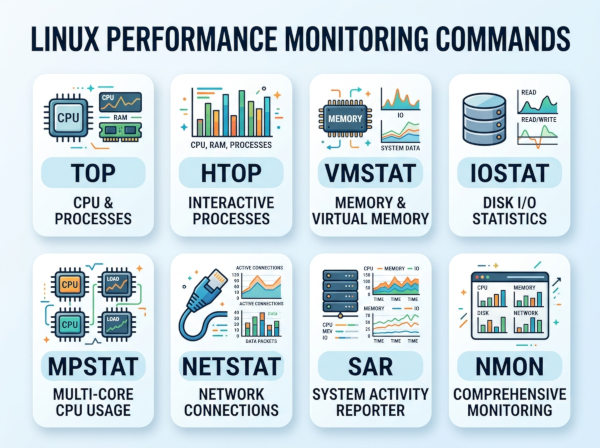
Linux performance monitoring tools are utilities and commands used to observe, analyze, and troubleshoot system resource usage and operating system behavior.
These tools help administrators, DevOps engineers, backend developers, and infrastructure teams understand how system resources are being consumed. They provide visibility into CPU utilization, memory allocation, disk activity, network traffic, process behavior, and overall server health.
Without monitoring tools, diagnosing production issues becomes extremely difficult because Linux servers often run many services simultaneously. Monitoring provides real-time operational insight that helps teams identify bottlenecks before they become outages.
Performance monitoring is especially important in:
• cloud infrastructure
• Kubernetes clusters
• database servers
• high-traffic APIs
• microservices platforms
• CI/CD systems
• enterprise Linux environments
Why Do We Use Linux Performance Monitoring Tools?
Detect System Bottlenecks
Performance monitoring tools help identify which system component is causing slowdowns.
For example:
• high CPU usage may indicate inefficient code
• excessive disk I/O may signal database issues
• memory pressure may indicate memory leaks
• network saturation may affect API latency
Without monitoring, teams often troubleshoot blindly.
Prevent Production Downtime
Monitoring allows engineers to detect abnormal system behavior before services fail completely.
For example, if disk space usage reaches 95%, administrators can intervene before applications crash due to unavailable storage.
Proactive monitoring greatly improves system reliability and operational stability.
Improve Application Performance
Linux monitoring tools help developers optimize applications by revealing resource consumption patterns.
For example:
• identifying CPU-heavy processes
• locating memory leaks
• detecting inefficient SQL queries
• analyzing thread contention
This insight helps engineering teams improve scalability and responsiveness.
Capacity Planning
Monitoring historical metrics helps organizations predict future infrastructure needs.
Teams can estimate:
• when to add more servers
• when to scale Kubernetes nodes
• when storage upgrades are necessary
• when cloud resource limits may become problematic
This improves budgeting and infrastructure planning.
Key Linux Performance Metrics
CPU Usage
CPU metrics show how processor resources are being utilized.
Important CPU indicators include:
• user CPU usage
• system CPU usage
• idle percentage
• CPU wait time
• context switching
• load averages
High CPU utilization may indicate:
• runaway processes
• inefficient algorithms
• insufficient server resources
• thread contention
Memory Usage
Memory metrics help determine how RAM and swap space are consumed.
Important memory indicators include:
• used memory
• free memory
• cached memory
• swap utilization
• page faults
Memory monitoring is critical because memory leaks can slowly degrade system performance over time.
Disk I/O
Disk monitoring tracks storage read/write performance and latency.
Important disk metrics include:
• IOPS (Input/Output Operations Per Second)
• disk utilization
• queue length
• read/write latency
• throughput
Slow disks commonly affect:
• databases
• logging systems
• analytics platforms
• large file processing systems
Network Performance
Network metrics reveal traffic patterns and communication bottlenecks.
Important network indicators include:
• bandwidth usage
• packet loss
• TCP retransmissions
• network latency
• active connections
Network monitoring is especially important for APIs, distributed systems, and cloud-native applications.
Load Average
Load average measures the number of processes waiting for CPU execution over time.
Linux commonly reports:
• 1-minute load average
• 5-minute load average
• 15-minute load average
A consistently high load average may indicate:
• CPU saturation
• blocked processes
• I/O bottlenecks
Most Used Linux Performance Monitoring Tools and Commands
1. top
top is one of the most commonly used Linux monitoring commands for real-time process and system monitoring.
It provides continuously updated information about:
• CPU usage
• memory consumption
• running processes
• system uptime
• load averages
Because it is preinstalled on nearly every Linux distribution, it is often the first tool engineers use during troubleshooting.
Strong Points of top
top is lightweight, simple, and available almost everywhere.
It provides immediate visibility into which processes consume the most CPU or memory resources. This makes it extremely useful during incident investigations and production troubleshooting.
Weak Points of top
The interface is relatively old and less user-friendly compared to newer tools.
Large systems with many processes may become difficult to analyze because the output can feel crowded and hard to navigate.
Example Usage
top
Sort by memory usage inside top:
Shift + M
Sort by CPU usage:
Shift + P
2. htop
htop is an improved interactive alternative to top.
It provides:
• colorized output
• mouse support
• easier navigation
• better process filtering
• visual CPU and memory bars
Many Linux administrators prefer htop because it improves readability significantly.
Strong Points of htop
htop provides a cleaner interface and simpler process management.
Users can:
• search processes interactively
• kill processes easily
• monitor CPU cores visually
• scroll horizontally and vertically
This improves troubleshooting efficiency considerably.
Weak Points of htop
htop may not be installed by default on minimal Linux servers.
It also consumes slightly more system resources compared to top, although this is rarely significant on modern systems.
Example Usage
htop
Install on Ubuntu:
sudo apt install htop
3. vmstat
vmstat reports system performance information related to:
• memory
• processes
• swap
• CPU activity
• I/O operations
It is especially useful for identifying memory pressure and CPU bottlenecks.
Strong Points of vmstat
vmstat provides compact and highly useful performance summaries.
It is excellent for quickly identifying:
• swap usage
• blocked processes
• CPU wait states
• I/O bottlenecks
This makes it valuable during performance tuning.
Weak Points of vmstat
The output format may feel cryptic to beginners.
Interpreting metrics properly often requires Linux performance knowledge and operational experience.
Example Usage
vmstat 2
This updates metrics every 2 seconds.
4. iostat
iostat focuses mainly on disk I/O statistics and storage performance.
It is part of the sysstat package and commonly used for diagnosing storage-related slowdowns.
Strong Points of iostat
iostat helps detect:
• disk bottlenecks
• excessive I/O wait
• overloaded storage systems
• high latency devices
Database administrators frequently use it during query performance investigations.
Weak Points of iostat
The tool focuses mainly on disk and CPU metrics, so it does not provide broader system observability.
It also requires some familiarity with storage performance terminology.
Example Usage
iostat -xz 2
This displays extended disk statistics every 2 seconds.
5. sar
sar collects and reports historical system performance data.
Unlike many real-time tools, sar allows engineers to analyze past system behavior.
Strong Points of sar
sar is extremely valuable for historical troubleshooting.
For example, administrators can analyze:
• CPU spikes from yesterday
• memory pressure during peak traffic
• historical network activity
This makes sar useful for long-term trend analysis.
Weak Points of sar
sar requires data collection services to be enabled beforehand.
If monitoring was not active during an incident, historical data may not exist.
Example Usage
sar -u 1 5
This reports CPU usage every second for 5 intervals.
6. free
free displays memory usage statistics.
It helps administrators quickly understand:
• available RAM
• used memory
• swap consumption
• cache utilization
Strong Points of free
free is extremely fast and simple.
It is commonly used during quick diagnostics to determine whether memory exhaustion may be affecting application performance.
Weak Points of free
The command provides limited detail compared to advanced monitoring tools.
It does not help identify which specific processes consume memory heavily.
Example Usage
free -h
The -h flag provides human-readable output.
7. netstat
netstat displays network connections, routing tables, interface statistics, and listening ports.
It is widely used for network troubleshooting and service diagnostics.
Strong Points of netstat
netstat helps engineers quickly identify:
• open ports
• active TCP connections
• suspicious network activity
• service listening states
It is very useful for infrastructure debugging.
Weak Points of netstat
Some Linux distributions consider netstat deprecated in favor of newer tools like ss.
The output can also become overwhelming on busy production servers.
Example Usage
netstat -tulnp
This shows listening TCP/UDP services and associated processes.
8. ss
ss is a modern replacement for netstat.
It provides faster and more efficient socket and network connection monitoring.
Strong Points of ss
ss performs much better on large-scale servers with many active connections.
It provides detailed socket information while consuming fewer system resources.
Weak Points of ss
The syntax can feel less intuitive for administrators accustomed to netstat.
Some older Linux tutorials still primarily reference netstat instead.
Example Usage
ss -tulnp
9. dstat
dstat combines multiple monitoring categories into a single real-time output.
It can monitor:
• CPU
• disk
• memory
• network
• paging
• interrupts
simultaneously.
Strong Points of dstat
dstat provides an excellent unified system overview.
Engineers can correlate multiple resource metrics in real time without switching between several commands.
Weak Points of dstat
Some distributions no longer maintain dstat actively.
Newer observability platforms may provide more advanced integrations and visualizations.
Example Usage
dstat
Advanced example:
dstat -cdnm
10. atop
atop is an advanced system and process monitor capable of recording historical resource usage.
It provides deep visibility into:
• CPU
• memory
• disk
• process behavior
• network usage
Strong Points of atop
atop supports historical playback, which helps engineers analyze incidents after they occur.
This makes it valuable for enterprise troubleshooting and root-cause analysis.
Weak Points of atop
The interface may feel overwhelming for beginners.
Advanced functionality also requires additional learning compared to simpler tools like top or free.
Example Usage
atop
Replay historical data:
atop -r
Comparison of Linux Monitoring Tools
| Tool | Main Focus | Best For | Strong Point | Weak Point |
|---|---|---|---|---|
| top | Processes and CPU | Quick troubleshooting | Installed almost everywhere | Old-style interface |
| htop | Interactive monitoring | Visual process management | User-friendly interface | Not always preinstalled |
| vmstat | Memory and CPU | Performance bottleneck analysis | Compact performance summaries | Steeper learning curve |
| iostat | Disk I/O | Storage troubleshooting | Detailed disk metrics | Narrow monitoring scope |
| sar | Historical monitoring | Trend analysis | Historical performance visibility | Requires prior data collection |
| free | Memory usage | Quick RAM checks | Very simple usage | Limited details |
| netstat | Network connections | Port and connection analysis | Broad network visibility | Considered legacy in some systems |
| ss | Socket statistics | Modern network monitoring | Fast and efficient | Less beginner-friendly syntax |
| dstat | Unified monitoring | Real-time system overview | Multiple metrics together | Reduced maintenance activity |
| atop | Advanced monitoring | Enterprise troubleshooting | Historical playback support | More complex interface |
When Should You Use Which Tool?
Use top or htop for Real-Time Troubleshooting
When applications suddenly become slow or CPU usage spikes unexpectedly, top and htop provide immediate visibility into active processes and resource consumption.
htop is usually preferred for interactive monitoring, while top remains useful because it exists on nearly every Linux server.
Use vmstat and iostat for Bottleneck Analysis
If systems experience latency but CPU usage appears normal, vmstat and iostat help uncover:
• disk bottlenecks
• swap pressure
• blocked I/O operations
• CPU wait states
These tools are especially valuable for databases and storage-intensive systems.
Use sar and atop for Historical Investigation
Historical monitoring becomes essential after production incidents.
sar and atop help teams understand:
• what happened
• when performance degraded
• which resources became saturated
This improves root-cause analysis significantly.
Use ss or netstat for Network Diagnostics
When APIs become unreachable or suspicious network activity appears, ss and netstat help investigate:
• open ports
• active sessions
• socket states
• service bindings
ss is generally preferred on modern Linux systems because of its better scalability and performance.
Alternatives to Traditional Linux Monitoring Commands
Prometheus
Prometheus is a modern metrics collection and monitoring platform commonly used in cloud-native environments.
It continuously collects time-series metrics and integrates with alerting systems. Kubernetes environments heavily rely on Prometheus for infrastructure observability.
Grafana
Grafana visualizes monitoring data through dashboards and charts.
Teams often combine Grafana with Prometheus to create centralized infrastructure observability platforms with real-time alerts and historical analytics.
Nagios
Nagios is a long-established infrastructure monitoring platform focused on server and service availability monitoring.
It is commonly used in enterprise environments where proactive alerting and uptime monitoring are critical.
Zabbix
Zabbix provides centralized monitoring for servers, applications, networks, and cloud systems.
Organizations often use Zabbix for enterprise-scale monitoring because it supports automation, alerting, historical reporting, and distributed monitoring.
Datadog
Datadog is a cloud-native observability platform designed for modern distributed systems.
It provides:
• infrastructure monitoring
• APM (Application Performance Monitoring)
• log aggregation
• tracing
• security monitoring
This makes it popular in large SaaS and cloud environments.
Final Recommendation
Linux monitoring tools are essential for maintaining reliable, scalable, and high-performance systems.
Different tools solve different operational problems:
• top and htop help with immediate process visibility
• vmstat and iostat identify bottlenecks
• ss and netstat troubleshoot networking
• sar and atop provide historical analysis
For modern infrastructures, many organizations combine:
• traditional Linux commands
• centralized observability platforms
• cloud-native monitoring systems
A practical approach is:
• Learn foundational Linux commands first
• Understand key performance metrics deeply
• Add centralized monitoring platforms later
• Implement alerting and historical analytics
• Integrate monitoring into CI/CD and Kubernetes environments
This layered monitoring strategy provides both low-level troubleshooting capability and enterprise-scale observability.