How to get CPU usage history by hour on Debian server?

On a Debian server, the standard way to get CPU usage history by hour (and per day) is to use sysstat (sar). It’s the most reliable built-in-style solution for historical performance data.
1. Install CPU monitoring (sysstat)
sudo apt update
sudo apt install sysstat
Enable data collection:
sudo sed -i 's/ENABLED="false"/ENABLED="true"/' /etc/default/sysstat
sudo systemctl enable sysstat
sudo systemctl restart sysstat
On newer Debian versions, this is already handled, but it’s worth checking.
2. How data is collected
sysstat runs via cron/systemd and stores logs in:
/var/log/sysstat/
Files look like:
sa26 (for day 26 of month)
sa27
3. View CPU usage by hour (daily breakdown)
Show full CPU stats for today:
sar -u
Show CPU usage with hourly resolution:
sar -u -f /var/log/sysstat/sa26
Replace sa26 with today’s file.
Filter by time range (very useful)
Example: 10:00 to 18:00
sar -u -f /var/log/sysstat/sa26 -s 10:00:00 -e 18:00:00
4. Convert to “hourly average CPU usage”
To summarize by hour (instead of per 10 min samples):
sar -u -f /var/log/sysstat/sa26 | awk '
NR>3 { cpu[$3]+=(100-$NF); count[$3]++ }
END {
for (t in cpu)
printf "%s %.2f%%\n", t, cpu[t]/count[t]
}'
This gives rough per-time-slot averages (depends on sysstat interval).
5. More readable daily summary (recommended)
Install extra tools:
sudo apt install sysstat
sadf -d /var/log/sysstat/sa26 -- -u
This outputs CSV-like data, ideal for Excel/Grafana.
6. If you want proper hourly dashboards (best practice)
For long-term monitoring, use:
Option A — Prometheus + Node Exporter
• real-time + historical graphs
• Grafana dashboards
• best for production servers
Option B — Netdata (fast setup)
bash <(curl -Ss https://my-netdata.io/kickstart.sh)
Gives instant per-hour CPU graphs in browser.
7. Quick check (no installation)
If you only need current snapshot:
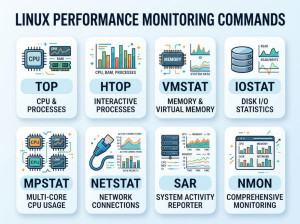
• top
• htop
But these do NOT provide history.