C# Async/Await vs Task: Deep Comparison with Real-World Examples
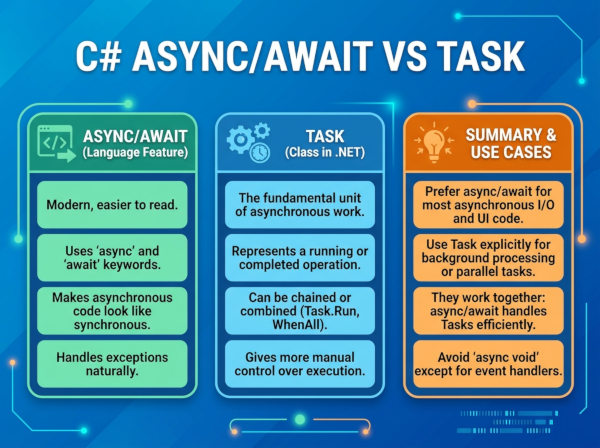
Task represents an asynchronous operation in .NET, while async/await is syntax sugar that makes asynchronous code easier to write and read.
What is a Task in C#?
A Task is a class from the Task Parallel Library (TPL) that represents work happening asynchronously. It can return a value using Task or simply represent completion using Task.
Tasks are heavily used in modern .NET applications because they integrate with asynchronous APIs, cancellation tokens, exception handling, and parallel execution. They are also composable, meaning multiple tasks can be combined together using methods like Task.WhenAll() and Task.WhenAny().
Tasks are not limited to background threads. Some tasks represent purely asynchronous I/O operations such as database queries, HTTP calls, or file operations where no dedicated thread is blocked while waiting for completion.
What is Async/Await in C#?
The async and await keywords simplify asynchronous programming by allowing developers to write non-blocking code in a readable linear style.
When the compiler sees an await, it transforms the method into a state machine behind the scenes. The method pauses execution until the awaited task completes, then resumes from the same point. This process happens automatically without developers needing to manually manage continuations.
The biggest advantage of async/await is readability. Instead of writing callback-heavy logic, developers can structure asynchronous code almost exactly like synchronous code, which reduces maintenance complexity and debugging difficulty.
Understanding the Relationship Between Task and Async/Await
Many developers think Task and async/await are competing concepts, but they actually solve different problems. A Task is an object that represents work that may complete in the future, whereas async/await is a language feature that simplifies consuming asynchronous operations.
Without async/await, developers had to manually manage callbacks and continuations using methods like ContinueWith. That approach often created deeply nested and difficult-to-maintain code. The introduction of async/await made asynchronous programming feel almost identical to synchronous programming while still keeping applications responsive.
Another common misunderstanding is assuming async/await automatically creates new threads. In reality, asynchronous operations often do not create extra threads at all. Instead, they rely on non-blocking I/O operations and continuation scheduling handled by the .NET runtime.
Core Difference Between Task and Async/Await
A Task is the actual asynchronous operation, while async/await is a way to work with that operation more cleanly.
Think of a Task as a package representing future work. The await keyword simply waits for that package to finish without blocking the current thread. Because of this relationship, you can create tasks without using await, and you can await almost any awaitable type.
Deep Technical Comparison
Task is a Data Structure
A Task stores information about asynchronous work including:
• Current execution status
• Completion state
• Exceptions
• Returned results
• Cancellation state
• Continuations
This makes tasks extremely flexible for orchestration scenarios. Developers can monitor, chain, cancel, combine, or retry tasks using built-in APIs.
Async/Await is Compiler Transformation
The async keyword does not create asynchronous behavior by itself. Instead, it tells the compiler to generate a state machine capable of pausing and resuming execution.
When execution reaches an await, the method returns control to the caller. Once the awaited task completes, execution continues automatically from the next line.
This transformation dramatically improves code readability while preserving scalability and responsiveness.
Comparison of Async/Await vs Task
| Feature | Task | Async/Await |
|---|---|---|
| Definition | Represents asynchronous work | Language syntax for consuming async operations |
| Main Purpose | Execution and orchestration | Readable asynchronous flow |
| Creates Threads? | Sometimes | No |
| Compiler Feature | No | Yes |
| Can Return Values? | Yes using Task<T> | Works with awaited values |
| Error Handling | AggregateException internally | Normal try/catch syntax |
| Readability | Lower in complex flows | Much higher |
| Best Use | Managing async operations | Writing maintainable async code |
Why Do We Use Async/Await and Task?
Modern applications frequently interact with external systems such as APIs, databases, cloud services, and file systems. These operations can take time to complete, and blocking threads during waiting periods reduces scalability and responsiveness.
Asynchronous programming allows applications to continue processing other requests while waiting for external operations to finish. This is especially important in web applications where thread starvation can severely impact performance under high traffic.
Desktop applications also benefit because the UI thread remains responsive while long-running operations execute asynchronously in the background.
When Should You Use Them?
Use Async/Await for I/O Operations
Operations like database calls, HTTP requests, reading files, or cloud communication are ideal for async programming. These tasks spend most of their time waiting for external systems rather than consuming CPU power.
Using async/await here improves scalability because threads are released back to the thread pool while waiting.
Use Task.Run for CPU-Bound Work
Heavy calculations, image processing, encryption, or report generation are CPU-intensive operations. In these cases, Task.Run() can move work to a background thread to avoid blocking the UI or request thread.
However, using Task.Run() in ASP.NET applications unnecessarily can hurt scalability because it consumes extra threads.
C# Examples
Basic Async/Await Example
public async Task<string> GetDataAsync()
{
await Task.Delay(2000);
return "Data loaded";
}
This method asynchronously waits for two seconds without blocking the thread. Once completed, execution resumes and returns the result.
Task Without Async/Await
public Task<string> GetDataAsync()
{
return Task.Run(() =>
{
Thread.Sleep(2000);
return "Data loaded";
});
}
This example manually creates a task using a background thread. While valid, it is less readable and blocks a thread during execution.
Multiple Tasks with Task.WhenAll
public async Task LoadMultipleResources()
{
Task apiTask = CallApiAsync();
Task dbTask = LoadDatabaseAsync();
Task cacheTask = RefreshCacheAsync();
await Task.WhenAll(apiTask, dbTask, cacheTask);
}
This pattern is useful when independent operations can run concurrently. It improves performance by reducing total waiting time.
Exception Handling Example
public async Task ProcessAsync()
{
try
{
await DangerousOperationAsync();
}
catch (Exception ex)
{
Console.WriteLine(ex.Message);
}
}
Using async/await enables natural try/catch handling instead of manually inspecting task exceptions.
Best Use Cases
Web APIs
Asynchronous programming is critical in ASP.NET Core APIs because requests frequently wait for databases, external APIs, or distributed services. Async operations improve throughput and reduce thread exhaustion under heavy traffic.
Desktop Applications
UI applications such as WPF or WinForms use async programming to keep interfaces responsive during long-running operations like file loading or report generation.
Cloud-Native Applications
Microservices and distributed systems heavily rely on asynchronous communication. Services often spend time waiting for network responses, making async operations essential for scalability.
Real-Time Applications
Applications using SignalR, WebSockets, or streaming systems benefit from async patterns because they handle many simultaneous connections efficiently.
Most Common Issues
Deadlocks
Calling .Result or .Wait() on asynchronous code can cause deadlocks, especially in UI frameworks or legacy ASP.NET applications.
Bad example:
var result = GetDataAsync().Result;
Preferred approach:
var result = await GetDataAsync();
Overusing Task.Run
Some developers wrap every method in Task.Run(), even for naturally asynchronous operations. This wastes threads and hurts scalability.
Async Void Problems
async void methods should generally only be used for event handlers. They are difficult to track, test, and handle exceptions from.
Forgotten Await
Forgetting to use await may cause methods to continue executing before operations complete, producing inconsistent behavior and hidden bugs.
Advantages
Improved Scalability
Asynchronous operations reduce blocked threads, allowing servers to handle more concurrent requests efficiently.
Better User Experience
Applications remain responsive during long-running operations, improving usability and perceived performance.
Cleaner Code
async/await produces significantly more readable code compared to callback-based asynchronous programming.
Easier Error Handling
Exceptions work naturally with try/catch, making debugging and maintenance easier.
Disadvantages
Debugging Complexity
Although async code is cleaner than callbacks, debugging asynchronous execution flow can still be difficult in large applications.
Hidden Performance Costs
Every async state machine introduces small overhead. Extremely tiny operations may become slower when unnecessarily converted to async methods.
Learning Curve
Understanding synchronization contexts, thread pools, deadlocks, and task scheduling requires deeper knowledge of .NET internals.
Async Propagation
Once a method becomes asynchronous, async behavior often propagates throughout the call stack.
Alternatives
Threads
Raw threads provide low-level concurrency control but require manual lifecycle management. They are more expensive and harder to scale compared to tasks.
BackgroundWorker
Older .NET desktop applications used BackgroundWorker before async/await became standard. Modern applications rarely use it today.
Reactive Extensions (Rx)
Reactive programming models asynchronous event streams using observables. It is powerful for real-time systems and event-heavy applications.
Channels and Pipelines
High-performance systems sometimes use channels or pipelines for producer-consumer architectures and streaming workloads.
Async/Await vs Thread
A thread is an actual operating system resource capable of executing code. Async/await is not a thread management system but a mechanism for coordinating asynchronous operations.
Async operations often complete without occupying a dedicated thread while waiting. This distinction is critical because it explains why asynchronous programming scales much better than creating large numbers of threads.
Performance Considerations
Asynchronous programming improves scalability rather than raw execution speed. If an operation is CPU-heavy, async alone will not make it faster.
The real benefit comes from freeing threads during waiting periods. In high-traffic systems, this dramatically increases the number of simultaneous requests an application can process efficiently.
For CPU-bound workloads, parallel processing and optimized algorithms usually matter more than async/await.