Modern Alternatives to BinaryFormatter in .NET: Secure Serialization Guide
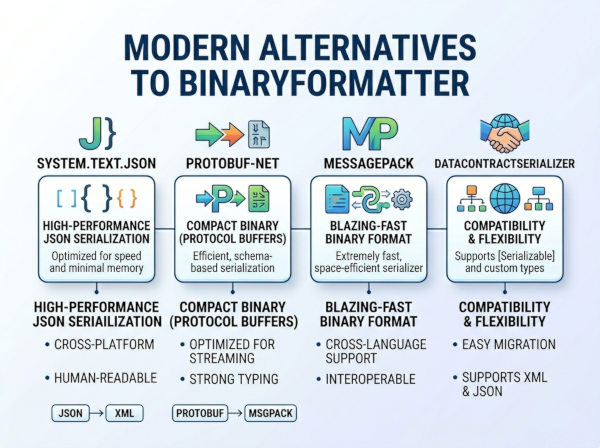
BinaryFormatter is a legacy .NET serialization API that converts objects into a binary format and reconstructs them later, but it is now obsolete and unsafe for modern applications.
Why it is no longer recommended?
BinaryFormatter was widely used in older .NET Framework systems for deep object serialization, remoting, and persistence. However, it was designed before modern security threats were well understood in serialization systems.
The main problem is that it can deserialize arbitrary object graphs, which makes it vulnerable to remote code execution attacks if untrusted data is processed. Because of this, Microsoft marked it as obsolete and strongly discourages its use in new development.
Modern applications now prefer safer, explicit, and cross-platform serialization formats.
Modern alternatives to BinaryFormatter
1. System.Text.Json (recommended default)
A high-performance, built-in JSON serializer for .NET designed for safe, fast, and cross-platform serialization.
Why we use it?
System.Text.Json is the default modern serializer in .NET because it is fast, secure, and integrates directly with ASP.NET Core. It avoids dangerous type reconstruction and only serializes explicitly defined data structures.
It is especially suitable for APIs, microservices, and cloud-native applications.
C# example
using System.Text.Json;
var user = new User
{
Id = 1,
Name = "Alice"
};
string json = JsonSerializer.Serialize(user);
User? deserialized = JsonSerializer.Deserialize<User>(json);
Advantages
• Secure by default (no type exploitation risks)
• High performance compared to older serializers
• Built into modern .NET without extra dependencies
Disadvantages
• Limited support for complex polymorphic scenarios (unless configured)
• Requires explicit configuration for advanced serialization needs
2. Newtonsoft.Json (Json.NET)
A widely used third-party JSON serializer that offers high flexibility and supports complex serialization scenarios.
Why we use it?
Newtonsoft.Json is still popular in enterprise applications because it supports advanced scenarios like polymorphism, dynamic objects, and flexible formatting rules that System.Text.Json only partially supports.
It is often used in legacy migrations and complex APIs.
C# example
using Newtonsoft.Json;
var user = new User { Id = 1, Name = "Alice" };
string json = JsonConvert.SerializeObject(user);
User? obj = JsonConvert.DeserializeObject<User>(json);
Advantages
• Very flexible and feature-rich
• Excellent support for complex object graphs
• Mature ecosystem with wide adoption
Disadvantages
• Slower than System.Text.Json in many scenarios
• External dependency
• More permissive (can increase misuse risk if not configured properly)
3. MessagePack for C#
A binary serialization format that is compact, extremely fast, and optimized for performance-critical applications.
Why we use it?
MessagePack for C# is used when performance and payload size are more important than human readability. It produces much smaller serialized data than JSON, making it ideal for high-throughput systems.
It is commonly used in gaming, distributed systems, and real-time services.
C# example
using MessagePack;
[MessagePackObject]
public class User
{
[Key(0)]
public int Id { get; set; }
[Key(1)]
public string Name { get; set; }
}
var user = new User { Id = 1, Name = "Alice" };
byte[] bytes = MessagePackSerializer.Serialize(user);
User obj = MessagePackSerializer.Deserialize<User>(bytes);
Advantages
• Extremely fast serialization/deserialization
• Very small payload size
• Ideal for distributed systems
Disadvantages
• Not human-readable
• Requires schema annotations or careful mapping
• Debugging is harder compared to JSON
4. Protobuf (Protocol Buffers)
A language-neutral binary serialization format designed for efficient communication between services.
Why we use it?
Protocol Buffers is commonly used in microservices and gRPC systems because it is compact, fast, and strongly typed. It defines strict contracts using .proto files, making systems more reliable and version-safe.
C# example
syntax = "proto3";
message User {
int32 id = 1;
string name = 2;
}
var user = new User { Id = 1, Name = "Alice" };
using var stream = new MemoryStream();
user.WriteTo(stream);
var result = User.Parser.ParseFrom(stream.ToArray());
Advantages
• Strongly typed contract-based system
• Very fast and compact
• Cross-language support
Disadvantages
• Requires .proto definitions
• Not human-readable
• Learning curve for schema design
5. XML Serialization (XmlSerializer)
A legacy-friendly but still supported serializer that converts objects into structured XML format.
Why we use it?
XmlSerializer is still used in systems that require strict interoperability, legacy integrations, or human-readable structured data exchange.
It is often found in enterprise systems integrating with older SOAP-based services.
C# example
using System.Xml.Serialization;
var serializer = new XmlSerializer(typeof(User));
using var writer = new StringWriter();
serializer.Serialize(writer, new User { Id = 1, Name = "Alice" });
string xml = writer.ToString();
Advantages
• Human-readable output
• Strong schema structure
• Still supported in .NET
Disadvantages
• Verbose output
• Slower than JSON/binary formats
• Limited modern usage
Comparison of BinaryFormatter and Modern Alternatives
| Technology | Type | Best Use Case | Performance | Security Level |
|---|---|---|---|---|
| BinaryFormatter (obsolete) | Binary | Legacy .NET Framework serialization | Medium | Unsafe / Not recommended |
| System.Text.Json | JSON | Web APIs, cloud apps | High | Secure |
| Newtonsoft.Json | JSON | Complex object serialization | Medium | Secure (config-dependent) |
| MessagePack | Binary | High-performance systems | Very High | Secure |
| Protocol Buffers | Binary | gRPC and microservices | Very High | Secure |
| XmlSerializer | XML | Legacy integrations | Low | Secure |
When to choose which BinaryFormatter alternative in .NET?
System.Text.Json
Use this as your default choice for modern .NET apps. It is best for ASP.NET Core APIs, microservices, and cloud applications where you need secure, fast, and simple JSON serialization.
Newtonsoft.Json
Use this when you need maximum flexibility. It is ideal for legacy projects, complex JSON structures, or when migrating older .NET Framework applications that already depend on it.
MessagePack
Use this when performance and small payload size are critical. It is best for real-time systems, caching, gaming, or high-throughput distributed systems.
Protocol Buffers (gRPC)
Use this for microservices and cross-language communication. It is the best choice when you need strict contracts, versioning safety, and high performance.
XmlSerializer
Use this only for legacy or XML-required integrations. It is mainly for systems that still depend on XML/SOAP or external partners requiring XML format.