Custom Middleware in ASP.NET Core
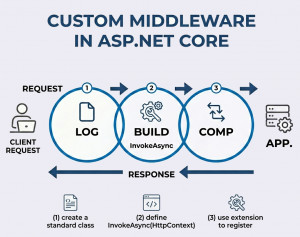
Custom middleware in ASP.NET Core is a user-defined component that you add to the HTTP request pipeline to handle or process requests and responses according to your application’s specific needs.
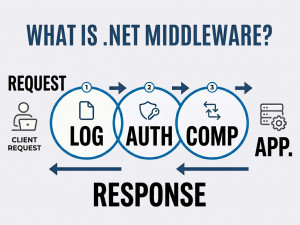
Before diving into why custom middleware is needed, it’s helpful to understand the basics of middleware in ASP.NET Core and how it functions within the request pipeline.
Why Create Custom Middleware?
Built-in middleware covers common scenarios, but real-world applications often require custom logic. Custom middleware allows you to implement cross-cutting concerns such as request logging, performance tracking, custom authentication, or modifying headers. It keeps your controllers clean and promotes reusable, centralized logic.
When to Use Custom Middleware?
You should use custom middleware when you need logic that applies globally or across multiple endpoints. It is ideal for tasks like logging, error handling, or request transformation. If the logic is specific to a single controller or action, consider using filters instead. Middleware is best suited for concerns that are independent of business logic.
How Custom Middleware Works?
Each middleware component has access to the HttpContext and a reference to the next delegate in the pipeline. It can perform operations before and after calling the next middleware. It can also short-circuit the pipeline and return a response immediately without passing control further.
Step-by-Step: Creating Custom Middleware
1. Create the Middleware Class
public class CustomMiddleware
{
private readonly RequestDelegate _next;
public CustomMiddleware(RequestDelegate next)
{
_next = next;
}
public async Task InvokeAsync(HttpContext context)
{
// Before logic
Console.WriteLine("Request incoming");
await _next(context);
// After logic
Console.WriteLine("Response outgoing");
}
}
2. Create an Extension Method
public static class CustomMiddlewareExtensions
{
public static IApplicationBuilder UseCustomMiddleware(this IApplicationBuilder builder)
{
return builder.UseMiddleware();
}
}
3. Register Middleware in the Pipeline
var builder = WebApplication.CreateBuilder(args);
var app = builder.Build();
app.UseCustomMiddleware();
app.Run();
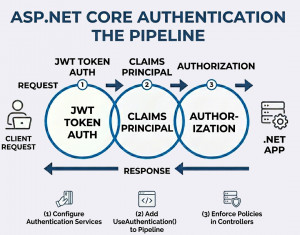
To see how middleware is used in real-world security scenarios, check out authentication middleware in ASP.NET Core, which demonstrates how user identity is validated and applied within the request pipeline.
Key Features of Custom Middleware
• Full access to HTTP request and response
• Ability to execute logic before and after the next middleware
• Can stop the request pipeline early
• Easily reusable across applications
• Supports dependency injection
Common Use Cases
• Request and response logging
• Global exception handling
• Adding custom headers
• API key validation
• Performance monitoring
• Request timing and analytics
Best Practices of Custom Middleware in ASP.NET Core
• Keep middleware focused on a single responsibility
• Be mindful of execution order in the pipeline
• Avoid heavy processing to prevent performance issues
• Use asynchronous code for scalability
• Handle exceptions gracefully
Advantages of Custom Middleware
Custom middleware provides flexibility to shape how requests are processed. It improves maintainability by centralizing shared logic and reduces duplication across controllers. It also integrates well with the ASP.NET Core pipeline and dependency injection system.
Disadvantages of Custom Middleware
Improper ordering can lead to unexpected behavior. Overusing middleware can make the pipeline complex and harder to debug. It may also introduce performance overhead if not implemented efficiently.
Alternatives
If your logic is tied to MVC actions, consider using action filters. For minimal APIs, endpoint filters can be a better fit. In some cases, handling logic within controllers or using external API gateways may be more appropriate.