ASP.NET Core Authentication Middleware
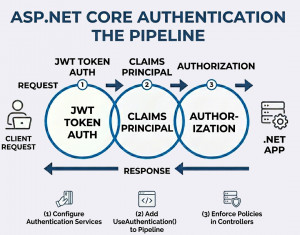
Authentication middleware in ASP.NET Core is a pipeline component that validates user identity and establishes the HttpContext.User for each request.
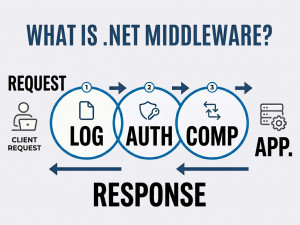
Authentication middleware is responsible for verifying who the user is before the request reaches protected resources. It runs early in the request pipeline and populates the user principal based on configured authentication schemes. ASP.NET Core provides built-in middleware for cookies, JWT bearer tokens, OAuth, and more. It works closely with authorization middleware, which determines what the authenticated user is allowed to access. Proper configuration ensures secure and consistent identity handling across the application.
Why we use Authentication Middleware?
Authentication middleware centralizes identity verification, ensuring consistent security across all endpoints. It removes the need to manually validate users in every controller. By integrating with built-in schemes, it simplifies implementation of secure login systems. It also supports modern authentication methods like token-based APIs and external providers.
When should we use our own Authentication Middleware?
Use authentication middleware whenever your application requires user identity, login systems, or protected resources. It is essential for APIs, web apps, and microservices that need secure access control. It should be configured before authorization middleware. Avoid skipping it when dealing with sensitive data or user-specific functionality.
Key components of Authentication Middleware
• Authentication schemes (JWT, Cookies, OAuth)
• AuthenticationHandler implementations
• HttpContext.User (ClaimsPrincipal)
• Middleware registration (UseAuthentication)
• Configuration in Program.cs
Key features of Authentication Middleware
• Supports multiple authentication schemes
• Claims-based identity system
• Integration with ASP.NET Core Identity
• Extensible with custom handlers
• Works seamlessly with authorization policies
Implementation Examples
1. JWT Authentication Middleware Example
Install package
dotnet add package Microsoft.AspNetCore.Authentication.JwtBearer
Configuration in Program.cs
using Microsoft.AspNetCore.Authentication.JwtBearer;
using Microsoft.IdentityModel.Tokens;
using System.Text;
var builder = WebApplication.CreateBuilder(args);
builder.Services.AddAuthentication(JwtBearerDefaults.AuthenticationScheme)
.AddJwtBearer(options =>
{
options.TokenValidationParameters = new TokenValidationParameters
{
ValidateIssuer = true,
ValidateAudience = true,
ValidateLifetime = true,
ValidateIssuerSigningKey = true,
ValidIssuer = "your_issuer",
ValidAudience = "your_audience",
IssuerSigningKey = new SymmetricSecurityKey(
Encoding.UTF8.GetBytes("your_secret_key"))
};
});
builder.Services.AddAuthorization();
var app = builder.Build();
app.UseAuthentication();
app.UseAuthorization();
app.MapGet("/secure", (HttpContext context) =>
{
return $"Hello {context.User.Identity?.Name}";
}).RequireAuthorization();
app.Run();
2. Cookie Authentication Example
using Microsoft.AspNetCore.Authentication.Cookies;
var builder = WebApplication.CreateBuilder(args);
builder.Services.AddAuthentication(CookieAuthenticationDefaults.AuthenticationScheme)
.AddCookie(options =>
{
options.LoginPath = "/login";
options.AccessDeniedPath = "/denied";
});
builder.Services.AddAuthorization();
var app = builder.Build();
app.UseAuthentication();
app.UseAuthorization();
app.MapGet("/login", async (HttpContext context) =>
{
var claims = new List<Claim>
{
new Claim(ClaimTypes.Name, "John Doe")
};
var identity = new ClaimsIdentity(claims, "Cookies");
var principal = new ClaimsPrincipal(identity);
await context.SignInAsync("Cookies", principal);
return "User logged in";
});
app.MapGet("/secure", () => "Secure Data")
.RequireAuthorization();
app.Run();
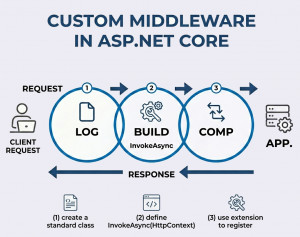
3. Custom Authentication Middleware Example
Sometimes you may want a lightweight custom approach instead of full authentication schemes.
public class CustomAuthMiddleware
{
private readonly RequestDelegate _next;
public CustomAuthMiddleware(RequestDelegate next)
{
_next = next;
}
public async Task InvokeAsync(HttpContext context)
{
if (!context.Request.Headers.ContainsKey("X-API-KEY"))
{
context.Response.StatusCode = 401;
await context.Response.WriteAsync("Unauthorized");
return;
}
var apiKey = context.Request.Headers["X-API-KEY"];
if (apiKey != "my-secret-key")
{
context.Response.StatusCode = 403;
await context.Response.WriteAsync("Forbidden");
return;
}
await _next(context);
}
}
Register it
app.UseMiddleware<CustomAuthMiddleware>();
4. Authentication with Claims Example
app.MapGet("/profile", (HttpContext context) =>
{
var user = context.User;
var name = user.Identity?.Name;
var role = user.FindFirst(ClaimTypes.Role)?.Value;
return new { name, role };
}).RequireAuthorization();
Use Cases / Examples of Authentication Middleware
• Securing REST APIs with JWT tokens
• Web app login systems using cookies
• API key validation for internal services
• Role-based access control using claims
• Integration with external providers (Google, Microsoft, etc.)
Advantages of Authentication Middleware
• Centralized and consistent authentication logic
• Supports modern security standards
• Highly extensible and configurable
• Integrates with authorization seamlessly
• Reduces repetitive security code
Disadvantages
• Initial configuration can be complex
• Misconfiguration may lead to security risks
• Requires careful ordering in middleware pipeline
• Token management (JWT) adds overhead
Alternatives
• ASP.NET Core Identity (full user management system)
• External identity providers (OAuth, OpenID Connect)
• API gateways handling authentication externally
• Custom filters for simple scenarios
Best Practices
• Always use HTTPS with authentication
• Store secrets securely (e.g., environment variables)
• Keep tokens short-lived
• Validate all inputs and claims
• Place UseAuthentication() before UseAuthorization()