Thread Safety Patterns in C# with Locks, Interlocked, Concurrent Collections, and Async Synchronization
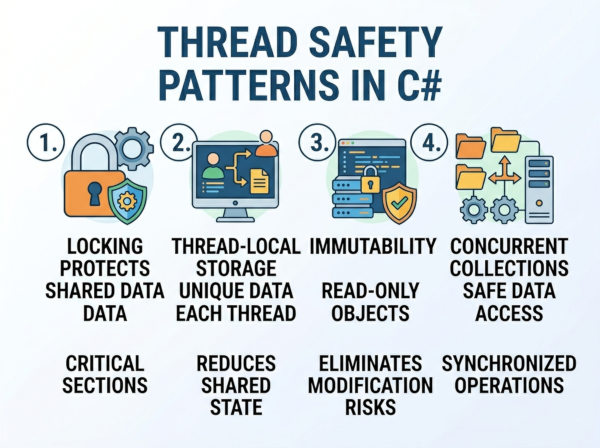
Thread safety patterns are design techniques and synchronization mechanisms used to ensure shared data remains correct and consistent when accessed by multiple threads concurrently.
Thread safety means code behaves correctly even when multiple threads execute it simultaneously. A thread-safe implementation prevents problems such as corrupted data, race conditions, inconsistent state, or unexpected application crashes.
In modern applications, multiple threads commonly run at the same time. Web servers handle many requests concurrently, background workers process jobs in parallel, and UI applications perform asynchronous operations to remain responsive.
Without proper synchronization, two threads may try to modify the same resource simultaneously, producing unpredictable results.
Why Thread Safety Matters?
Concurrency issues are difficult because they are often intermittent. An application may work perfectly during testing but fail randomly in production under heavy load.
For example, imagine two threads updating a bank account balance at the same time. If synchronization is missing, one update may overwrite the other, causing data loss.
Thread safety protects:
• shared memory
• application state
• caches
• collections
• file access
• database operations
• background processing systems
Common Concurrency Problems
Race Conditions
A race condition occurs when program behavior depends on execution timing between threads.
Example:
counter++;
This operation is not atomic. Internally it performs:
• read value
• increment value
• write value
If two threads execute this simultaneously, updates may be lost.
Deadlocks
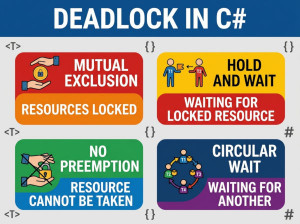
Deadlocks happen when threads wait indefinitely for locks held by each other.
Example scenario:
• Thread A locks Resource 1
• Thread B locks Resource 2
• Thread A waits for Resource 2
• Thread B waits for Resource 1
Neither thread can continue.
Data Corruption
Unsynchronized writes to shared collections or objects may corrupt internal state.
This can produce invalid data structures, exceptions, or application crashes.
Memory Visibility Problems
One thread may update a variable while another thread still sees an outdated cached value.
Modern CPUs and compilers aggressively optimize memory access, making visibility issues more common than many developers expect.
Core Thread Safety Patterns
1. Lock Pattern
The lock statement is the most common synchronization mechanism in C#.
It ensures only one thread enters a critical section at a time.
Example:
private readonly object _lock = new object();
public void Increment()
{
lock (_lock)
{
counter++;
}
}
How It Works?
When a thread enters the lock:
• other threads wait
• only one thread executes protected code
After the lock exits:
• waiting threads compete for access
This prevents simultaneous modification of shared data.
Best Use Cases
The lock pattern works well for:
• shared counters
• collections
• caches
• in-memory state
• small critical sections
It is simple, reliable, and easy to understand.
Common Mistakes
Locking Public Objects
Never lock on:
• this
• strings
• public objects
External code could also lock them, creating deadlocks.
Correct approach:
private readonly object _lock = new object();
Large Lock Scope
Expensive operations inside locks reduce concurrency.
Bad:
lock (_lock)
{
Thread.Sleep(5000);
}
Long-running locks create bottlenecks.
2. Interlocked Pattern
Interlocked provides atomic operations without full locking overhead.
It is ideal for simple numeric updates.
Example:
using System.Threading;
Interlocked.Increment(ref counter);
Why It Is Faster?
Interlocked uses CPU-level atomic instructions instead of blocking locks.
This reduces:
• context switching
• thread contention
• synchronization overhead
Supported Operations
Common methods:
• Increment
• Decrement
• Add
• Exchange
• CompareExchange
CompareExchange Example
Interlocked.CompareExchange(
ref value,
newValue,
expectedValue);
This updates the value only if it matches the expected value.
It forms the foundation of many lock-free algorithms.
Best Use Cases
Interlocked is excellent for:
• counters
• statistics
• reference swapping
• lightweight synchronization
It is not suitable for complex multi-step operations.
3. ReaderWriterLockSlim Pattern
Sometimes applications have:
• many readers
• few writers
A normal lock blocks all threads, including readers.
ReaderWriterLockSlim allows:
• multiple concurrent readers
• exclusive writers
Example
using System.Threading;
private ReaderWriterLockSlim rwLock =
new ReaderWriterLockSlim();
public void ReadData()
{
rwLock.EnterReadLock();
try
{
Console.WriteLine(data);
}
finally
{
rwLock.ExitReadLock();
}
}
Why It Improves Performance?
If 100 threads only read data:
• normal lock allows 1 thread
• reader lock allows all readers simultaneously
This dramatically improves throughput in read-heavy systems.
Best Use Cases
Ideal for:
• configuration data
• in-memory caches
• lookup tables
• shared metadata
Drawbacks
Reader-writer locks are more complex than standard locks.
Heavy write contention may reduce performance benefits.
4. Concurrent Collections Pattern
.NET provides built-in thread-safe collections.
Examples:
• ConcurrentDictionary
• ConcurrentQueue
• ConcurrentBag
• ConcurrentStack
These collections internally handle synchronization.
ConcurrentDictionary Example
using System.Collections.Concurrent;
ConcurrentDictionary<int, string> users =
new ConcurrentDictionary<int, string>();
users.TryAdd(1, "John");
Why Concurrent Collections Matter?
Traditional collections like List and Dictionary<TKey, TValue> are not thread-safe.
Concurrent collections:
• reduce manual locking
• improve scalability
• avoid common synchronization bugs
Best Use Cases
Excellent for:
• caching systems
• producer-consumer queues
• shared application state
• parallel processing pipelines
5. Immutable Object Pattern
Immutable objects cannot change after creation.
Instead of modifying shared state:
• create new objects
This removes synchronization requirements entirely.
Example
public record User(string Name, int Age);
Why Immutability Is Powerful?
Immutable data is naturally thread-safe because:
• no thread can modify it
• no synchronization is required
Functional programming heavily relies on immutability.
Best Use Cases
Great for:
• configuration objects
• DTOs
• event data
• message passing
• domain models
Drawbacks
Creating new objects repeatedly increases:
• allocations
• garbage collection pressure
Large mutable structures may become inefficient when copied frequently.
6. Thread-Local Storage Pattern
Sometimes threads should have isolated copies of data.
ThreadLocal<T> provides per-thread storage.
Example
ThreadLocal<int> localCounter =
new ThreadLocal<int>(() => 0);
localCounter.Value++;
Why It Helps?
Each thread gets independent data.
No synchronization is needed because threads do not share state.
Best Use Cases
Useful for:
• per-thread caches
• random number generators
• temporary buffers
• request-scoped state
7. Semaphore Pattern
A semaphore limits concurrent access to a resource.
Unlike a lock: multiple threads may enter simultaneously
Example
SemaphoreSlim semaphore =
new SemaphoreSlim(3);
await semaphore.WaitAsync();
try
{
// protected work
}
finally
{
semaphore.Release();
}
Real-World Example
Imagine limiting:
• database connections
• API requests
• file processing jobs
Only a fixed number of threads can proceed concurrently.
Best Use Cases
Semaphores are excellent for:
• rate limiting
• resource pools
• throttling
• bounded concurrency
8. Producer-Consumer Pattern
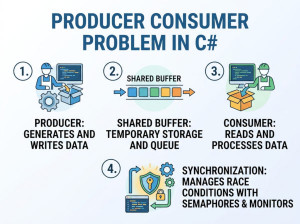
Producer-consumer systems coordinate:
• task producers
• task consumers
using thread-safe queues.
Example Using BlockingCollection
BlockingCollection<int> queue =
new BlockingCollection<int>();
queue.Add(1);
int item = queue.Take();
Why It Matters?
This pattern decouples:
• task creation
• task execution
It improves scalability and responsiveness.
9. Async Synchronization Pattern
Traditional locks block threads.
Modern async applications use:
• SemaphoreSlim
• async queues
• channels
to avoid thread blocking.
Async Lock Example
await semaphore.WaitAsync();
try
{
await SaveDataAsync();
}
finally
{
semaphore.Release();
}
Why Async Synchronization Is Important?
Blocking threads harms scalability in ASP.NET and cloud systems.
Async synchronization:
• reduces thread starvation
• improves throughput
• supports high concurrency
Lock-Free Programming
Advanced systems sometimes avoid locks entirely.
Lock-free algorithms use:
• atomic CPU operations
• compare-and-swap
• memory barriers
These systems can achieve extremely high performance.
Benefits
Lock-free systems reduce:
• deadlocks
• contention
• context switching
They are common in:
• trading systems
• game engines
• high-frequency messaging systems
Drawbacks
Lock-free code is extremely difficult to design correctly.
Small mistakes may create subtle concurrency bugs.
Thread Safety Best Practices
Keep Shared State Minimal
The fewer shared variables exist, the easier synchronization becomes.
Prefer isolated or immutable data whenever possible.
Prefer High-Level Abstractions
Use:
• concurrent collections
• channels
• BlockingCollection
• async pipelines
instead of manually managing locks whenever possible.
Avoid Nested Locks
Nested locking increases deadlock risk dramatically.
If multiple locks are required, always acquire them in consistent order.
Keep Critical Sections Small
Only protect code that truly needs synchronization.
Large lock scopes reduce scalability.
Use Immutable Data When Possible
Immutable data removes entire categories of concurrency bugs.
This is often the safest approach in distributed systems.
Performance Considerations
Different synchronization methods have different costs.
| Pattern | Performance | Complexity | Best For |
|---|---|---|---|
| lock | Medium | Low | General synchronization |
| Interlocked | Very High | Low | Counters and atomic updates |
| ReaderWriterLockSlim | High | Medium | Read-heavy workloads |
| Concurrent Collections | High | Low | Shared collections |
| Immutable Objects | High | Low | Shared read-only state |
| Lock-Free | Very High | Very High | Ultra-low latency systems |
Common Mistakes about Thread Safety
Using Regular Collections Concurrently
This is unsafe:
Dictionary<int, string> dict =
new Dictionary<int, string>();
Multiple concurrent writes may corrupt internal state.
Overusing Locks
Excessive locking can destroy scalability.
Sometimes developers synchronize entire methods unnecessarily.
Ignoring Memory Visibility
Without synchronization, threads may observe stale values.
Volatile fields or synchronization primitives solve this issue.
Blocking Async Code
This is dangerous:
Task.Result
Task.Wait()
Blocking async operations may cause deadlocks and thread starvation.
Choosing the Right Pattern
Use:
• lock for simple synchronization
• Interlocked for counters
• ConcurrentDictionary for shared maps
• ReaderWriterLockSlim for read-heavy systems
• immutable objects whenever possible
• channels or async pipelines for scalable async systems
The best thread safety strategy depends on:
• contention level
• read/write ratio
• scalability requirements
• complexity tolerance
Modern Recommendation for .NET Applications
In modern ASP.NET Core and cloud applications:
• prefer async programming
• minimize shared state
• use concurrent collections
• favor immutable data
• avoid manual thread management unless necessary
High-level concurrency abstractions are usually safer and more maintainable than low-level locking.