Concurrency Problems in C#: Causes, Examples, Solutions, and Best Practices
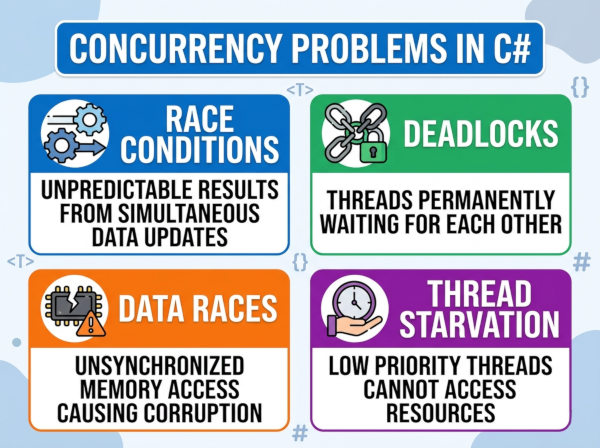
A concurrency problem in C# occurs when multiple threads or tasks access and modify shared data at the same time, causing unpredictable behavior, inconsistent results, or application failures.
What Are Concurrency Problems in C#?
Concurrency problems appear when a program executes multiple operations simultaneously and those operations interact with the same resources without proper coordination. In C#, this usually happens in multi-threaded applications, asynchronous programming, web servers, background services, or parallel processing systems.
For example, imagine two threads trying to update the same bank account balance at the exact same time. If both threads read the old value before either writes the new one, one update may overwrite the other, producing incorrect results. These kinds of issues are difficult to detect because they may only happen under heavy load or rare timing conditions.
Concurrency problems are especially important in modern C# applications because .NET heavily supports parallelism through Task, async/await, Parallel.For, thread pools, and background workers. While these features improve performance and responsiveness, they also increase the risk of data corruption and synchronization issues if developers are not careful.
Why Do We Face Concurrency Problems?
Concurrency problems exist because modern applications try to perform many operations at the same time to improve speed and scalability. Multiple users may access the same API simultaneously, background services may process shared data, or several tasks may update the same memory location concurrently.
The core issue is that CPU operations are not always atomic. A simple statement like counter++ actually consists of multiple steps: reading the value, incrementing it, and writing it back. If another thread interrupts this process midway, the final result may become incorrect.
Another reason is that threads execute independently and unpredictably. Developers cannot guarantee the exact execution order of concurrent operations. Even code that works perfectly during testing may fail in production when the timing changes under real-world traffic.
Modern hardware also contributes to the challenge. Multi-core processors execute threads truly in parallel, increasing the chance that shared resources will be accessed simultaneously.
Common Types of Concurrency Problems in C#
Race Condition
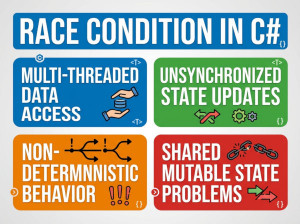
A race condition happens when multiple threads access shared data and the final result depends on the timing of execution. Since thread scheduling is unpredictable, the output may differ every time the program runs.
In C#, race conditions commonly occur when incrementing counters, updating collections, or modifying shared objects without synchronization.
Example
int counter = 0;
Parallel.For(0, 1000, i =>
{
counter++;
});
Console.WriteLine(counter);
The expected result is 1000, but the actual output may be smaller because multiple threads overwrite each other’s updates.
Deadlock
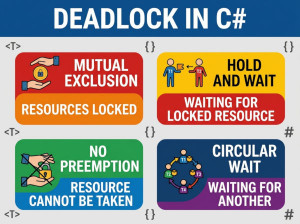
A deadlock occurs when two or more threads wait for each other indefinitely. Each thread holds a resource that another thread needs, so none of them can continue execution.
Deadlocks are dangerous because the application may freeze completely while consuming system resources.
Example
object lock1 = new object();
object lock2 = new object();
Task.Run(() =>
{
lock (lock1)
{
Thread.Sleep(100);
lock (lock2)
{
Console.WriteLine("Thread 1");
}
}
});
Task.Run(() =>
{
lock (lock2)
{
Thread.Sleep(100);
lock (lock1)
{
Console.WriteLine("Thread 2");
}
}
});
Here, each thread waits for the lock held by the other thread, creating an infinite wait state.
Data Corruption
Data corruption happens when multiple threads modify shared data structures simultaneously without synchronization. The data may become incomplete, invalid, or inconsistent.
This issue is common when developers use normal collections like List<T> or Dictionary<TKey, TValue> in concurrent environments.
Example
List<int> numbers = new List<int>();
Parallel.For(0, 1000, i =>
{
numbers.Add(i);
});
Since List<T> is not thread-safe, concurrent writes can corrupt internal memory structures or throw exceptions.
Thread Starvation
Thread starvation happens when some threads never get CPU time or resources because other threads continuously occupy them. This usually occurs in poorly designed locking strategies or blocking operations.
Applications experiencing thread starvation often become slow and unresponsive under heavy load.
Example
lock (_sharedLock)
{
Thread.Sleep(10000);
}
If one thread holds the lock for a long time, other threads may remain blocked unnecessarily.
How to Handle Concurrency Problems in C#?
Use lock for Shared Resources
The lock statement ensures that only one thread can access a critical section at a time. This is one of the simplest and most common synchronization techniques in C#.
It works well for protecting small sections of code that modify shared data. However, developers should avoid locking large code blocks because excessive locking reduces performance.
Example
private static readonly object _lock = new object();
private static int counter = 0;
lock (_lock)
{
counter++;
}
Use Thread-Safe Collections
The .NET framework provides concurrent collections designed specifically for multi-threaded environments. These collections handle synchronization internally, reducing the risk of corruption.
Examples include ConcurrentDictionary, ConcurrentQueue, and ConcurrentBag.
Example
ConcurrentDictionary<int, string> users =
new ConcurrentDictionary<int, string>();
users.TryAdd(1, "John");
Use Atomic Operations with Interlocked
The Interlocked class performs atomic operations without requiring full locks. It is highly efficient for simple counters and numeric updates.
This approach improves performance because it avoids unnecessary thread blocking.
Example
int counter = 0;
Interlocked.Increment(ref counter);
Prefer Immutable Objects
Immutable objects cannot change after creation, which eliminates many synchronization issues. Since threads only read the object instead of modifying it, concurrency becomes safer.
Strings in C# are a common example of immutable objects.
Example
record User(string Name, int Age);
Use Async Programming Correctly
Asynchronous programming reduces thread blocking and improves scalability. However, developers should avoid mixing synchronous and asynchronous code improperly.
For example, calling .Result or .Wait() on async tasks may cause deadlocks in ASP.NET applications.
Correct Example
public async Task GetDataAsync()
{
await Task.Delay(1000);
}
Common Mistakes About Concurrency Problems in C#
Assuming Simple Operations Are Safe
Many developers think operations like counter++ are automatically thread-safe because they look simple. In reality, these operations contain multiple CPU instructions and can fail under concurrency.
This misunderstanding often creates hidden race conditions that only appear under production load.
Locking Too Much Code
Some developers place very large blocks of logic inside a lock statement. While this may prevent concurrency issues, it also severely reduces performance and scalability.
Locks should protect only the minimum required code section.
Ignoring Deadlock Risks
Developers sometimes acquire multiple locks in inconsistent orders across different parts of the application. This creates a high risk of deadlocks.
A consistent locking order should always be maintained throughout the application.
Using Non-Thread-Safe Collections Concurrently
Standard collections like List<T> and Dictionary<TKey, TValue> are not safe for simultaneous writes. Developers frequently assume these collections can handle parallel access.
This can lead to exceptions, corrupted memory states, and unpredictable behavior.
Blocking Async Code
Calling .Wait() or .Result on asynchronous tasks is a common mistake in C#. It may block threads unnecessarily and even cause deadlocks in UI or ASP.NET environments.
Developers should prefer await instead of forcing synchronous execution.
Best Practices for Concurrency in C#
Keep Shared State Minimal
The fewer shared variables your application has, the fewer synchronization problems you will face. Whenever possible, design components to work independently.
Reducing shared state also makes debugging and testing significantly easier.
Use High-Level Concurrency APIs
Instead of manually managing threads, developers should use modern .NET abstractions like Task, async/await, and concurrent collections. These APIs are safer, easier to maintain, and optimized internally.
Manual thread management increases complexity and introduces more opportunities for mistakes.
Avoid Nested Locks
Nested locks increase the probability of deadlocks and make the code harder to understand. Applications should keep locking strategies simple and predictable.
If multiple locks are required, always acquire them in the same order.
Measure Performance Before Optimizing
Some developers add concurrency too early, believing it will automatically improve performance. In reality, synchronization overhead may actually slow the application down.
Always profile and benchmark before introducing parallelism.
Write Concurrency Tests
Concurrency bugs are often intermittent and difficult to reproduce manually. Automated stress tests and parallel execution tests help identify hidden synchronization issues.
Testing under realistic load conditions is essential for production-grade systems.
Example: Safe Counter Implementation in C#
using System;
using System.Threading;
using System.Threading.Tasks;
class Program
{
private static int counter = 0;
static async Task Main()
{
Task[] tasks = new Task[100];
for (int i = 0; i < 100; i++)
{
tasks[i] = Task.Run(() =>
{
for (int j = 0; j < 1000; j++)
{
Interlocked.Increment(ref counter);
}
});
}
await Task.WhenAll(tasks);
Console.WriteLine(counter);
}
}
This example safely increments a shared counter using Interlocked.Increment, preventing race conditions without requiring explicit locks.