Deadlock in C#
A deadlock in C# occurs when two or more threads wait indefinitely for each other to release resources, causing the application to stop progressing.
Deadlock is one of the most dangerous concurrency problems in multi-threaded applications. It happens when multiple threads hold resources that other threads need, while simultaneously waiting for those resources to be released. Since every thread is waiting on another thread, none of them can continue execution, and the program becomes stuck permanently.
In C#, deadlocks commonly appear when developers use multiple lock statements incorrectly, block asynchronous code with .Wait() or .Result, or hold locks for too long. These problems are especially common in ASP.NET applications, desktop applications with UI threads, and systems that heavily depend on parallel processing.
Deadlocks are difficult to debug because they do not always throw exceptions or crash the application. Instead, the program simply freezes or becomes unresponsive. In production systems, deadlocks can cause severe performance issues, request timeouts, and service outages.
How Deadlocks Happen?
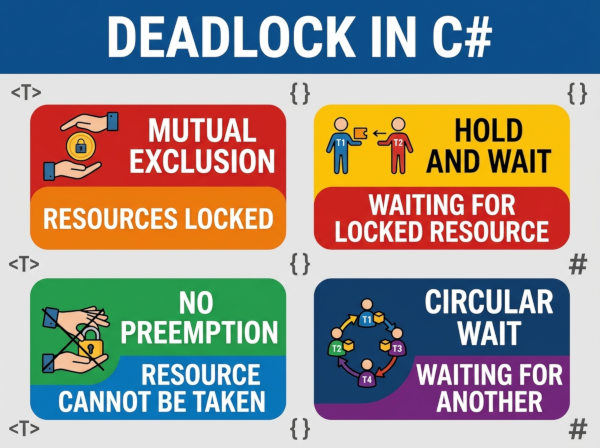
A deadlock usually requires four conditions to exist at the same time:
• Mutual exclusion: a resource can only be used by one thread at a time.
• Hold and wait: a thread holds one resource while waiting for another.
• No preemption: resources cannot be forcibly taken away from threads.
• Circular wait: threads wait for each other in a circular chain.
If all four conditions exist simultaneously, the risk of deadlock becomes very high.
Deadlock Example 1: Opposite Lock Order
This is the most classic deadlock scenario in C#.
Problem
object lockA = new object();
object lockB = new object();
Task.Run(() =>
{
lock (lockA)
{
Thread.Sleep(100);
lock (lockB)
{
Console.WriteLine("Thread 1");
}
}
});
Task.Run(() =>
{
lock (lockB)
{
Thread.Sleep(100);
lock (lockA)
{
Console.WriteLine("Thread 2");
}
}
});
In this example, the first thread locks lockA and waits for lockB, while the second thread locks lockB and waits for lockA. Both threads wait forever because neither can continue.
Solution
Always acquire locks in the same order throughout the application.
object lockA = new object();
object lockB = new object();
Task.Run(() =>
{
lock (lockA)
{
lock (lockB)
{
Console.WriteLine("Thread 1");
}
}
});
Task.Run(() =>
{
lock (lockA)
{
lock (lockB)
{
Console.WriteLine("Thread 2");
}
}
});
By using a consistent lock order, circular waiting is eliminated.
Deadlock Example 2: Blocking Async Code
This is one of the most common deadlock problems in modern C# applications.
Problem
public string GetData()
{
return GetDataAsync().Result;
}
public async Task<string> GetDataAsync()
{
await Task.Delay(1000);
return "Completed";
}
The .Result call blocks the current thread while waiting for the async method to complete. In UI applications or ASP.NET environments, the async method may attempt to resume on the same blocked thread, creating a deadlock.
Solution
Use await instead of blocking asynchronous tasks.
public async Task<string> GetData()
{
return await GetDataAsync();
}
public async Task<string> GetDataAsync()
{
await Task.Delay(1000);
return "Completed";
}
This approach allows the thread to remain free while waiting for the asynchronous operation.
Deadlock Example 3: Nested Locks in Different Methods
Deadlocks can also occur when different methods lock shared resources inconsistently.
Problem
object customerLock = new object();
object orderLock = new object();
public void UpdateCustomer()
{
lock (customerLock)
{
Thread.Sleep(100);
lock (orderLock)
{
Console.WriteLine("Customer updated");
}
}
}
public void UpdateOrder()
{
lock (orderLock)
{
Thread.Sleep(100);
lock (customerLock)
{
Console.WriteLine("Order updated");
}
}
}
Different methods use opposite lock sequences, which increases the chance of circular waiting under concurrent execution.
Solution
Create a global locking strategy and use the same order everywhere.
public void UpdateCustomer()
{
lock (customerLock)
{
lock (orderLock)
{
Console.WriteLine("Customer updated");
}
}
}
public void UpdateOrder()
{
lock (customerLock)
{
lock (orderLock)
{
Console.WriteLine("Order updated");
}
}
}
Consistent resource ordering removes the deadlock risk.
How to Prevent Deadlocks in C#?
Use a Consistent Lock Order
One of the simplest and most effective techniques is always locking resources in the same sequence. If every part of the application follows the same order, circular waiting cannot occur.
For example, if two locks exist called UserLock and OrderLock, every thread should always lock UserLock before OrderLock. Even a single inconsistent method can introduce deadlocks into the entire application.
Avoid Long Lock Durations
Threads should hold locks for the shortest time possible. Long-running operations such as database calls, API requests, or file access should never happen inside a lock block.
Keeping locks short reduces thread contention and lowers the chance that multiple threads will become dependent on each other.
Prefer Async/Await Over Blocking
Modern .NET applications should avoid .Wait(), .Result, and synchronous blocking whenever possible. These patterns commonly create deadlocks in ASP.NET and UI applications.
Using await allows asynchronous operations to complete naturally without freezing the calling thread.
Use Timeout-Based Locking
The Monitor.TryEnter method allows developers to attempt lock acquisition with a timeout. If the lock cannot be acquired within a certain period, the thread can recover gracefully instead of waiting forever.
Example
bool lockTaken = false;
try
{
Monitor.TryEnter(myLock, TimeSpan.FromSeconds(2), ref lockTaken);
if (lockTaken)
{
Console.WriteLine("Lock acquired");
}
else
{
Console.WriteLine("Timeout occurred");
}
}
finally
{
if (lockTaken)
{
Monitor.Exit(myLock);
}
}
This approach helps prevent infinite waiting situations.
Reduce Shared State
Applications with fewer shared resources naturally experience fewer deadlocks. Immutable objects and stateless services help reduce thread dependencies.
This is one reason why modern distributed systems and microservices often prefer stateless architecture patterns.
Best Use Cases for Deadlock Prevention Strategies
High-Traffic Web APIs
Web APIs process many requests simultaneously, often accessing shared caches, databases, or services. Deadlock prevention becomes critical because blocked requests can quickly exhaust server resources.
Using async programming correctly and minimizing shared state helps APIs remain scalable under heavy traffic.
Banking and Financial Systems
Financial systems require strong consistency while processing transactions concurrently. Improper locking strategies may freeze payment processing or account updates.
Careful synchronization design and timeout-based locking are essential in these environments because reliability is more important than raw speed.
Desktop Applications
UI applications such as WPF or WinForms often deadlock when the UI thread becomes blocked waiting for async operations. This causes the application interface to freeze completely.
Using await properly keeps the UI responsive while background work continues asynchronously.
Distributed Enterprise Applications
Large enterprise systems frequently combine databases, APIs, message queues, and caching systems. Multiple services may compete for the same resources simultaneously.
Clear lock hierarchies and short lock durations help prevent system-wide bottlenecks and deadlocks.
Most Common Deadlock Issues in C#
Mixing Synchronous and Asynchronous Code
One of the biggest modern mistakes is calling asynchronous methods synchronously using .Result or .Wait(). Developers often do this for convenience without realizing it can freeze entire applications.
This problem is extremely common in ASP.NET, WPF, and WinForms applications.
Locking Multiple Resources Incorrectly
Applications that use several locks without a strict order are highly vulnerable to deadlocks. The issue becomes more dangerous as the codebase grows and more developers contribute.
A centralized locking strategy helps reduce this risk significantly.
Overusing Locks
Some developers add locks everywhere to avoid race conditions. While this may improve thread safety, excessive locking increases contention and makes deadlocks more likely.
Good concurrency design focuses on minimizing shared state rather than simply adding more locks.
Performing External Operations Inside Locks
Database queries, HTTP requests, and file operations inside lock blocks are dangerous because they may take unpredictable amounts of time.
This increases the probability that other threads will become blocked waiting for the same resource.
Ignoring Thread Analysis and Testing
Deadlocks are often timing-dependent and may not appear during normal development. Without stress testing or thread analysis tools, these problems may remain hidden until production.
Testing concurrent systems under realistic load conditions is essential for identifying hidden synchronization issues.
Example of a Safe Locking Pattern
private static readonly object accountLock = new object();
public void UpdateBalance(decimal amount)
{
lock (accountLock)
{
balance += amount;
}
}
This example demonstrates a simple and safe locking strategy where only one thread can modify the balance at a time.