Docker vs Kubernetes: Differences, Similarities, Use Cases and C# Examples
What is Docker?
Docker is a containerization platform that allows developers to package an application together with its dependencies, libraries, runtime, and configuration into a lightweight unit called a container.
A Docker container behaves the same way regardless of where it runs. Whether the application is deployed on a developer laptop, a testing server, or a cloud environment, the container provides a consistent runtime environment. This eliminates the classic “it works on my machine” problem that software teams often face.
Docker mainly focuses on:
• Creating containers
• Packaging applications
• Running isolated environments
• Simplifying deployment processes
A Docker setup generally includes:
• Docker Engine
• Docker Images
• Docker Containers
• Docker Hub
• Docker Compose
Example: A .NET API with SQL Server dependencies can be packaged into a Docker container so another developer can run the exact same environment using a single command.
What is Kubernetes?
Kubernetes is a container orchestration platform designed to manage, deploy, scale, and monitor containers automatically.
While Docker helps create and run containers, Kubernetes helps manage large numbers of containers across multiple servers. It is especially useful for enterprise systems, cloud-native applications, microservices architectures, and high-availability infrastructures.
Kubernetes handles:
• Automatic scaling
• Load balancing
• Self-healing containers
• Service discovery
• Rolling deployments
• Cluster management
In real-world production systems, running hundreds of containers manually becomes difficult. Kubernetes automates infrastructure operations and keeps applications available even when servers fail.
Example: An e-commerce platform with dozens of microservices may use Kubernetes to automatically scale services during high traffic periods such as Black Friday.
Similar Features Between Docker and Kubernetes
Although Docker and Kubernetes are different technologies, they work together and share several goals.
Container-Based Architecture
Both technologies are built around containers. Containers isolate applications from the host system and ensure consistency between environments. This approach improves portability, reliability, and deployment speed.
For example, a C# ASP.NET Core API packaged inside a container behaves consistently on Windows, Linux, Azure, AWS, or local machines.
Cloud-Native Development Support
Docker and Kubernetes both support modern cloud-native development practices. They are commonly used in microservices architectures where applications are divided into smaller independent services.
This structure helps teams deploy features independently, scale only required services, and reduce downtime during updates.
Scalability
Both technologies help applications scale more efficiently compared to traditional virtual machines.
Docker enables fast container startup and lightweight deployments, while Kubernetes automates horizontal scaling based on CPU, memory usage, or custom metrics.
Isolation and Security
Containers isolate applications from each other. If one application crashes or becomes compromised, other applications remain unaffected.
This isolation also simplifies dependency management. Different services can run different runtime versions without conflicts.
DevOps and CI/CD Integration
Docker and Kubernetes integrate well with CI/CD pipelines. They are widely used with platforms such as:
• GitHub Actions
• GitLab CI/CD
• Jenkins
• Azure DevOps
This automation allows teams to build, test, and deploy applications faster and more reliably.
Differences Between Docker and Kubernetes
Core Purpose
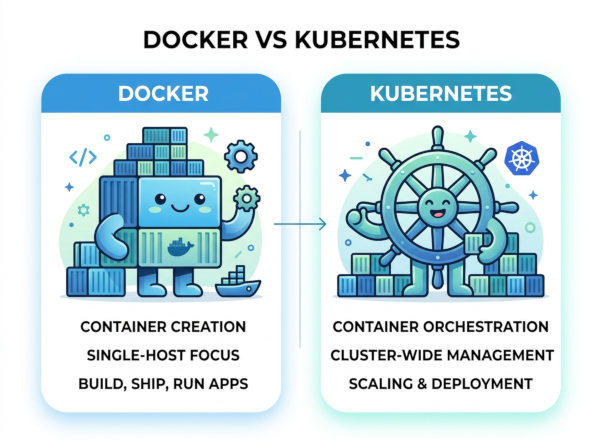
Docker focuses on container creation and execution. It solves the problem of packaging applications consistently.
Kubernetes focuses on orchestration. It solves the operational challenge of managing many containers across distributed systems.
Scale of Usage
Docker is usually sufficient for:
• Small projects
• Local development
• Single-server deployments
• Simple applications
Kubernetes is designed for:
• Large-scale systems
• Distributed architectures
• Enterprise infrastructures
• High-availability applications
Automation Capabilities
Docker itself provides limited orchestration abilities. Docker Compose can manage multiple containers on one machine, but it does not provide enterprise-grade orchestration.
Kubernetes provides advanced automation features such as:
• Auto-restart
• Auto-scaling
• Load balancing
• Rolling updates
• Self-healing infrastructure
Complexity
Docker is relatively easy to learn and configure. Developers can start using it within hours.
Kubernetes has a much steeper learning curve because it introduces concepts such as:
• Pods
• Nodes
• Services
• Deployments
• Ingress
• StatefulSets
• ConfigMaps
For small teams, Kubernetes may introduce unnecessary operational complexity.
Infrastructure Management
Docker mainly operates at the application level.
Kubernetes operates at the infrastructure orchestration level, coordinating containers across clusters of machines.
Docker vs Kubernetes Differences
| Feature | Docker | Kubernetes |
|---|---|---|
| Main Purpose | Container creation and execution | Container orchestration and management |
| Primary Focus | Application packaging | Infrastructure automation |
| Complexity | Easy to learn | Advanced learning curve |
| Scaling | Manual or limited scaling | Automatic scaling support |
| Load Balancing | Limited | Built-in advanced load balancing |
| Self-Healing | No | Yes |
| Best For | Development and small deployments | Enterprise production systems |
| Multi-Server Management | Limited | Excellent |
| Deployment Updates | Manual handling | Rolling and automated deployments |
| Monitoring | Basic | Advanced ecosystem support |
C# Docker Example
ASP.NET Core API Dockerfile
FROM mcr.microsoft.com/dotnet/aspnet:8.0 AS base
WORKDIR /app
EXPOSE 8080
FROM mcr.microsoft.com/dotnet/sdk:8.0 AS build
WORKDIR /src
COPY . .
RUN dotnet publish -c Release -o /app/publish
FROM base AS final
WORKDIR /app
COPY --from=build /app/publish .
ENTRYPOINT ["dotnet", "MyApi.dll"]
This Dockerfile packages a .NET API into a portable container image. Any machine with Docker installed can run the application consistently without installing .NET manually.
Run command:
docker build -t myapi .
docker run -p 8080:8080 myapi
C# Kubernetes Example
Kubernetes Deployment YAML for ASP.NET Core
apiVersion: apps/v1
kind: Deployment
metadata:
name: myapi-deployment
spec:
replicas: 3
selector:
matchLabels:
app: myapi
template:
metadata:
labels:
app: myapi
spec:
containers:
- name: myapi
image: myapi:latest
ports:
- containerPort: 8080
This configuration tells Kubernetes to:
• Run 3 instances of the API
• Automatically replace failed containers
• Distribute traffic across replicas
• Maintain application availability
Deploy command:
kubectl apply -f deployment.yaml
Best Use Cases for Docker
Local Development Environments
Docker is excellent for development consistency. A team can share identical environments without worrying about operating system differences or dependency conflicts.
For example, a backend developer using Windows and another using Linux can both run the exact same PostgreSQL and ASP.NET environment using Docker containers.
CI/CD Pipelines
Docker simplifies automated testing and deployment workflows. CI/CD systems can create temporary isolated environments for builds and tests.
This approach reduces deployment inconsistencies and improves release reliability.
Small Applications and Startups
Small projects often do not require Kubernetes complexity. Docker alone is usually enough for:
• Internal tools
• MVP applications
• Single-server APIs
• Small SaaS platforms
Using Kubernetes too early may increase infrastructure maintenance costs unnecessarily.
Best Use Cases for Kubernetes
Large Microservices Architectures
Kubernetes shines when applications contain many independent services. It manages communication, scaling, and availability automatically.
For example, a fintech platform may contain:
• Authentication service
• Payment service
• Notification service
• Reporting service
• Fraud analysis service
Kubernetes coordinates all these services efficiently.
High Availability Systems
Applications requiring near-zero downtime benefit greatly from Kubernetes.
If a server crashes, Kubernetes automatically recreates containers on healthy nodes. This improves system resilience and reduces operational interruptions.
Auto-Scaling Cloud Platforms
Kubernetes can automatically scale workloads during traffic spikes.
For example, an online education platform may experience sudden traffic increases during live webinars. Kubernetes can temporarily launch more containers and later reduce them when traffic decreases.
When Should You Use Docker vs Kubernetes?
Use Docker When
Use Docker if:
• Your application is relatively small
• You need fast local development
• You deploy on a single server
• Your infrastructure is simple
• Your team is small
• You want minimal operational overhead
Docker provides simplicity and fast onboarding without requiring deep infrastructure expertise.
Use Kubernetes When
Use Kubernetes if:
• You manage many services
• High availability is critical
• Automatic scaling is required
• You operate in cloud environments
• Your traffic fluctuates heavily
• You need enterprise-grade orchestration
Kubernetes becomes more valuable as operational complexity increases.
Final Recommendation
Docker and Kubernetes are not direct competitors. In modern software architectures, they are usually complementary technologies.
Docker handles application packaging and portability. Kubernetes handles orchestration, automation, scalability, and operational reliability.
A common real-world adoption path looks like this:
• Start with Docker during development.
• Add Docker Compose for multi-container applications.
• Introduce Kubernetes when infrastructure complexity grows.
This gradual adoption strategy helps teams avoid unnecessary complexity while still preparing for future scalability.