CI/CD Pipeline Explained: Benefits, Components, Tools and C# Examples
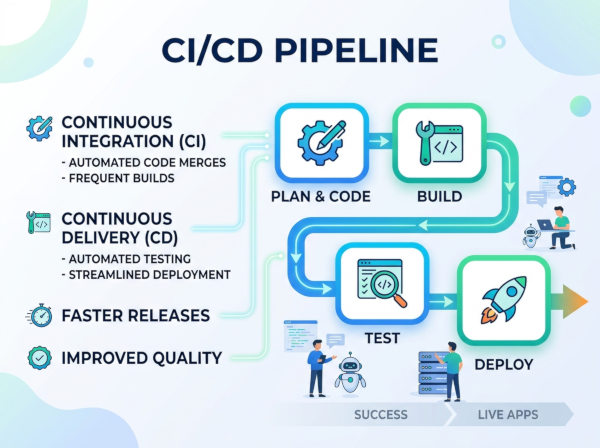
CI/CD stands for Continuous Integration and Continuous Delivery (or Continuous Deployment). A CI/CD pipeline is an automated workflow that helps developers build, test, validate, and deploy software faster and more reliably.
The pipeline starts when developers push code changes into a version control system such as Git. The system then automatically performs predefined tasks like compiling code, running automated tests, analyzing security issues, packaging applications, and deploying updates to staging or production environments.
Instead of manually performing deployments and testing processes, CI/CD automates repetitive development tasks. This reduces human error and allows teams to release software more frequently with greater confidence.
A typical CI/CD pipeline may include:
• Source code integration
• Automated builds
• Unit testing
• Security scanning
• Deployment automation
• Monitoring and rollback mechanisms
What is Continuous Integration (CI)?
Continuous Integration focuses on automatically validating code changes whenever developers commit new code.
In traditional development processes, developers might work independently for weeks before integrating code changes. This often creates integration conflicts, unstable builds, and deployment problems.
CI solves this by:
• Automatically building applications
• Running tests after every commit
• Detecting integration issues early
• Preventing broken code from reaching production
For example, when a developer pushes a new ASP.NET Core feature into the repository, the CI system can immediately:
• Restore dependencies
• Compile the project
• Run unit tests
• Execute static code analysis
• Generate build artifacts
If any step fails, developers receive immediate feedback.
What is Continuous Delivery (CD)?
Continuous Delivery automates the release preparation process after CI succeeds.
The software becomes deployment-ready at any moment because every successful build passes through standardized quality checks and packaging steps.
Continuous Delivery commonly includes:
• Deployment to staging environments
• Infrastructure validation
• Integration testing
• Approval workflows
• Release packaging
The final production deployment may still require manual approval.
What is Continuous Deployment?
Continuous Deployment goes one step further by automatically deploying validated code directly into production environments without manual approval.
If all tests pass successfully, the system immediately releases the update to end users.
This approach is popular among cloud-native companies and SaaS platforms because it enables:
• Faster feature releases
• Rapid bug fixes
• Continuous product improvements
However, it also requires strong automated testing and monitoring systems.
Why Do We Use CI/CD Pipelines?
Faster Software Delivery
CI/CD pipelines dramatically reduce deployment time. Instead of manually building, testing, and deploying applications, the system automates these tasks consistently.
Development teams can release updates multiple times per day instead of waiting for large release cycles. This helps businesses respond faster to customer feedback and market changes.
Reduced Human Error
Manual deployments often introduce mistakes such as:
• Missing configuration files
• Incorrect environment variables
• Forgotten dependency updates
• Deployment inconsistencies
CI/CD pipelines standardize deployment procedures, making releases more predictable and reliable.
Early Bug Detection
Automated testing helps teams detect issues immediately after code changes occur.
Rather than discovering critical bugs weeks later during production deployment, developers receive instant feedback during development. This significantly reduces debugging costs and technical debt.
Improved Collaboration
CI/CD pipelines encourage collaborative development practices because developers integrate changes continuously.
Teams avoid large merge conflicts and maintain healthier codebases through frequent integration and automated validation.
How CI/CD Pipelines Help Development Teams?
Better Deployment Consistency
Every deployment follows the exact same automated process. This ensures consistency between:
• Local development
• Testing environments
• Staging systems
• Production servers
For example, a .NET API deployed through a pipeline behaves identically across all environments because deployment steps are standardized.
Faster Recovery from Failures
Modern CI/CD pipelines often include rollback mechanisms. If a deployment introduces problems, teams can quickly revert to a previous stable version.
This minimizes production downtime and improves operational stability.
Enhanced Code Quality
CI/CD pipelines commonly integrate:
• Unit testing
• Integration testing
• Static code analysis
• Security scanning
• Dependency vulnerability checks
These automated quality controls improve long-term software maintainability.
Scalability for Large Teams
As development teams grow, manual release management becomes difficult.
CI/CD pipelines provide centralized automation that scales efficiently across:
• multiple developers
• multiple repositories
• microservices architectures
• distributed cloud environments
Key Features of CI/CD Pipelines
Automated Build Processes
The pipeline automatically compiles applications whenever code changes are pushed.
For C# projects, this often includes:
• dotnet restore
• dotnet build
• dependency management
• package generation
This ensures applications remain buildable throughout development.
Automated Testing
Testing automation is one of the most important CI/CD capabilities.
Pipelines may execute:
• Unit tests
• Integration tests
• API tests
• UI tests
• Performance tests
This helps prevent unstable code from progressing into deployment stages.
Deployment Automation
Deployment automation removes manual release complexity.
Applications can automatically deploy to:
• Development environments
• Staging servers
• Kubernetes clusters
• Cloud platforms
• Production infrastructure
This greatly accelerates release cycles.
Monitoring and Notifications
CI/CD systems monitor pipeline status continuously.
If failures occur:
• developers receive alerts
• logs become available immediately
• failed stages are identified quickly
This improves troubleshooting efficiency.
Versioning and Artifact Management
Pipelines often generate versioned deployment artifacts such as:
• NuGet packages
• Docker images
• compiled binaries
• release archives
Artifact repositories ensure deployment reproducibility and rollback support.
Key Components of a CI/CD Pipeline
Source Control Repository
The repository stores application source code and tracks changes.
Platforms commonly used include:
• GitHub
• GitLab
• Bitbucket
The repository usually acts as the pipeline trigger source.
Build Server
The build server compiles and validates code automatically.
Popular build systems include:
• Jenkins
• TeamCity
• Azure DevOps Pipelines
The build server ensures code changes produce successful application builds.
Test Automation Framework
Testing frameworks validate application behavior automatically.
In C# projects, common testing tools include:
• xUnit
• NUnit
• MSTest
Automated testing reduces deployment risk significantly.
Artifact Repository
Artifacts generated during builds are stored in repositories.
Examples include:
• Docker Hub
• JFrog Artifactory
• NuGet feeds
Artifact management improves traceability and deployment consistency.
Deployment Environment
Deployment targets may include:
• Virtual machines
• Cloud servers
• Kubernetes clusters
• Serverless platforms
• Containers
Modern CI/CD pipelines commonly deploy applications into cloud-native infrastructure automatically.
CI/CD Pipeline in C# Projects
Basic ASP.NET Core CI Pipeline Example
Example GitHub Actions workflow:
name: .NET CI Pipeline
on:
push:
branches:
- main
jobs:
build:
runs-on: ubuntu-latest
steps:
- uses: actions/checkout@v4
- name: Setup .NET
uses: actions/setup-dotnet@v4
with:
dotnet-version: 8.0.x
- name: Restore Dependencies
run: dotnet restore
- name: Build Project
run: dotnet build --no-restore
- name: Run Tests
run: dotnet test --no-build
This pipeline automatically:
• downloads source code
• restores dependencies
• builds the project
• executes tests
If any stage fails, deployment can be blocked automatically.
C# Docker Deployment Example in CI/CD
Example Docker build stage:
- name: Build Docker Image
run: docker build -t myapi:latest .
This stage packages the ASP.NET Core application into a Docker container for deployment consistency.
Containers simplify deployments across:
• development
• testing
• staging
• production environments
Kubernetes Deployment Example
Example deployment step:
- name: Deploy to Kubernetes
run: kubectl apply -f deployment.yaml
This allows automated deployments into Kubernetes clusters after successful validation stages.
Large enterprise systems commonly combine:
• CI/CD pipelines
• Docker containers
• Kubernetes orchestration
for scalable cloud-native deployments.
CI/CD Tools with Explanations
GitHub Actions
GitHub Actions provides built-in CI/CD automation directly inside GitHub repositories. Developers can define workflows using YAML files and automate testing, builds, deployments, and infrastructure tasks.
It is especially popular among smaller teams and open-source projects because setup is simple and deeply integrated into GitHub repositories.
GitLab CI/CD
GitLab CI/CD offers a complete DevOps platform with integrated source control, pipelines, security scanning, package management, and deployment automation.
Organizations that prefer an all-in-one DevOps ecosystem often choose GitLab because it reduces external tooling complexity.
Jenkins
Jenkins is one of the most widely used open-source automation servers. It supports thousands of plugins and highly customizable pipeline workflows.
Large enterprises frequently use Jenkins for complex infrastructure automation and hybrid cloud deployments.
Azure DevOps
Azure DevOps provides enterprise-grade CI/CD pipelines tightly integrated with Microsoft technologies and cloud services.
C# and .NET development teams commonly prefer Azure DevOps because it integrates naturally with:
• Visual Studio
• Azure Cloud
• Active Directory
• Microsoft-hosted agents
CircleCI
CircleCI focuses heavily on fast cloud-native CI/CD execution. It provides scalable build infrastructure optimized for containerized applications.
Startups and SaaS platforms often choose CircleCI for its speed and simplified cloud integration.
Travis CI
Travis CI became popular in open-source communities because of its simple GitHub integration and lightweight pipeline configuration.
It remains suitable for smaller projects that need straightforward CI automation without enterprise-level infrastructure complexity.
Advantages of Using CI/CD Pipelines
Faster Release Cycles
Teams can release features rapidly without waiting for large deployment windows.
This agility improves customer responsiveness and accelerates product innovation.
Higher Software Quality
Automated testing and validation improve application reliability consistently.
Frequent automated checks reduce hidden defects and improve code maintainability over time.
Improved Developer Productivity
Developers spend less time on repetitive operational tasks such as:
• manual deployments
• build preparation
• release coordination
This allows teams to focus more on product development.
Better Infrastructure Scalability
CI/CD pipelines scale effectively across:
• large engineering teams
• multiple repositories
• cloud-native systems
• distributed architectures
Automation becomes increasingly valuable as systems grow more complex.
Disadvantages of Using CI/CD Pipelines
Initial Setup Complexity
Building robust pipelines requires infrastructure knowledge, scripting skills, and deployment expertise.
Smaller teams may initially struggle with:
• pipeline design
• environment configuration
• security setup
• infrastructure automation
Maintenance Overhead
CI/CD systems require ongoing maintenance as:
• dependencies change
• infrastructure evolves
• security requirements increase
• deployment workflows expand
Poorly maintained pipelines can become unstable over time.
Infrastructure Costs
Advanced CI/CD systems may require:
• cloud runners
• build agents
• storage systems
• monitoring infrastructure
Large-scale pipelines can increase operational expenses significantly.
Risk of Broken Automated Deployments
If pipelines are configured incorrectly, automated deployments may release unstable code into production rapidly.
Strong testing and monitoring practices are essential to reduce this risk.
Alternatives to CI/CD Pipelines
Manual Deployment Processes
Some small projects still rely on manual deployments performed directly by developers or operations teams.
While simpler initially, manual processes become difficult to scale and increase the likelihood of human error.
Scheduled Release Management
Traditional software teams often use scheduled release cycles such as:
• weekly releases
• monthly deployments
• quarterly release windows
This approach provides more control but significantly slows delivery speed.
Infrastructure Automation Without Full CI/CD
Some organizations automate infrastructure separately using tools like:
• Ansible
• Terraform
• Puppet
These tools help automate servers and environments even if complete CI/CD pipelines are not implemented.
Platform-as-a-Service Deployments
Some cloud platforms abstract deployment complexity entirely.
Platforms such as:
• Heroku
• Vercel
• Netlify
provide simplified deployment experiences with minimal pipeline management.
CI/CD Pipeline Components
| Component | Purpose | Example Technologies |
|---|---|---|
| Source Control | Stores application code and tracks changes | GitHub, GitLab, Bitbucket |
| Build Server | Compiles and validates applications automatically | Jenkins, Azure DevOps, TeamCity |
| Testing Framework | Executes automated software tests | xUnit, NUnit, MSTest |
| Artifact Repository | Stores deployment packages and binaries | Docker Hub, Artifactory, NuGet |
| Deployment Platform | Deploys applications into runtime environments | Kubernetes, Azure, AWS |
| Monitoring System | Tracks deployment health and application stability | Prometheus, Grafana, Datadog |
Final Recommendation
CI/CD pipelines have become a foundational part of modern software engineering because they improve:
• development speed
• deployment reliability
• software quality
• operational scalability
For C# and ASP.NET Core projects, CI/CD integrates naturally with:
• Git repositories
• Docker containers
• Kubernetes clusters
• Azure cloud services
Small teams can start with simple automated build pipelines and gradually evolve toward fully automated cloud-native deployment systems.
The most successful CI/CD adoption strategies usually begin with:
• automated builds
• automated testing
• deployment automation
• infrastructure orchestration
• monitoring and rollback systems
This incremental approach helps teams improve delivery processes without introducing unnecessary complexity too early.