Jenkins

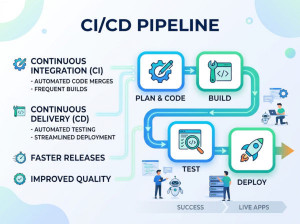
Jenkins is an open-source automation server used to build, test, and deploy software. It’s most commonly associated with CI/CD (Continuous Integration and Continuous Delivery/Deployment) pipelines. Originally forked from Hudson, it’s now maintained by the Jenkins community.
Jenkins provides continuous integration services for software development. It is a server-based system running in a servlet container such as Apache Tomcat. It supports SCM tools including AccuRev, CVS, Subversion, Git, Mercurial, Perforce, Clearcase and RTC, and can execute Apache Ant and Apache Maven based projects as well as arbitrary shell scripts and Windows batch commands. The primary developer of Jenkins is Kohsuke Kawaguchi. Released under the MIT License, Jenkins is free software.
Builds can be started by various means, including being triggered by commit in a version control system, by scheduling via a cron-like mechanism, by building when other builds have completed, and by requesting a specific build URL.
Why we use Jenkins?
• Automate repetitive tasks: compile code, run tests, package artifacts, deploy.
• Continuous Integration (CI): automatically build and test on every commit.
• Continuous Delivery/Deployment (CD): push changes to staging or production in a controlled way.
• Early feedback: catch integration issues quickly instead of at release time.
• Consistency: standardize how builds and deployments run across environments.
When should you use it?
Use Jenkins when:
• You have a team committing code frequently and want automated builds/tests.
• You need a customizable pipeline (multiple stages, conditional steps, approvals).
• You’re integrating with many tools (version control, testing frameworks, artifact repos).
• You prefer a self-hosted solution with full control.
Avoid or reconsider when:
• You want a fully managed, low-maintenance CI/CD service.
• Your pipelines are simple and already well-supported by your Git hosting platform.
• You don’t want to manage plugins, upgrades, and infrastructure.
Key features of Jenkins
• Pipeline as Code: define pipelines in a Jenkinsfile (Groovy-based DSL).
• Extensive plugin ecosystem: integrations for Git, Docker, Kubernetes, cloud providers, testing tools, etc.
• Distributed builds: master/controller delegates jobs to agents for scalability.
• Triggers: run jobs on commits, schedules (cron), webhooks, or manual triggers.
• Credentials management: store and use secrets securely (with best practices).
• Extensible UI & APIs: REST APIs and CLI for automation.
Key components of Jenkins
• Controller (formerly “master”): orchestrates jobs, schedules builds, manages configuration.
• Agents (workers/nodes): execute build steps; can be static VMs, containers, or ephemeral nodes.
• Jobs/Projects: individual tasks (freestyle, pipeline, multibranch).
• Pipelines: ordered stages (build, test, deploy), defined in code.
• Plugins: add capabilities (SCM, notifications, artifact storage, cloud integrations).
• Jenkinsfile: versioned pipeline definition stored with your code.
Advantages
• Highly flexible and customizable.
• Huge ecosystem of plugins and integrations.
• Mature and widely adopted; lots of community knowledge.
• Self-hosted control: run anywhere, tailor security/networking as needed.
• Supports complex workflows and legacy setups.
Disadvantages
• Operational overhead: you manage servers, scaling, backups, upgrades.
• Plugin sprawl: compatibility issues and maintenance burden.
• UI/UX can feel dated and fragmented.
• Security hardening required: misconfiguration can expose risks.
• Pipeline DSL (Groovy) has a learning curve and can become hard to maintain at scale.
Alternatives
• GitHub Actions: tight integration with GitHub; easy setup, hosted runners.
• GitLab CI/CD: built-in pipelines if you use GitLab; strong end-to-end DevOps features.
• Azure DevOps Pipelines: good for Microsoft-centric stacks; hosted and self-hosted agents.
• CircleCI: cloud-first, fast setup, good parallelism.
• Travis CI: simple for open-source and smaller projects.
• TeamCity: JetBrains CI server; polished UI, both on-prem and cloud.
• Bamboo: Atlassian’s CI tool; integrates with Jira/Bitbucket (less popular now).
• Buildkite: hybrid model; you host agents, control execution, SaaS orchestration.