TeamCity
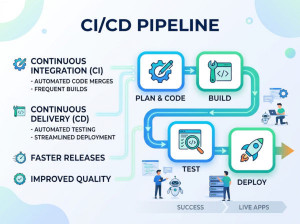
TeamCity is a modern (and still actively maintained) Continuous Integration and Continuous Delivery server developed by JetBrains. Unlike older tools such as CruiseControl.NET, TeamCity has evolved with current DevOps practices and is widely used in professional environments. With TeamCity you can build, check and run automated tests on the server even before committing your changes — keeping your code base clean at all times.
TeamCity is a closed source, Java-based build management and continuous integration server from JetBrains. JetBrains TeamCity is a user-friendly continuous integration (CI) server for professional developers and build engineers. It is trivial to setup and absolutely free for small teams.
TeamCity helps you automate code analysis, compiling, and testing processes, providing instant feedback on build progress, problems and test failures, all in simple, intuitive web interface. You can run multiple builds and tests under different configurations and platforms simultaneously, perform pre-tested commits, helping your team sustain an uninterrupted workflow.
Once you have TeamCity, you will have build history insight with customizable statistics on build duration, success rate, code quality and custom metrics. The integration continuously and automatically updates the White Source repository whenever a new open source component is added, to ensure that all OSS components are immediately reported, analyzed, and reviewed for approval -without any overhead.
Why teams use TeamCity?
• Strong out-of-the-box experience (less setup than Jenkins)
• Deep IDE integration (especially with JetBrains tools)
• Excellent UI for monitoring builds
• Powerful configuration with relatively low friction
Key components of TeamCity
• Server: central CI engine and UI
• Build Agents: machines that run builds (can scale horizontally)
• Build Configurations: define pipelines (steps, triggers, parameters)
• VCS Integration: connects to Git, etc.
• Artifacts & Dependencies: manages outputs between builds
Key features / capabilities
1. Pipeline configuration
• UI-based setup or “configuration as code” (Kotlin DSL)
• Easier to maintain than XML-heavy systems like CruiseControl.NET
2. Build automation
• Supports MSBuild, .NET CLI, Maven, Gradle, etc.
• Strong .NET support (better than many generic tools)
3. Parallel and distributed builds
• Multiple agents for scalability
• Build chains and dependencies
4. Test reporting
• Rich test history and failure tracking
• Flaky test detection
5. Integrations
• Works with Git, GitHub, GitLab, Bitbucket
• Integrates with issue trackers and IDEs
6. Container support
• Docker-based builds via Docker
7. Notifications
• Email, Slack, IDE notifications
Advantages
• Very polished and user-friendly UI
• Strong default behavior (less scripting needed)
• Excellent visibility into build history and failures
• Good performance and scalability with agents
• First-class .NET support (important compared to many CI tools)
• Kotlin DSL gives type-safe pipeline configuration
Disadvantages
• Not fully free (free tier is limited)
• Requires server + agents setup (more overhead than SaaS tools)
• Smaller ecosystem than Jenkins plugins
• Less “cloud-native” than tools like GitHub Actions or GitLab CI/CD
• Kotlin DSL has a learning curve if your team isn’t familiar
Supported version control systems
• Subversion
• Perforce
• CVS
• Borland StarTeam
• IBM Rational ClearCase (Base and UCM)
• Team Foundation Server (2005, 2008, 2010)
• Microsoft Visual SourceSafe
• Git
• Mercurial
• SourceGear Vault