Replacing Threads with Async/Await in C#: A Practical Guide
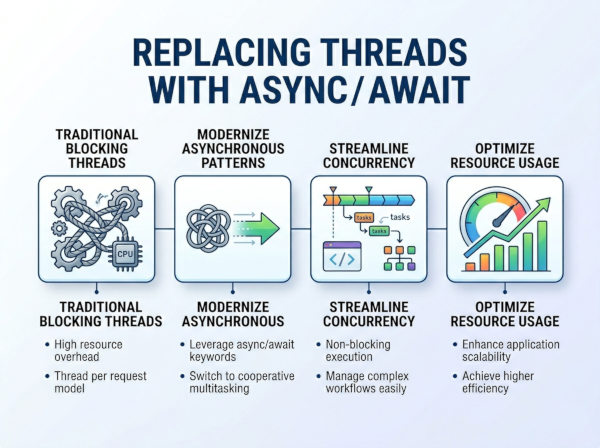
Replacing Thread with async/await means refactoring manually managed background threads into task-based asynchronous operations that do not block threads while waiting for work to complete.
Understanding the Shift from Thread to Async/Await
In older C# applications, developers often used Thread or ThreadPool directly to perform background work. While this gave full control over execution, it also introduced complexity in synchronization, resource management, and scalability.
Modern .NET applications prefer async/await because it simplifies concurrency and allows the runtime to manage thread scheduling efficiently. Instead of manually creating threads, developers describe what should happen asynchronously, and the runtime decides how and when to execute it.
This shift is not just syntactic—it is a fundamental change in how concurrency is handled.
Why Replace Threads with Async/Await?
Threads are expensive resources. Creating and blocking threads for I/O operations leads to wasted CPU and memory resources.
Async/await solves this by:
• Freeing threads during I/O waits
• Improving scalability in web applications
• Reducing context-switch overhead
• Simplifying code readability
• Avoiding thread starvation in high-load systems
In server applications, especially ASP.NET Core, replacing threads with async/await can significantly improve throughput.
When Should You Replace Thread Usage?
You should replace threads when:
• The thread is used for I/O operations (database, HTTP, file access)
• You are using Thread.Sleep for delays
• You manually manage background workers for simple tasks
• You want better scalability in web APIs
• You are modernizing legacy .NET Framework code
However, threads may still be useful for:
• Long-running CPU-bound work with dedicated isolation
• Low-level system programming
• Specialized scheduling scenarios
Key Difference Between Thread and Async/Await
A thread is an operating system resource that executes code independently.
Async/await is a programming model that allows non-blocking execution without manually managing threads.
Core Concept Difference
Threads represent physical execution units, while async/await represents logical asynchronous flow. This is why async/await often does not create new threads at all.
Example: Thread-Based Code (Legacy)
public void ProcessData()
{
Thread thread = new Thread(() =>
{
Thread.Sleep(2000);
Console.WriteLine("Processing completed");
});
thread.Start();
}
This approach manually creates and manages a thread, including lifecycle and execution timing.
Equivalent Async/Await Version
public async Task ProcessDataAsync()
{
await Task.Delay(2000);
Console.WriteLine("Processing completed");
}
This version achieves the same logical behavior without blocking a thread.
Real-World Refactoring Example
Scenario: Calling External API
Old Thread-Based Approach
public void GetData()
{
Thread thread = new Thread(() =>
{
var client = new WebClient();
string result = client.DownloadString("https://api.howcsharp.com/data");
Console.WriteLine(result);
});
thread.Start();
}
This blocks a thread while waiting for network I/O, which is inefficient.
Modern Async/Await Approach
public async Task<string> GetDataAsync()
{
using HttpClient client = new HttpClient();
string result = await client.GetStringAsync("https://api.howcsharp.com/data");
return result;
}
Here, no thread is blocked during the HTTP request.
Difference of Thread and Async/Await
| Feature | Thread | Async/Await |
|---|---|---|
| Resource Type | OS-level thread | Task-based logical flow |
| Blocking Behavior | Blocking | Non-blocking (for I/O) |
| Scalability | Lower | High |
| Memory Cost | High | Low |
| Code Complexity | High | Low |
| Best Use Case | CPU-bound long tasks | I/O-bound operations |
| Thread Control | Manual | Managed by runtime |
How Async/Await Replaces Thread Internally?
When you use async/await, the compiler transforms your method into a state machine. Instead of blocking a thread, execution is paused and resumed later.
For example:
• Method starts execution
• Hits await
• Execution returns to caller
• Task completes later
• Continuation resumes method
This mechanism eliminates the need for manual thread management in most scenarios.
Why Threading Is Still Sometimes Used?
Even though async/await is preferred, threads are still useful in specific cases:
Dedicated CPU Work
Heavy computations such as video processing or encryption may require dedicated threads or parallel tasks.
Low-Level Control
Some system-level applications require explicit thread management for scheduling precision.
Common Mistakes When Replacing Threads
Using Thread.Sleep Instead of Task.Delay
Bad:
Thread.Sleep(2000);
Good:
await Task.Delay(2000);
Thread.Sleep blocks the thread, while Task.Delay does not.
Wrapping Everything in Task.Run
Bad practice:
await Task.Run(() => DoWork());
This unnecessarily uses threads for operations that may already be asynchronous.
Mixing Blocking Calls
Bad:
var result = GetDataAsync().Result;
This can cause deadlocks in UI or server environments.
Advantages of Replacing Thread with Async/Await
• Better Scalability: Async methods free threads during waiting, allowing servers to handle more requests efficiently.
• Improved Readability: Async/await eliminates callback-style complexity and nested thread logic.
• Lower Resource Consumption: Fewer threads are created, reducing memory and CPU overhead.
• Better Error Handling: Exceptions propagate naturally using try/catch blocks.
Disadvantages and Limitations
• Not Always Faster: Async does not improve CPU-bound performance; it only improves waiting efficiency.
• Debugging Complexity: Async call stacks can be harder to trace in complex systems.
• Misuse Risk: Improper use of async/await can still lead to thread pool exhaustion or blocking behavior.
Best Practices for Replacing Threads
Use Async for I/O Operations
Always prefer async/await for database, API, and file operations.
Avoid Manual Thread Creation
Replace Thread usage with Task-based patterns wherever possible.
Use Task.Run Sparingly
Only use Task.Run for CPU-bound work when necessary.
Propagate Async Properly
Once a method becomes async, propagate async through the call chain instead of blocking.
Real-World Migration Strategy
Step 1: Identify Thread Usage
Find all Thread, ThreadPool, and BackgroundWorker usage.
Step 2: Classify Workload
Determine whether each task is CPU-bound or I/O-bound.
Step 3: Replace I/O Threads with Async
Convert network, database, and file operations to async methods.
Step 4: Refactor Call Chains
Ensure async methods propagate properly through the system.
Step 5: Remove Legacy Thread Code
Once verified, remove old thread-based implementations.
Best Use Cases After Migration
• Web Applications: ASP.NET Core applications benefit significantly from async patterns.
• Microservices: Async improves service-to-service communication efficiency.
• UI Applications: Desktop apps remain responsive during background operations.
• Cloud Systems: Async reduces infrastructure load and improves scalability.
Final Thoughts
Replacing Thread with async/await is one of the most important modernizations in C# development. It shifts developers from low-level thread management to a high-level asynchronous programming model that is more scalable, readable, and efficient.
However, the key is understanding when async replaces threads and when it does not. Async is not a performance boost for CPU work—it is a scalability improvement for I/O-bound operations.