Migrating from .NET Framework to .NET 10: Complete Modernization Guide
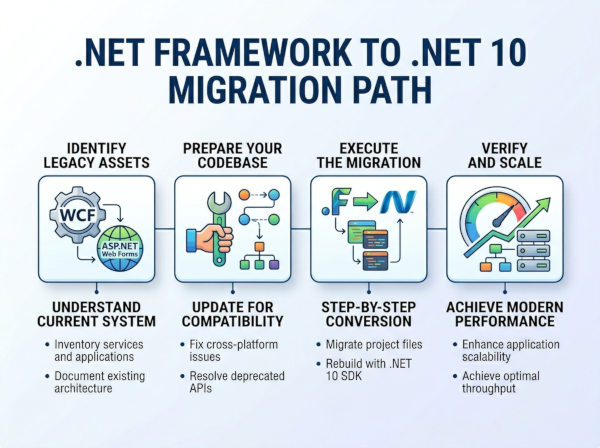
Migrating from .NET Framework to .NET 10 means upgrading legacy Windows-only applications built on the .NET Framework to a modern, cross-platform, high-performance .NET runtime.
Understanding the Migration Shift
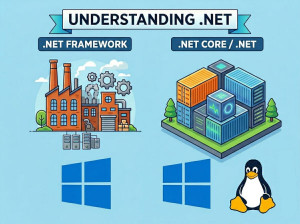
.NET Framework is a Windows-only runtime that powered enterprise applications for many years. It includes technologies like ASP.NET Web Forms, WCF, and Windows-specific APIs that are tightly coupled with the operating system.
.NET 10 represents the modern unified .NET platform designed for cross-platform development, cloud-native applications, microservices, and high-performance workloads.
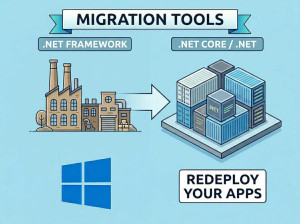
The migration is not a simple version upgrade. It is an architectural transition from a Windows-centric ecosystem to a modern, cross-platform runtime.
Why Migrate to .NET 10?
Performance Improvements
Modern .NET runtimes are significantly faster due to optimized JIT compilation, reduced memory allocations, and improved garbage collection.
Cross-Platform Support
Unlike .NET Framework, .NET 10 runs on Windows, Linux, and macOS, making it ideal for cloud and container environments.
Cloud-Native Readiness
Modern .NET integrates seamlessly with Docker, Kubernetes, microservices, and serverless architectures.
Long-Term Support
Microsoft focuses active development on modern .NET, while .NET Framework receives only maintenance updates.
When Should You Migrate?
You should consider migration when:
• Your application requires cloud deployment
• You want performance improvements
• You need cross-platform support
• You are modernizing legacy architecture
• You want microservices or containerization
• You rely on outdated frameworks like Web Forms or WCF
If your application heavily depends on Windows-only technologies, migration may require partial redesign instead of direct upgrade.
Key Differences Between .NET Framework and .NET 10
Runtime Architecture
.NET Framework is tightly integrated with Windows OS APIs, while .NET 10 uses a modular, open-source runtime designed for portability and performance.
Deployment Model
.NET Framework apps require machine-level installation. .NET 10 supports self-contained deployments and container-based distribution.
Performance
.NET 10 introduces significant improvements in startup time, memory efficiency, and throughput compared to .NET Framework.
API Surface
Some legacy APIs exist only in .NET Framework and have been replaced or removed in modern .NET.
Migration Strategy Overview
Migrating from .NET Framework to .NET 10 requires a structured approach:
• Analyze existing dependencies
• Identify incompatible APIs
• Upgrade project files to SDK-style
• Replace deprecated libraries
• Migrate ASP.NET to ASP.NET Core
• Refactor data access layers
• Test and validate behavior
• Deploy incrementally
Step 1: Old .NET Framework Project Example
<Project ToolsVersion="15.0" xmlns="http://schemas.microsoft.com/developer/msbuild/2003">
<PropertyGroup>
<TargetFrameworkVersion>v4.7.2</TargetFrameworkVersion>
</PropertyGroup>
</Project>
This is a legacy project format with verbose configuration.
Step 2: Modern .NET 10 SDK-Style Project
<Project Sdk="Microsoft.NET.Sdk.Web">
<PropertyGroup>
<TargetFramework>net10.0</TargetFramework>
</PropertyGroup>
</Project>
The SDK-style format is simpler, cleaner, and supports modern tooling.
Step 3: ASP.NET Migration Example
Legacy ASP.NET (Framework)
public partial class Default : System.Web.UI.Page
{
protected void Page_Load(object sender, EventArgs e)
{
Response.Write("Hello from .NET Framework");
}
}
This model relies on Web Forms and page lifecycle events.
Modern ASP.NET Core (.NET 10)
var builder = WebApplication.CreateBuilder(args);
var app = builder.Build();
app.MapGet("/", () => "Hello from .NET 10");
app.Run();
This minimal API approach is lightweight and highly performant.
Step 4: Dependency Mapping
| Legacy Technology | Modern Replacement in .NET 10 | Explanation |
|---|---|---|
| ASP.NET Web Forms | ASP.NET Core MVC / Razor Pages | Web Forms relies on a page lifecycle and view state, while modern ASP.NET Core uses a lightweight MVC or Razor Pages model that is more testable, maintainable, and performance-friendly. |
| WCF (Windows Communication Foundation) | gRPC / Minimal APIs | WCF uses SOAP-based XML messaging, while modern replacements like gRPC use binary Protocol Buffers or lightweight JSON APIs for faster, cross-platform communication. |
| ASMX Web Services | REST APIs (ASP.NET Core Web API) | ASMX is an older XML-based web service technology, whereas REST APIs provide lightweight, stateless communication using HTTP standards. |
| Web.config | appsettings.json + Environment Variables | Configuration moves from XML-based centralized files to flexible JSON configuration and environment-based overrides for cloud readiness. |
| Global.asax | Middleware Pipeline (Program.cs) | Application lifecycle events are replaced by a composable middleware pipeline that gives fine-grained control over request processing. |
| ADO.NET (Manual Data Access) | Entity Framework Core | Manual SQL execution is replaced with an ORM that supports LINQ, change tracking, and async database operations for better productivity and maintainability. |
| Membership Provider | ASP.NET Core Identity / JWT Authentication | Legacy membership systems are replaced with modern, secure authentication mechanisms supporting tokens, claims, and external providers. |
Step 5: Data Access Migration
Old ADO.NET Style
SqlConnection conn = new SqlConnection(connectionString);
SqlCommand cmd = new SqlCommand("SELECT * FROM Users", conn);
conn.Open();
SqlDataReader reader = cmd.ExecuteReader();
Modern EF Core Approach
var users = await _dbContext.Users.ToListAsync();
Entity Framework Core simplifies database access with async support and LINQ-based querying.
Key Components in Migration
ASP.NET Core
Modern web framework replacing legacy ASP.NET with middleware-based architecture.
Entity Framework Core
ORM used for modern data access with cross-platform support and async capabilities.
Dependency Injection
Built-in DI container replaces manual object creation and improves testability.
Configuration System
Replaces XML-based configuration with JSON and environment-based settings.
Comparison of .NET Framework and .NET 10
| Feature | .NET Framework | .NET 10 |
|---|---|---|
| Platform | Windows only | Cross-platform |
| Performance | Slower | Highly optimized |
| Deployment | Machine installation | Self-contained / container |
| Architecture | Monolithic | Modular |
| Web Framework | ASP.NET (Web Forms/MVC) | ASP.NET Core |
| Future Support | Maintenance only | Active development |
Common Migration Challenges
Legacy Dependencies
Old libraries may not support .NET 10 and require replacements or wrappers.
Windows-Specific APIs
Some System.Web and COM-based components require redesign.
Configuration Differences
Web.config must be migrated to appsettings.json and environment variables.
Authentication Changes
Old membership providers are replaced with modern authentication systems like JWT or Identity.
Advantages of Migrating to .NET 10
• High Performance: Modern runtime optimizations significantly improve throughput and reduce memory usage.
• Cloud Readiness: Better integration with Docker, Kubernetes, and cloud providers.
• Modern Development Experience: Simplified project structure and improved tooling in Visual Studio and CLI.
• Better Security: Modern authentication, encryption, and secure defaults improve application safety.
Disadvantages of Migration
• High Initial Effort: Large enterprise systems require significant refactoring.
• Compatibility Issues: Some legacy APIs and third-party libraries may not have direct replacements.
• Learning Curve: Developers must adapt to ASP.NET Core, dependency injection, and async-first design.
Real-World Migration Strategy
Strangler Pattern
Gradually replace .NET Framework modules with .NET 10 services instead of rewriting everything at once.
API Gateway Approach
Route traffic between legacy and modern services during transition.
Incremental Refactoring
Migrate one module at a time (authentication, services, UI, data layer).
Best Use Cases After Migration
Cloud Applications
Modern .NET is ideal for scalable cloud-native systems.
Microservices
Each service can be independently deployed and scaled.
High-Traffic APIs
Improved performance handles large concurrent workloads efficiently.
Enterprise Modernization
Large systems benefit from modular architecture and long-term maintainability.
Final Thoughts
Migrating from .NET Framework to .NET 10 is a major architectural transformation rather than a simple upgrade. It modernizes applications for performance, scalability, and cloud readiness while introducing a cleaner development model.
The safest approach is incremental migration using patterns like strangler architecture, allowing legacy and modern systems to coexist during transition. Over time, this results in a fully modern, maintainable, and high-performance .NET ecosystem.