Binary Format in Software Development
Binary format is a method of storing or transmitting data using sequences of bytes instead of human-readable text. Computers naturally process information in binary form using 0s and 1s, so binary formats allow applications to work with data in a more compact and efficient way.
Unlike text-based formats such as JSON, XML, or CSV, binary data is not directly readable by humans. A binary file may contain encoded numbers, strings, images, audio, or structured application data represented as raw bytes.
Binary formats are heavily used in operating systems, databases, networking protocols, multimedia processing, embedded systems, and game development. They are designed for performance, smaller file sizes, and fast processing rather than readability.
Why Do We Use Binary Format?
Binary formats are used because they are usually faster and more storage-efficient than text-based formats. Since computers already operate internally with bytes and memory structures, binary data can often be processed with less conversion overhead.
Applications that require high performance or large-scale data processing commonly rely on binary formats. Examples include real-time systems, video streaming, financial trading platforms, multiplayer games, and database engines.
Binary formats are also important for network communication. Many communication protocols exchange compact binary packets instead of verbose text messages to reduce bandwidth usage and improve transmission speed.
When Should You Use Binary Format?
You should use binary formats when performance, compact storage, or efficient communication are more important than human readability.
High-Performance Applications
Applications that process large amounts of data frequently use binary formats to reduce memory consumption and improve execution speed.
For example, game engines and financial trading systems often exchange binary packets because low latency is critical.
File Storage Systems
Binary files are commonly used for storing images, audio, videos, and proprietary application data.
A binary structure allows developers to optimize file sizes and access patterns for better performance.
Network Communication
Many network protocols use binary communication to reduce packet sizes and improve throughput.
This is especially important in systems that handle thousands of requests per second.
Embedded and IoT Systems
Embedded devices often have limited memory and processing power.
Binary formats help reduce resource consumption and improve transmission efficiency in constrained environments.
Core Features of Binary Format
Compact Data Representation
Binary data occupies less space compared to text formats because values are stored directly as bytes instead of readable characters.
This reduces storage requirements and improves transmission efficiency.
Faster Processing
Applications can process binary data more efficiently because less parsing and conversion are required.
For example, converting JSON strings into objects requires additional parsing overhead, while binary structures can map directly into memory.
Structured Data Storage
Binary formats can define strict layouts for headers, metadata, payloads, and records.
This predictable structure improves performance and simplifies low-level data handling.
Efficient Network Communication
Binary protocols minimize bandwidth usage by reducing unnecessary textual information.
This is useful in high-frequency communication systems such as online games and real-time trading platforms.
Support for Complex Data Types
Binary formats can easily store integers, floating-point numbers, arrays, images, and custom object structures.
Complex nested structures can be serialized efficiently into compact byte streams.
Core Components of Binary Format
Header
The header usually contains metadata about the file or packet structure.
This may include version numbers, file size, encoding information, or protocol identifiers.
Payload
The payload contains the actual data being transmitted or stored.
For example, in a multimedia file, the payload may contain audio or video byte streams.
Byte Order (Endianness)
Binary systems must define how bytes are ordered in memory.
Little-endian and big-endian formats determine how multi-byte values are interpreted across different platforms.
Encoding Rules
Binary formats define rules for converting application data into bytes.
Without consistent encoding rules, systems may interpret data incorrectly.
Metadata
Metadata provides additional information describing the binary content.
Examples include timestamps, compression details, checksums, or object schemas.
Binary Format Architecture Overview
| Component | Purpose |
|---|---|
| Header | Stores metadata and structural information |
| Payload | Contains actual application data |
| Encoding Rules | Defines how data is converted into bytes |
| Checksum | Validates data integrity |
| Footer | Marks the end of the binary structure |
Binary Serialization in C#
Binary serialization converts objects into byte streams for storage or transmission.
Simple Binary File Example in C#
// Writing Binary Data
using System;
using System.IO;
class Program
{
static void Main()
{
using (BinaryWriter writer =
new BinaryWriter(File.Open("data.bin", FileMode.Create)))
{
writer.Write(1001);
writer.Write("John Doe");
writer.Write(4500.75);
}
Console.WriteLine("Binary data written successfully.");
}
}
This example creates a binary file and stores an integer, string, and double value inside it.
The BinaryWriter class converts data directly into bytes, making storage compact and efficient.
// Reading Binary Data
using System;
using System.IO;
class Program
{
static void Main()
{
using (BinaryReader reader =
new BinaryReader(File.Open("data.bin", FileMode.Open)))
{
int id = reader.ReadInt32();
string name = reader.ReadString();
double salary = reader.ReadDouble();
Console.WriteLine($"{id} {name} {salary}");
}
}
}
This example reads binary data sequentially from a file.
The order of reading must match the order used during writing, otherwise data corruption or runtime errors may occur.
Example: Custom Binary Protocol in C#
using System;
using System.IO;
using System.Text;
public class PacketBuilder
{
public byte[] CreatePacket(string message)
{
using (MemoryStream ms = new MemoryStream())
using (BinaryWriter writer = new BinaryWriter(ms))
{
byte[] data = Encoding.UTF8.GetBytes(message);
writer.Write(data.Length);
writer.Write(data);
return ms.ToArray();
}
}
}
This example creates a simple binary packet containing message length and payload data.
Custom binary protocols are widely used in game servers, IoT systems, and financial communication platforms.
Best Use Cases for Binary Format
Multiplayer Game Servers
Online games frequently exchange binary packets between clients and servers.
This reduces network latency and improves synchronization performance during gameplay.
Financial Trading Platforms
Trading systems require extremely fast communication and low processing overhead.
Binary protocols help minimize delays in high-frequency trading environments.
Multimedia Applications
Images, videos, and audio files are naturally stored in binary form.
Binary storage allows efficient compression and streaming.
Embedded Systems
Embedded devices often operate with strict memory and bandwidth limitations.
Binary communication helps reduce resource consumption and improves system responsiveness.
Database Engines
Databases internally use binary storage structures for indexing and data retrieval.
This enables faster searches and optimized memory management.
Advantages of Binary Format
Better Performance
Binary processing usually requires less parsing overhead compared to text formats.
This improves execution speed in performance-critical systems.
Smaller File Sizes
Binary data is more compact because values are stored directly as bytes.
This reduces storage requirements and network bandwidth usage.
Faster Network Communication
Smaller packet sizes improve communication efficiency and reduce transmission delays.
This is especially important for real-time systems.
Efficient Memory Usage
Binary formats map more naturally to computer memory structures.
Applications can often read or write binary data directly without expensive conversions.
Disadvantages of Binary Format
Difficult Human Readability
Binary files cannot easily be inspected manually.
Developers often need specialized tools or parsers to analyze binary data.
Platform Compatibility Challenges
Different systems may interpret byte ordering differently.
Without clear format definitions, compatibility issues can occur across operating systems and architectures.
Debugging Complexity
Debugging binary data is more difficult than debugging JSON or XML.
Corrupted byte sequences may be hard to identify manually.
Versioning Problems
Changing binary structures incorrectly can break backward compatibility.
Applications must carefully manage schema evolution and version handling.
Common Mistakes in Binary Format Projects
Ignoring Endianness
Developers sometimes assume all systems use the same byte order.
This can lead to incorrect data interpretation when applications run across different platforms.
Reading Data in the Wrong Order
Binary readers must follow the exact order used during writing.
Even a small mismatch may corrupt the entire parsing process.
Missing Validation Checks
Some applications trust binary input without validation.
Malformed or malicious binary data may cause crashes or security vulnerabilities.
Hardcoding Structure Definitions
Changing binary layouts later becomes difficult when structures are tightly coupled to application logic.
Using version identifiers and flexible schemas improves maintainability.
Alternatives to Binary Format
JSON
JSON is one of the most common text-based formats for APIs and configuration files.
It is human-readable and easy to debug, but larger and slower than binary formats.
XML
XML provides structured and highly descriptive data representation.
It is commonly used in enterprise systems but generates larger payload sizes.
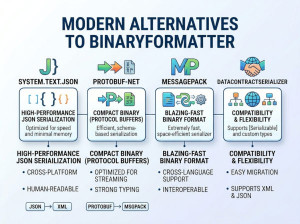
Protocol Buffers (Protobuf)
Protocol Buffers provide efficient binary serialization with schema definitions.
They are widely used in gRPC and distributed systems.
MessagePack
MessagePack is a compact binary alternative to JSON.
It offers better performance while preserving relatively simple serialization models.
BSON
BSON is a binary representation of JSON-like documents.
It is commonly used in MongoDB for efficient document storage.
Binary Format vs JSON
| Feature | Binary Format | JSON |
|---|---|---|
| Readability | Not human-readable | Human-readable |
| Performance | Faster | Slower parsing |
| File Size | Smaller | Larger |
| Debugging | More difficult | Easier |
| Network Efficiency | Higher | Lower |
Final Thoughts
Binary formats are fundamental in modern software systems where performance, compact storage, and efficient communication are critical. They are widely used in networking, databases, multimedia processing, embedded systems, and high-performance enterprise applications.
Although binary formats introduce additional complexity and debugging challenges, they provide significant advantages in speed and resource efficiency. Developers working with distributed systems, real-time communication, or large-scale data processing should understand binary structures and serialization techniques as essential software engineering skills.