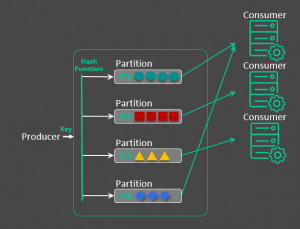
Message Groups

Messages can occur within groups to allow ordering of messages. In addition to ordering of messages, message grouping allows segmentation of large messages within the same group.
Message Groups for ActiveMQ are an enhancement to the Exclusive Consumer feature to provide:
• guarranteed ordering of the processing of related messages across a single queue
• load balancing of the processing of messages across multiple consumers
• high availability / auto-failover to other consumers if a JVM goes down
So logically Message Groups are kinda like a parallel Exclusive Consumer. Rather than all messages going to a single consumer, the standard JMS header JMSXGroupID is used to define which message group the message belongs to. The Message Group feature then ensures that all messages for the same message group will be sent to the same JMS consumer - while that consumer stays alive. As soon as the consumer dies another will be chosen.
Another way of explaining Message Groups is that it provides sticky load balancing of messages across consumers; where the JMSXGroupID is kinda like a HTTP session ID or cookie value and the message broker is acting like a HTTP load balancer.
How Message Groups Work?
1. Producer sends messages with a JMSXGroupID
Example:
• Order #1 → Group = "customer-123"
• Order #2 → Group = "customer-456"
2. ActiveMQ assigns each group to a single consumer
3. All messages with the same group ID go to the same consumer
4. Different groups can go to different consumers
Key Components of Message Groups
1. JMSXGroupID
• Defines the group
• Required for grouping
2. JMSXGroupSeq (optional)
• Sequence number
• Can signal end of a group (e.g., -1 closes group)
3. Consumers
Each group is pinned to one consumer
4. Broker Assignment Logic
ActiveMQ tracks which consumer owns which group
Key Features of Message Groups
• Sticky assignment (same group → same consumer)
• Parallel processing across groups
• Automatic rebalancing if a consumer dies
• Ordering guaranteed per group
• No application-level locking needed
Advantages of Message Groups
Combines Ordering + Scalability
Best of both worlds.
Efficient Resource Usage
All consumers actively process messages.
Fault Tolerance
If a consumer fails: Its groups are reassigned
Flexible Partitioning
You control grouping logic (by user, order, region, etc.)
Disadvantages of Message Groups
Uneven Load Distribution
If one group is very “hot”: One consumer becomes a bottleneck
Requires Good Group Design
Bad grouping strategy → poor performance
Memory Overhead
Broker tracks group ownership
Ordering Only Within Group
No global ordering across all messages