Kafka Consumer Group Explained with C# Examples and Real Use Cases
A Kafka consumer group is a collection of consumers working together to read messages from a Kafka topic. Instead of every consumer reading all messages independently, Kafka distributes topic partitions across consumers inside the same group. This allows applications to process messages faster and scale horizontally.
For example, imagine an e-commerce system that receives thousands of order events every second. A single consumer may not process all incoming events quickly enough. By creating multiple consumers inside the same consumer group, Kafka splits the workload automatically between them.
Consumer groups are one of the core reasons why Apache Kafka is highly scalable. They allow systems to process large amounts of streaming data without requiring a single machine to handle everything.
Why We Use Kafka Consumer Groups?
Kafka consumer groups are mainly used for scalability, fault tolerance, and workload distribution. Modern applications often generate millions of events such as logs, payments, notifications, analytics data, and user activities. Processing all of this data with a single consumer becomes a bottleneck very quickly.
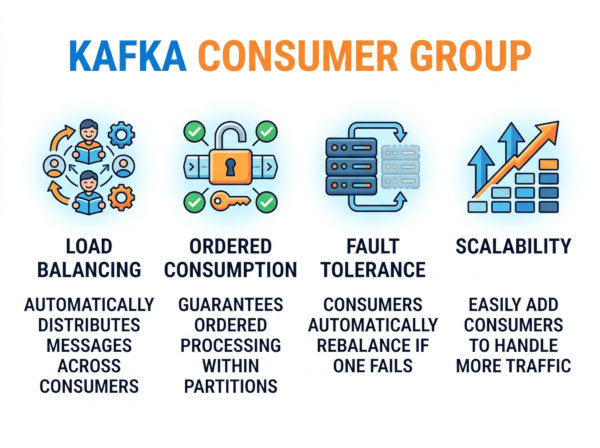
A consumer group solves this problem by allowing multiple consumers to process messages in parallel. Kafka assigns partitions dynamically to consumers so the workload is shared efficiently. If one consumer crashes, Kafka automatically reassigns its partitions to another consumer in the group. This helps applications continue running without data loss or manual intervention.
Consumer groups are also useful when applications need independent processing pipelines. For example, the same Kafka topic can be consumed by different groups for analytics, notifications, fraud detection, and reporting. Each group receives the full stream independently.
Key Features of Kafka Consumer Groups
Parallel Message Processing
Kafka distributes partitions across multiple consumers in the same group. This enables concurrent message processing and significantly improves throughput for high-traffic applications.
For example, if a topic has six partitions and the consumer group has three consumers, each consumer may handle two partitions. This setup allows the system to process messages much faster compared to a single consumer.
Automatic Load Balancing
Kafka automatically balances partitions when consumers join or leave the group. Developers do not need to manually assign workloads in most scenarios.
This is especially useful in cloud-native environments where containers may scale dynamically. Kafka adjusts partition ownership automatically whenever the infrastructure changes.
Fault Tolerance
If a consumer crashes or becomes unavailable, Kafka reassigns its partitions to another active consumer. This minimizes downtime and helps applications remain operational.
This feature is important for financial systems, logistics platforms, and real-time monitoring systems where uninterrupted data processing is critical.
Offset Management
Kafka tracks the position of consumed messages using offsets. Consumer groups can store and recover offsets so applications can continue processing from the correct location after a restart.
Offset management also helps developers implement retry mechanisms and replay old messages when necessary.
Key Components of Kafka Consumer Groups
Consumer
A consumer is the application instance that reads messages from Kafka topics. Multiple consumers can belong to the same group.
Each consumer processes messages from one or more partitions assigned by Kafka.
Consumer Group ID
The group ID uniquely identifies a consumer group. All consumers with the same group ID work together and share partitions.
If consumers use different group IDs, they operate independently and each receives all messages from the topic.
Topic
A topic is the logical channel where Kafka stores messages. Producers write data into topics and consumers read data from them.
Topics can contain multiple partitions for scalability.
Partition
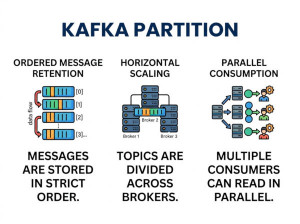
Partitions divide topic data into smaller ordered segments. Kafka assigns partitions to consumers within the group.
A single partition can only be consumed by one consumer within the same group at a time. This guarantees message order inside that partition.
Offset
An offset is the position of a message inside a partition. Kafka uses offsets to track which messages have already been processed.
Offsets are critical for recovery scenarios and exactly-once or at-least-once delivery strategies.
How Kafka Consumer Groups Work?
When a consumer starts, it connects to Kafka using a group ID. Kafka checks all active consumers in that group and distributes partitions between them.
Suppose a topic contains four partitions:
Partition-0
Partition-1
Partition-2
Partition-3
If two consumers join the same group, Kafka may assign partitions like this:
Consumer-A -> Partition-0, Partition-1
Consumer-B -> Partition-2, Partition-3
If another consumer joins later, Kafka performs a rebalance and redistributes partitions again.
This mechanism allows applications to scale dynamically based on workload.
How to Use Kafka Consumer Groups?
Step 1: Create a Kafka Topic
First, create a topic with multiple partitions. More partitions usually allow higher parallelism.
Example command:
kafka-topics.sh --create \
--topic order-events \
--bootstrap-server localhost:9092 \
--partitions 4 \
--replication-factor 1
Step 2: Create Consumers with the Same Group ID
Consumers that share the same group ID automatically become part of the same consumer group.
Step 3: Start Processing Messages
Kafka assigns partitions automatically and consumers begin processing messages independently.
Kafka Consumer Group C# Example
Install NuGet Package
dotnet add package Confluent.Kafka
Producer Example
using Confluent.Kafka;
var config = new ProducerConfig
{
BootstrapServers = "localhost:9092"
};
using var producer = new ProducerBuilder<Null, string>(config).Build();
for (int i = 1; i <= 10; i++)
{
await producer.ProduceAsync(
"order-events",
new Message<Null, string>
{
Value = $"Order #{i}"
});
Console.WriteLine($"Sent Order #{i}");
}
Consumer Group Example
using Confluent.Kafka;
var config = new ConsumerConfig
{
BootstrapServers = "localhost:9092",
GroupId = "order-processing-group",
AutoOffsetReset = AutoOffsetReset.Earliest
};
using var consumer = new ConsumerBuilder<Ignore, string>(config).Build();
consumer.Subscribe("order-events");
while (true)
{
var result = consumer.Consume();
Console.WriteLine(
$"Consumer: {config.GroupId} | " +
$"Partition: {result.Partition} | " +
$"Message: {result.Message.Value}");
}
If you run this consumer multiple times, Kafka distributes partitions automatically between instances.
Best Use Cases for Kafka Consumer Groups
Order Processing Systems
E-commerce platforms often receive thousands of order events every minute. Consumer groups allow multiple services to process orders simultaneously without overwhelming a single machine.
For example, one consumer may validate payments while another updates inventory. Kafka distributes events efficiently across the system.
Log Aggregation Platforms
Applications and servers continuously generate logs. Consumer groups help distribute log processing workloads across multiple instances.
This enables real-time monitoring dashboards, alert systems, and centralized analytics platforms to operate efficiently under heavy traffic.
Fraud Detection Systems
Financial systems analyze transaction streams continuously to detect suspicious activities. Consumer groups allow fraud detection engines to process large transaction volumes in parallel.
This reduces detection latency and helps companies react faster to potential threats.
Notification Services
Messaging systems often send emails, SMS messages, and push notifications at scale. Consumer groups help distribute notification tasks across multiple workers.
This ensures users receive notifications quickly even during traffic spikes.
IoT Data Processing
IoT devices generate large streams of sensor data. Consumer groups help process telemetry data from thousands of devices simultaneously.
This architecture is commonly used in smart factories, logistics tracking systems, and industrial monitoring solutions.
Advantages of Kafka Consumer Groups
High Scalability
Consumer groups allow systems to scale horizontally by simply adding more consumers. This makes Kafka suitable for applications handling very large data streams.
Instead of upgrading a single server continuously, companies can distribute processing across multiple machines.
Better Fault Tolerance
Kafka automatically reassigns partitions when a consumer fails. Applications continue processing messages with minimal interruption.
This reduces operational risk and improves service availability.
Efficient Resource Usage
Workloads are distributed evenly between consumers, preventing one server from becoming overloaded while others remain idle.
This improves infrastructure efficiency and reduces unnecessary hardware costs.
Independent Processing Pipelines
Different consumer groups can process the same topic independently. One group may handle analytics while another handles notifications.
This makes Kafka highly flexible for event-driven architectures.
Disadvantages of Kafka Consumer Groups
Partition Limitations
The number of active consumers in a group cannot exceed the number of partitions effectively. If a topic has three partitions and five consumers, two consumers remain idle.
This means partition planning becomes important for scalability.
Rebalancing Overhead
Whenever consumers join or leave a group, Kafka triggers a rebalance. During this process, message consumption may pause temporarily.
Frequent scaling events can therefore impact performance in highly dynamic environments.
Complex Offset Management
Managing offsets manually can become difficult in advanced applications. Incorrect offset handling may lead to duplicate processing or skipped messages.
This is especially important in financial systems or transactional workflows.
Ordering Constraints
Kafka guarantees ordering only inside a single partition. Messages across multiple partitions may arrive in different orders.
Applications that require strict global ordering may need additional design considerations.
Alternatives to Kafka Consumer Groups
RabbitMQ Consumer Queues
RabbitMQ distributes messages through queues instead of partitions. It is often simpler to configure and works well for traditional task-processing systems.
However, RabbitMQ generally does not handle extremely large streaming workloads as efficiently as Kafka.
Amazon SQS
Amazon SQS is a managed cloud queue service that removes infrastructure management responsibilities. It is suitable for applications already hosted in AWS.
Compared to Kafka, SQS offers simpler operations but fewer advanced stream-processing capabilities.
Apache Pulsar
Apache Pulsar provides messaging and streaming features similar to Kafka. It includes built-in multi-tenancy and tiered storage support.
Some organizations choose Pulsar when they need stronger geographic replication or more flexible storage architectures.
Redis Streams
Redis Streams support lightweight event streaming with low latency. They are easier to deploy for smaller systems and microservices.
However, Redis Streams may not scale as effectively as Kafka for very large distributed event pipelines.
Kafka Consumer Group vs RabbitMQ Consumers
| Feature | Kafka Consumer Group | RabbitMQ Consumers |
|---|---|---|
| Architecture | Partition-based distributed streaming | Queue-based messaging |
| Scalability | Very high scalability for large event streams | Good scalability for task queues |
| Message Retention | Messages can remain stored for replay | Messages are usually removed after consumption |
| Ordering | Guaranteed within a partition | Queue ordering supported |
| Best For | Event streaming and analytics | Background jobs and task processing |
Conclusion
Kafka consumer groups are one of the most important features of Apache Kafka because they enable scalable, fault-tolerant, and distributed message processing. By sharing partitions between consumers, Kafka allows applications to process huge event streams efficiently while maintaining reliability.
Consumer groups are widely used in modern architectures including e-commerce systems, financial platforms, analytics pipelines, IoT platforms, and real-time monitoring systems. Although they introduce some complexity around partitions and offsets, their scalability and resilience make them essential for event-driven applications.
For C# developers, libraries such as Confluent.Kafka make it relatively straightforward to implement Kafka consumer groups and build high-performance distributed systems.