Kafka Partition Explained with Examples and C# Code
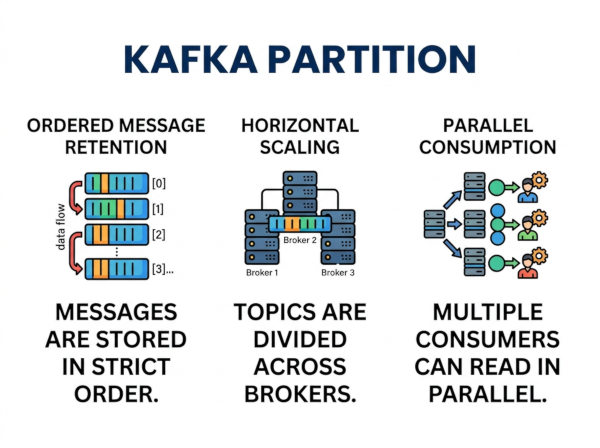
A Kafka partition is a subdivision of a Kafka topic that stores messages in an ordered and immutable sequence. Instead of storing all messages inside a single large queue, Kafka splits topic data into multiple partitions so messages can be processed in parallel.
For example, imagine a payment platform processing millions of transactions every day. If all transaction events were stored in one single queue, message processing would quickly become a bottleneck. Kafka partitions solve this problem by distributing data across multiple partitions, allowing producers and consumers to work concurrently.
Each partition maintains message order independently. Kafka assigns every message an offset value, which acts like the message position inside that partition.
Why Kafka Partitions Are Important?
Kafka partitions are the foundation of Kafka scalability and performance. Without partitions, Kafka would behave like a traditional queue system with limited throughput.
Partitions allow Kafka to distribute workloads across multiple brokers and consumers. This enables applications to process huge amounts of data efficiently while maintaining reliability and fault tolerance.
Partitions also make horizontal scaling possible. If traffic increases, developers can add more consumers or brokers to handle the additional workload instead of upgrading a single machine continuously.
How Kafka Partitions Work?
When a producer sends a message to Kafka, the message is written into a specific partition. Kafka determines the target partition using one of these methods:
• Round-robin distribution
• Message keys
• Custom partition logic
Inside each partition, messages are stored sequentially.
Example topic structure:
Topic: order-events
Partition-0
Offset-0 -> Order #1001
Offset-1 -> Order #1002
Partition-1
Offset-0 -> Order #1003
Offset-1 -> Order #1004
Each partition has its own offset sequence. Offsets are unique only within the partition, not across the entire topic.
Kafka Partition and Message Ordering
Kafka guarantees message order only inside a single partition. This is one of the most important concepts developers must understand before designing Kafka-based systems.
For example, if all events for a customer are written into the same partition using the customer ID as the message key, Kafka preserves the order of those events. This is critical for systems such as banking applications, inventory tracking, and payment processing.
However, messages stored in different partitions may be consumed in parallel and therefore processed in different orders.
Why Kafka Uses Partitions?
Scalability
Partitions allow Kafka topics to scale horizontally. Instead of processing all messages through one broker or one consumer, Kafka distributes the workload across multiple systems.
For example, a video streaming platform generating user activity events can increase throughput simply by increasing partition count and adding more consumers.
Parallel Processing
Consumers in the same consumer group can process different partitions simultaneously. This improves throughput significantly for high-volume applications.
A logistics platform tracking delivery updates from thousands of vehicles can process events much faster by splitting partitions across multiple consumers.
Fault Tolerance
Kafka replicates partitions across multiple brokers. If one broker fails, another broker can continue serving the partition.
This architecture helps Kafka maintain high availability even during infrastructure failures.
Better Resource Distribution
Partitions help distribute CPU, memory, storage, and network usage across multiple servers instead of overloading a single machine.
This reduces infrastructure bottlenecks and improves overall system stability.
Key Components of Kafka Partitions
Topic
A topic is the logical container for messages. Partitions exist inside topics.
For example, an application may have topics such as:
user-events
payment-events
notification-events
Each topic may contain multiple partitions.
Offset
Offsets identify message positions inside a partition.
Example:
Partition-0
Offset-0
Offset-1
Offset-2
Consumers use offsets to track processed messages.
Partition Leader
Each partition has a leader broker responsible for handling reads and writes.
All producers and consumers communicate with the partition leader directly.
Replica Partitions
Kafka creates replicas of partitions on other brokers for fault tolerance.
If the leader broker fails, Kafka elects another replica as the new leader automatically.
Kafka Partition Example
Suppose a topic contains four partitions:
Topic: payment-events
Partition-0
Partition-1
Partition-2
Partition-3
A producer sends payment events using customer IDs as keys:
Customer-101 -> Partition-1
Customer-205 -> Partition-3
Customer-101 -> Partition-1
Kafka hashes the key and always routes the same customer to the same partition. This guarantees ordering for that customer’s events.
How to Create Kafka Partitions?
Create a Topic with Partitions
Example command:
kafka-topics.sh --create \
--topic payment-events \
--bootstrap-server localhost:9092 \
--partitions 4 \
--replication-factor 1
This creates a topic with four partitions.
Increase Partition Count
Partitions can also be increased later:
kafka-topics.sh --alter \
--topic payment-events \
--partitions 8 \
--bootstrap-server localhost:9092
However, increasing partitions may affect message ordering strategies.
Kafka Partition C# Producer Example
Install Kafka Client Library
dotnet add package Confluent.Kafka
Send Messages to Kafka Partitions
using Confluent.Kafka;
var config = new ProducerConfig
{
BootstrapServers = "localhost:9092"
};
using var producer =
new ProducerBuilder<string, string>(config).Build();
var orders = new[]
{
("customer-1", "Order #1001"),
("customer-2", "Order #1002"),
("customer-1", "Order #1003")
};
foreach (var order in orders)
{
var result = await producer.ProduceAsync(
"payment-events",
new Message<string, string>
{
Key = order.Item1,
Value = order.Item2
});
Console.WriteLine(
$"Message: {order.Item2} " +
$"Partition: {result.Partition}");
}
Because the same key is used for the same customer, Kafka routes those messages to the same partition.
Kafka Partition C# Consumer Example
using Confluent.Kafka;
var config = new ConsumerConfig
{
BootstrapServers = "localhost:9092",
GroupId = "payment-group",
AutoOffsetReset = AutoOffsetReset.Earliest
};
using var consumer =
new ConsumerBuilder<string, string>(config).Build();
consumer.Subscribe("payment-events");
while (true)
{
var result = consumer.Consume();
Console.WriteLine(
$"Partition: {result.Partition} | " +
$"Offset: {result.Offset} | " +
$"Message: {result.Message.Value}");
}
This consumer reads messages from assigned partitions and displays partition and offset information.
Best Use Cases for Kafka Partitions
Real-Time Analytics Platforms
Analytics systems process massive event streams such as clicks, searches, and user interactions. Partitions allow these systems to distribute workloads across multiple processing nodes efficiently.
This architecture helps companies analyze user behavior in near real time without overwhelming a single server.
Financial Transaction Processing
Banking and payment systems often require ordered processing for account-related events. By using account IDs as partition keys, Kafka ensures transaction order is preserved for each account.
This reduces the risk of inconsistent balances or invalid transaction sequences.
IoT Sensor Data Processing
IoT environments generate continuous streams of telemetry data from sensors and devices. Kafka partitions help distribute this data across multiple consumers for scalable processing.
Factories, logistics systems, and smart city applications commonly use this approach.
Event-Driven Microservices
Microservice architectures frequently rely on Kafka for communication between services. Partitions enable services to process events concurrently while maintaining scalability.
For example, separate consumers may process orders, inventory updates, shipping events, and notifications simultaneously.
Advantages of Kafka Partitions
High Throughput
Partitions allow Kafka to process huge numbers of messages in parallel. This significantly increases throughput compared to single-queue architectures.
Applications with millions of daily events benefit greatly from partition-based scaling.
Horizontal Scalability
Kafka can scale by adding brokers and consumers instead of upgrading individual machines continuously.
This makes Kafka suitable for large distributed systems and cloud-native architectures.
Better Fault Tolerance
Partition replication protects against broker failures. Kafka can continue serving data even when hardware issues occur.
This improves reliability for mission-critical applications.
Efficient Consumer Distribution
Consumer groups can process partitions independently, improving processing efficiency for large workloads.
This reduces latency and improves system responsiveness.
Disadvantages of Kafka Partitions
Complex Partition Planning
Choosing the correct partition count can be difficult. Too few partitions may limit scalability, while too many partitions may increase operational overhead.
Partition strategy requires careful long-term planning.
Ordering Limitations
Kafka guarantees ordering only inside a single partition. Global ordering across all partitions is not guaranteed.
Applications requiring strict ordering across all events may need additional logic.
Rebalancing Overhead
When consumers join or leave a consumer group, Kafka rebalances partitions. During rebalancing, consumption may pause temporarily.
Frequent infrastructure changes can therefore affect performance.
Uneven Data Distribution
Poor partition key selection can cause some partitions to receive significantly more traffic than others.
This problem, known as partition skew, can create bottlenecks.
Kafka Partition Best Practices
Choose Partition Keys Carefully
Use keys that distribute traffic evenly across partitions. Poor key selection may overload certain partitions while others remain underutilized.
For example, using geographic regions or customer IDs usually provides better distribution than static values.
Avoid Too Few Partitions
A small number of partitions limits scalability. Future traffic growth should be considered during topic design.
Increasing partitions later is possible but may affect ordering guarantees.
Monitor Partition Lag
Consumer lag indicates how far consumers are behind producers.
Monitoring lag helps detect performance issues before they impact users.
Balance Replication and Performance
Higher replication improves reliability but increases storage and network overhead.
Applications should balance fault tolerance requirements against infrastructure costs.
Kafka Partition vs Traditional Queue
| Feature | Kafka Partition | Traditional Queue |
|---|---|---|
| Scalability | Horizontal scaling with partitions | Usually limited scaling |
| Ordering | Guaranteed within partition | Usually global queue ordering |
| Message Retention | Messages can remain stored | Messages are often deleted after consumption |
| Parallel Processing | High parallelism support | Limited parallelism |
| Best Use Case | Event streaming systems | Task processing systems |
Conclusion
Kafka partitions are the core building blocks that enable Kafka to achieve scalability, parallelism, and fault tolerance. By splitting topics into multiple partitions, Kafka can distribute workloads across brokers and consumers efficiently.
Partitions make Kafka highly suitable for real-time analytics, financial systems, IoT platforms, and large-scale event-driven architectures. However, developers must carefully design partition strategies to avoid issues such as uneven load distribution and ordering limitations.
For C# developers, libraries like Confluent.Kafka provide a straightforward way to work with Kafka partitions and build scalable distributed systems capable of handling very large event streams.