.NET CLR (Common Language Runtime)
CLR, or Common Language Runtime, is the execution engine of the .NET platform. It is responsible for running .NET applications, managing memory, handling exceptions, enforcing type safety, performing security checks, and converting Intermediate Language (IL) code into native machine code.
When developers write C# code, the code is not compiled directly into CPU instructions. Instead, the compiler converts the source code into IL (Intermediate Language). The CLR then takes this IL code and compiles it into native machine instructions using the Just-In-Time (JIT) compiler during execution.
The CLR acts as a managed execution environment between the application and the operating system. Instead of developers manually managing low-level concerns such as memory allocation or pointer cleanup, the CLR automates many of these responsibilities.
Why Do We Use CLR?
Before managed runtimes became popular, developers had to manually manage memory, handle resource cleanup, and deal with low-level system issues directly. These tasks increased development complexity and caused problems such as memory leaks, segmentation faults, and application crashes.
CLR simplifies application development by providing automatic memory management, garbage collection, runtime validation, structured exception handling, and cross-language interoperability. Developers can focus more on business logic instead of infrastructure-level concerns.
Another important reason is portability and consistency. CLR provides a standardized runtime environment where .NET applications behave consistently across different systems and architectures.
When Should You Use CLR?
CLR is automatically used whenever you develop applications using .NET technologies such as:
• ASP.NET Core
• Console Applications
• Windows Services
• Background Workers
• Web APIs
• Desktop Applications
• Microservices
• Cloud-Native Applications
If you are writing C#, F#, or VB.NET applications, your application already depends on CLR internally.
CLR becomes especially valuable in:
• Enterprise applications requiring reliability
• High-performance server applications
• Applications requiring memory safety
• Long-running backend services
• Multi-threaded applications
• Cloud-based distributed systems
Applications requiring extremely low-level hardware access or deterministic memory management may sometimes prefer native runtimes instead of CLR.
CLR Execution Pipeline
The CLR execution pipeline starts when developers compile source code.
The execution flow looks like this:
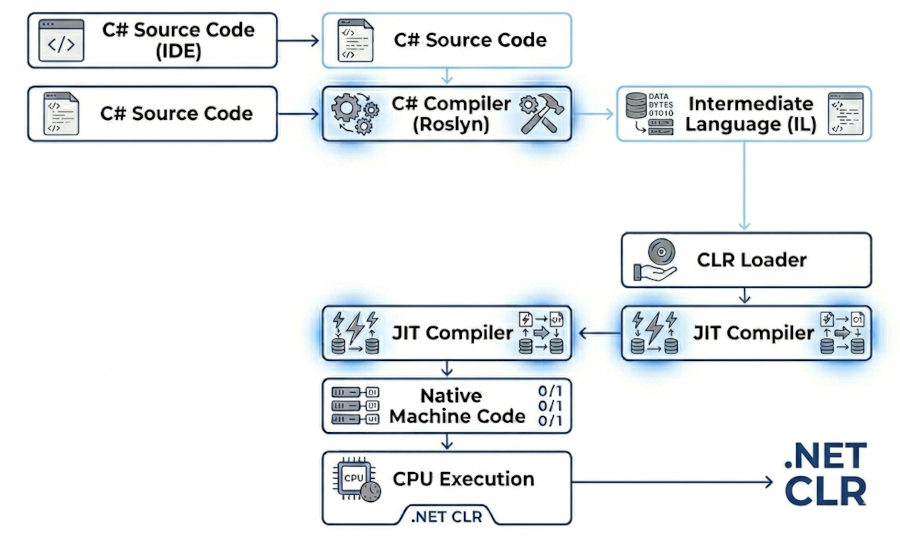
The process allows .NET applications to remain portable because IL code is CPU-independent until runtime compilation occurs.
Core Components of CLR
Assembly Loader
The Assembly Loader loads compiled .NET assemblies into memory. Assemblies usually contain:
• IL code
• Metadata
• Manifest information
• Version information
The loader also resolves dependencies between assemblies.
For example, when an ASP.NET Core application starts, CLR loads required DLL files and prepares them for execution.
JIT (Just-In-Time) Compiler
The JIT compiler converts IL code into native machine instructions during runtime.
Instead of compiling the entire application at startup, JIT compiles methods only when they are first executed. This improves startup efficiency and reduces unnecessary compilation work.
Example flow:
• Method is called
• CLR checks whether native code exists
• If not compiled yet, JIT compiles the method
• Native code is cached in memory
• Future calls reuse compiled code
C# example:
public class Calculator
{
public int Add(int a, int b)
{
return a + b;
}
}
The Add() method is initially stored as IL code and compiled by JIT only when executed.
Garbage Collector (GC)
The Garbage Collector automatically manages memory allocation and cleanup.
Without GC, developers would need to manually release memory, which often causes:
• Memory leaks
• Dangling pointers
• Double-free errors
• Application instability
GC periodically identifies unused objects and frees their memory automatically.
C# example:
public void CreateObjects()
{
for (int i = 0; i < 100000; i++)
{
var user = new User();
}
}
After objects become unreachable, the GC eventually removes them from memory.
Type Safety System
CLR validates types during execution to prevent invalid memory operations.
For example:
• Invalid casts are blocked
• Array bounds are checked
• Unsafe memory access is restricted
This improves application stability and security significantly.
Example:
object value = "hello";
int number = (int)value;
This throws an exception because CLR detects an invalid type conversion.
Exception Handling System
CLR provides structured exception handling across all .NET languages.
Instead of crashing the application immediately, CLR allows controlled error handling.
Example:
try
{
int x = 10;
int y = 0;
Console.WriteLine(x / y);
}
catch (DivideByZeroException ex)
{
Console.WriteLine(ex.Message);
}
CLR handles stack unwinding and exception propagation internally.
Thread Management
CLR manages threads and thread pools for asynchronous operations.
The runtime optimizes:
• Task scheduling
• Thread reuse
• Context switching
• Parallel execution
This is especially important in ASP.NET Core applications handling thousands of concurrent requests.
Example:
await Task.Run(() =>
{
Console.WriteLine("Running in background");
});
CLR manages underlying thread pool operations automatically.
Managed Code vs Unmanaged Code
Managed code runs under CLR supervision, while unmanaged code executes directly on the operating system.
Managed code advantages:
• Automatic memory management
• Type safety
• Exception handling
• Runtime validation
Unmanaged code advantages:
• Lower-level hardware access
• Potentially lower overhead
• Deterministic resource control
Example:
• C# applications are managed code
• Traditional C applications are unmanaged code
Intermediate Language (IL)
IL is a CPU-independent instruction set generated by .NET compilers.
This allows applications to remain portable across architectures because the CLR handles machine-specific compilation later.
Example IL instructions:
IL_0001: ldarg.1
IL_0002: ldarg.2
IL_0003: add
IL_0004: ret
These instructions represent addition logic before native compilation.
CoreCLR vs .NET Framework CLR
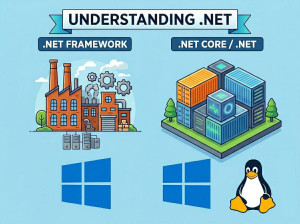
The original .NET Framework used a Windows-only CLR implementation. Modern .NET uses CoreCLR.
CoreCLR advantages:
• Cross-platform support
• Better performance
• Container support
• Cloud-native optimization
• Reduced memory footprint
CoreCLR powers:
• .NET 6
• .NET 7
• .NET 8
• .NET 9
• .NET 10
CLR Memory Management
CLR divides memory into multiple regions.
Major memory areas include:
• Stack
• Heap
• Large Object Heap (LOH)
• Generation 0
• Generation 1
• Generation 2
Objects are allocated on the managed heap while local variables typically remain on the stack.
Example:
int number = 5;
string name = "John";
number is typically stack allocated while name references heap memory.
Generational Garbage Collection
CLR uses generational garbage collection for optimization.
Objects are grouped into generations:
• Gen 0: Short-lived objects
• Gen 1: Medium-lived objects
• Gen 2: Long-lived objects
This improves performance because most objects die young.
Example:
Temporary request objects inside Web APIs usually remain in Gen 0 and are collected quickly.
Best Use Cases of CLR
Enterprise Backend Systems
Large enterprise systems benefit from CLR because memory management, exception handling, and thread management are automated. This reduces infrastructure-related bugs and improves application stability over long production lifecycles.
Banking systems, ERP platforms, insurance software, and large SaaS applications commonly rely on CLR-based applications because reliability is more important than manual low-level optimization.
Web APIs and ASP.NET Core Applications
CLR is heavily optimized for server-side workloads. Features such as thread pooling, asynchronous execution, and garbage collection help applications handle high concurrency efficiently.
Modern ASP.NET Core APIs processing thousands of requests per second depend on CLR internals for scalability and performance.
Cloud-Native Microservices
Microservices architectures often deploy many small services simultaneously. CLR simplifies memory safety and deployment consistency across distributed systems.
Containerized .NET applications running on Kubernetes commonly use CoreCLR because of its optimized startup time and reduced resource consumption.
Multi-Threaded Applications
Applications involving background processing, asynchronous programming, and parallel execution benefit from CLR thread management.
CLR thread pools help reduce expensive thread creation overhead and improve scalability.
Advantages of CLR
Automatic Memory Management
Developers do not manually free memory. This significantly reduces memory leaks and invalid memory access problems.
Applications become more stable and easier to maintain compared to unmanaged systems.
Cross-Language Interoperability
CLR allows multiple .NET languages to work together because they compile into the same IL format.
For example, a C# library can be consumed by an F# or VB.NET application without compatibility issues.
Improved Security
CLR enforces runtime checks and type validation, reducing many security vulnerabilities caused by invalid memory operations.
This is especially valuable in enterprise systems handling sensitive data.
Better Productivity
Developers can focus more on application logic instead of low-level infrastructure concerns.
Features such as exception handling, thread pooling, and garbage collection improve development speed significantly.
Disadvantages of CLR
Runtime Overhead
CLR introduces additional runtime abstraction layers.
Operations such as:
• Garbage collection
• JIT compilation
• Runtime validation
can introduce performance overhead compared to native applications.
Non-Deterministic Garbage Collection
Developers cannot precisely control when garbage collection occurs.
In latency-sensitive applications, GC pauses may occasionally impact response times.
Higher Memory Usage
Managed runtimes usually consume more memory than low-level native applications because metadata, runtime structures, and GC bookkeeping require additional resources.
Common Mistakes When Working with CLR
Creating Excessive Allocations
Creating too many temporary objects increases garbage collection pressure.
Bad example:
for (int i = 0; i < 1000000; i++)
{
string text = i.ToString();
}
Frequent allocations may cause unnecessary GC activity.
Ignoring IDisposable
Some developers assume GC automatically cleans everything.
However, unmanaged resources such as:
• Database connections
• File streams
• Socket handles
still require explicit disposal.
Correct example:
using var stream = new FileStream("data.txt", FileMode.Open);
Misusing Large Objects
Allocating large objects repeatedly increases pressure on the Large Object Heap (LOH), which is more expensive to clean.
This can negatively affect performance in high-throughput systems.
Blocking Threads Unnecessarily
Blocking CLR thread pool threads with synchronous operations reduces scalability.
Bad example:
Thread.Sleep(5000);
Prefer asynchronous approaches whenever possible.
Alternatives to CLR
Native C++ Runtime
C++ applications compile directly into native machine code without managed runtime overhead.
This provides:
• Better low-level control
• Deterministic memory management
• Lower runtime abstraction
However, developers must manually manage memory and resources.
JVM (Java Virtual Machine)
JVM is conceptually similar to CLR.
Both provide:
• Managed execution
• Garbage collection
• Runtime compilation
• Cross-platform execution
The main difference is ecosystem and language integration.
Rust Runtime Model
Rust avoids garbage collection entirely through ownership and borrowing rules.
This provides:
• Memory safety
• Deterministic performance
• Lower runtime overhead
However, Rust introduces a steeper learning curve.
Comparison of CLR and Native Runtime
| Feature | CLR | Native Runtime |
|---|---|---|
| Memory Management | Automatic Garbage Collection | Manual Management |
| Type Safety | Runtime Enforced | Developer Responsibility |
| Performance | High but managed | Potentially faster |
| Developer Productivity | Higher | Lower |
| Runtime Overhead | Present | Minimal |
Conclusion
CLR is one of the most important components of the .NET ecosystem. It provides a managed runtime environment responsible for execution, memory management, type safety, exception handling, threading, and JIT compilation.
Modern .NET applications rely heavily on CLR optimizations for scalability, reliability, and productivity. Features such as garbage collection, managed execution, and runtime validation simplify software development while improving application stability.
Understanding CLR internals helps developers write more efficient, scalable, and production-ready .NET applications, especially in high-performance backend systems and cloud-native architectures.