.NET Cluster: Architecture, Load Balancing and High Availability
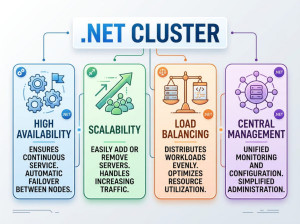
A .NET Cluster is a group of multiple servers or application instances working together as a single system to improve scalability, availability, reliability, and performance. Instead of running one ASP.NET Core or .NET application on a single machine, clustering distributes workloads across several nodes.
In modern software systems, clustering is commonly used in cloud-native applications, microservices architectures, container orchestration platforms, and enterprise backend systems. If one server fails, another server inside the cluster continues serving requests without interrupting the application.
A cluster can contain:
• Multiple ASP.NET Core application instances
• Background worker services
• Distributed cache servers
• Message brokers
• Database replicas
• Reverse proxies and load balancers
The main goal is eliminating the single point of failure while supporting higher traffic and better fault tolerance.
Why Do We Use .NET Clusters?
Single-server applications eventually become difficult to scale. As traffic increases, CPU usage, memory pressure, database connections, and response times start becoming bottlenecks. Clustering solves these problems by distributing requests among multiple servers.
Another important reason is high availability. In production systems, server crashes, operating system updates, network failures, or hardware problems are unavoidable. A cluster allows the application to remain online even when one or more nodes become unavailable.
Clusters are also important for modern DevOps and cloud deployments. Technologies such as Kubernetes, Docker Swarm, Azure Kubernetes Service (AKS), and Amazon ECS rely heavily on clustered architectures to automatically scale and recover applications.
When Should You Use a .NET Cluster?
You should consider clustering when your application starts facing scalability or reliability challenges.
For example, an e-commerce website handling thousands of concurrent users during a campaign period benefits from clustering because traffic can be distributed across multiple application instances. If one instance crashes, customer sessions continue on healthy nodes.
Real-time systems such as trading platforms, multiplayer gaming backends, IoT systems, and messaging applications also benefit from clusters because downtime and latency directly affect users and business operations.
Clustering is commonly used in:
• ASP.NET Core Web APIs
• Microservices platforms
• High-traffic SaaS systems
• Financial systems
• Distributed background processing
• Streaming platforms
• Real-time chat systems
• Enterprise applications
For very small applications with low traffic, clustering may introduce unnecessary complexity and infrastructure cost.
Core Components of a .NET Cluster
Load Balancer
A load balancer distributes incoming traffic between application instances. Without a load balancer, requests cannot be shared effectively.
Popular load balancers include:
• NGINX
• HAProxy
• YARP
• Azure Load Balancer
• AWS Elastic Load Balancer
The load balancer can use algorithms such as:
• Round Robin
• Least Connections
• IP Hash
• Weighted Distribution
Example:
A user request arrives at the load balancer. Instead of always hitting Server A, the request may go to Server B or Server C depending on current workload.
Application Nodes
Application nodes are the actual .NET applications running in the cluster. These are usually identical deployments of the same application.
Each node should ideally remain stateless. Stateless applications are easier to scale because requests can be routed to any server without depending on local memory or session state.
Example:
Three ASP.NET Core API containers running behind Kubernetes are considered cluster nodes.
Distributed Cache
In clustered systems, in-memory caching inside one server becomes problematic because other nodes cannot access that memory. Distributed caching solves this issue.
Common distributed cache technologies:
• Redis
• NCache
• Memcached
Example:
If authentication tokens are stored only inside one server memory, another node cannot validate the user session. Redis centralizes shared cache data for all nodes.
Service Discovery
In dynamic environments such as Kubernetes, containers may start and stop frequently. Service discovery helps applications locate active services automatically.
Examples:
• Consul
• Kubernetes DNS
• Eureka
This prevents hardcoding server addresses.
Health Checks
Health checks continuously monitor cluster nodes to determine whether they are healthy.
ASP.NET Core includes built-in health check middleware.
C# example:
builder.Services.AddHealthChecks();
app.MapHealthChecks("/health");
The load balancer can stop routing traffic to unhealthy nodes automatically.
.NET Cluster Architecture Example
Below is a simplified architecture flow:
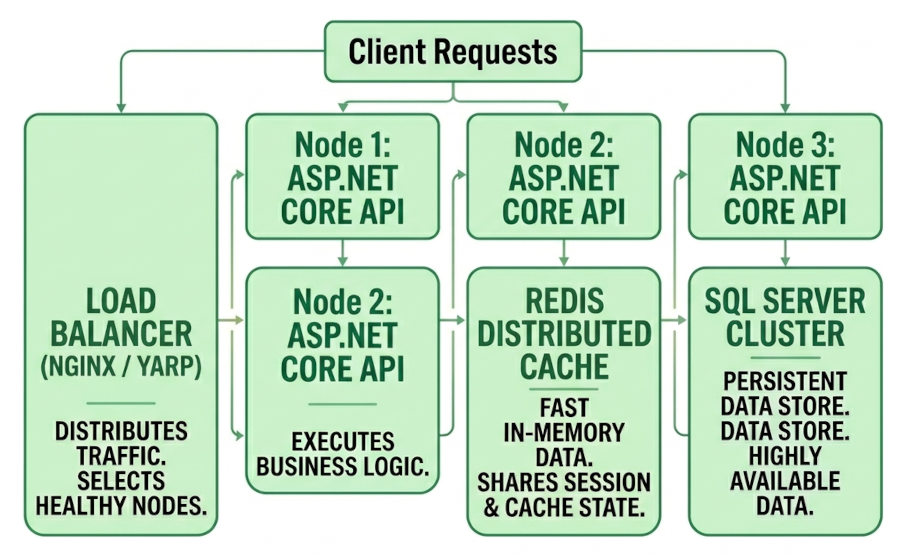
ASP.NET Core Cluster Example with Redis Session Storage
In clustered applications, session state should not remain inside local memory because requests may hit different nodes.
Example configuration:
builder.Services.AddStackExchangeRedisCache(options =>
{
options.Configuration = "localhost:6379";
});
builder.Services.AddSession(options =>
{
options.IdleTimeout = TimeSpan.FromMinutes(30);
});
var app = builder.Build();
app.UseSession();
This configuration allows all application nodes to share sessions through Redis.
Load Balancing Example with YARP
YARP is Microsoft's reverse proxy solution for ASP.NET Core.
Example configuration:
{
"ReverseProxy": {
"Routes": {
"route1": {
"ClusterId": "cluster1",
"Match": {
"Path": "{**catch-all}"
}
}
},
"Clusters": {
"cluster1": {
"Destinations": {
"destination1": {
"Address": "https://localhost:5001/"
},
"destination2": {
"Address": "https://localhost:5002/"
}
}
}
}
}
}
This configuration forwards requests between multiple ASP.NET Core instances.
High Availability in .NET Clusters
High availability means the application continues operating even when failures occur.
For example:
• One server crashes
• A container stops unexpectedly
• A node becomes unreachable
• A deployment fails
A healthy cluster redirects traffic to remaining nodes automatically.
Modern orchestrators such as Kubernetes also restart failed containers automatically, improving resiliency significantly.
Horizontal Scaling vs Vertical Scaling
Horizontal scaling means adding more servers to the cluster. Vertical scaling means increasing hardware resources such as CPU or RAM on one machine.
Horizontal scaling is generally preferred for cloud-native systems because:
• It improves fault tolerance
• It avoids hardware limitations
• It supports elastic scaling
• It reduces downtime risks
Horizontal scaling example:
Instead of upgrading one server from 8 GB RAM to 64 GB RAM, add five smaller servers behind a load balancer.
Best Use Cases for .NET Clustering
High-Traffic Web APIs
Large APIs receiving thousands of requests per second need clustering to avoid overload situations. Traffic can be distributed dynamically between nodes, reducing response times and preventing downtime during peak hours.
Example industries include e-commerce, ticketing systems, and payment gateways where traffic spikes are common and service interruptions directly impact revenue.
Microservices Architectures
Microservices naturally fit clustered environments because each service can scale independently. One service may require ten replicas while another only needs two.
For example, an order processing service may require additional nodes during shopping campaigns, while a reporting service may remain relatively stable.
Real-Time Systems
Applications such as chat systems, multiplayer games, and stock trading platforms require low latency and continuous availability. Clusters help distribute connections while maintaining responsiveness under heavy load.
These systems often combine clustering with distributed messaging systems like Kafka or RabbitMQ for scalability.
Background Processing Systems
Worker services processing jobs, emails, notifications, or video transcoding tasks can run across multiple nodes. If one worker crashes, other workers continue processing queued tasks.
This architecture improves reliability and processing throughput significantly.
Advantages of Using .NET Clusters
Improved Scalability
Clusters allow applications to scale horizontally by adding new nodes. This makes it easier to handle increasing traffic without redesigning the entire application.
Cloud environments especially benefit because infrastructure can scale automatically based on CPU or memory usage.
Better Fault Tolerance
A single server failure does not take the entire application offline. Requests are redirected to healthy nodes automatically.
This significantly reduces downtime and improves customer trust in production systems.
Easier Maintenance
Servers can be updated gradually without shutting down the entire application. Rolling deployments become possible because traffic can temporarily bypass nodes being updated.
This is extremely important for systems requiring near-zero downtime.
Higher Performance
Load distribution prevents individual servers from becoming overloaded. Applications respond faster because work is shared among multiple machines.
This is especially useful for CPU-intensive or IO-heavy systems.
Disadvantages of Using .NET Clusters
Increased Infrastructure Complexity
Clusters introduce networking, orchestration, monitoring, caching, synchronization, and deployment complexity. Developers must understand distributed systems concepts properly.
Debugging distributed applications is also harder compared to single-server applications.
Higher Operational Cost
Running multiple servers, containers, monitoring systems, and orchestration platforms increases infrastructure expenses.
Small projects may not justify the additional operational cost.
Distributed System Challenges
Clusters introduce issues such as:
• Network latency
• Partial failures
• Cache synchronization
• Data consistency
• Split-brain scenarios
These problems do not exist in simple monolithic applications.
Common Mistakes in .NET Clustering
Storing Session State in Memory
One of the most common mistakes is storing user sessions in local server memory.
In a clustered environment, a request may hit another node where session data does not exist. This causes authentication issues and inconsistent user behavior.
Distributed session storage using Redis is usually the preferred solution.
Ignoring Health Checks
Without proper health checks, load balancers may continue routing requests to broken servers.
Applications should expose health endpoints and include dependency validation for databases, caches, and external services.
Creating Stateful Services
Stateful services are difficult to scale horizontally because requests depend on local machine state.
Stateless application design simplifies clustering significantly and improves resiliency.
Scaling the Application but Not the Database
Developers often scale web servers while leaving the database as a bottleneck.
Database replication, read replicas, caching, and query optimization are equally important for overall scalability.
Alternatives to .NET Clustering
Vertical Scaling
Instead of adding more servers, vertical scaling upgrades a single server with better hardware resources.
This approach is simpler initially but has hardware limits and creates a single point of failure.
Serverless Architectures
Platforms such as Azure Functions or AWS Lambda automatically scale functions without managing clusters directly.
Serverless systems reduce operational complexity but may introduce cold start latency and execution limitations.
Edge Computing
Some workloads can be distributed closer to users using edge computing platforms. This reduces latency and decreases load on centralized servers.
Edge computing is commonly used in CDN systems and IoT platforms.
Kubernetes and .NET Clustering
Kubernetes is currently one of the most popular orchestration platforms for clustered .NET applications.
Kubernetes provides:
• Automatic scaling
• Self-healing containers
• Rolling deployments
• Service discovery
• Traffic balancing
• Health monitoring
Example deployment command:
kubectl scale deployment my-api --replicas=5
This command scales the application to five running instances.
Comparison of .NET Cluster and Single Server
| Feature | Single Server | .NET Cluster |
|---|---|---|
| Scalability | Limited by hardware | Can scale horizontally |
| Fault Tolerance | Single point of failure | High availability |
| Deployment | Often requires downtime | Rolling deployments possible |
| Complexity | Simple architecture | Distributed system complexity |
| Infrastructure Cost | Lower | Higher |
Conclusion
.NET Clustering is a foundational concept in modern distributed systems and cloud-native application development. It enables scalability, resiliency, fault tolerance, and high availability by distributing workloads across multiple application instances.
As applications grow, clustering becomes essential for handling traffic spikes, reducing downtime, and supporting continuous deployment strategies. However, clustering also introduces operational and architectural complexity, meaning developers must understand distributed systems principles, caching strategies, monitoring, and failover handling.
For modern ASP.NET Core applications, combining clustering with Kubernetes, Redis, distributed tracing, and containerization provides a highly scalable and production-ready architecture.