
Microsoft Message Queuing (MSMQ)

Microsoft Message Queuing (MSMQ) is a messaging technology developed by Microsoft that enables applications running at different times or on different systems to communicate reliably through message queues.
MSMQ allows applications to send messages asynchronously, meaning the sender and receiver do not need to interact with each other at the same time. It stores messages in queues until the receiving application is ready to process them, which improves reliability and fault tolerance in distributed systems. MSMQ supports transactional messaging, message prioritization, encryption, and security features to ensure safe and ordered communication. It is commonly used in enterprise applications for background processing, system integration, and communication between services in Windows-based environments. MSMQ helps reduce network dependency and improves scalability by decoupling application components.
Microsoft Message Queuing (MSMQ) Flow
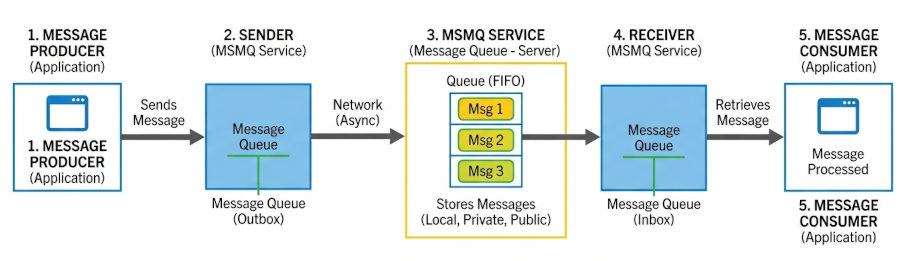
Here is how the end-to-end messaging flow operates based on the architecture diagram:
1. Message Producer (Application): The process begins when a sender application creates a message payload and initiates a call to hand it off to the local MSMQ subsystem rather than attempting to connect directly to the destination server.
2. Sender (MSMQ Service): The local MSMQ service instantly accepts the message and places it into a temporary local outbound queue, allowing the producer application to immediately resume its own processing operations without waiting for a network response.
3. MSMQ Service (Message Queue - Server): Operating asynchronously over the network, the underlying MSMQ protocol transfers the message to the target machine's central queue storage where it is securely persisted in a First-In, First-Out (FIFO) order.
4. Receiver (MSMQ Service): The receiving machine's MSMQ service hosts the target queue (such as a local private or public queue), holding the incoming messages safely in system memory or disk storage until a consumer becomes available.
5. Message Consumer (Application): Finally, the consuming application connects to its designated local queue, pulls the waiting message from the top of the stack, and processes the payload to complete the decoupled transactional workflow.
By decoupling the sender and receiver through this managed queue infrastructure, MSMQ ensures that critical data is never lost, even if network connections fail or the receiving application goes offline temporarily.
More details about MSMQ
MSMQ is essentially a messaging protocol that allows applications running on separate servers/processes to communicate in a failsafe manner. A queue is a temporary storage location from which messages can be sent and received reliably, as and when conditions permit. This enables communication across networks and between computers, running Windows, which may not always be connected. By contrast, sockets and other network protocols assume that direct connections always exist.
MSMQ is responsible for reliably delivering messages between applications inside and outside the enterprise. MSMQ ensures reliable delivery by placing messages that fail to reach their intended destination in a queue and then resending them once the destination is reachable. It also supports security and priority based messaging. Dead letter queues can be created for looking at messages which timed out or failed for other reasons.
MSMQ also supports transactions. It permits multiple operations on multiple queues, with all of the operations wrapped in a single transaction, thus ensuring that either all or none of the operations will take effect. Microsoft Distributed Transaction Coordinator (MSDTC) supports transactional access to MSMQ and other resources.
Message Queuing provides guaranteed message delivery, efficient routing, security, and priority-based messaging.
Why MSMQ Is Used?
MSMQ is used when you need:
• Asynchronous communication: Applications can send messages without waiting for an immediate response.
• Reliability: Messages are stored safely in queues until they are successfully delivered.
• Fault tolerance: If a network or service fails temporarily, messages are not lost.
• Decoupling systems: Sender and receiver applications work independently, making systems easier to maintain and scale.
• Load balancing: MSMQ helps manage heavy workloads by processing messages gradually instead of all at once.
• Security and transactions: Supports encrypted messages and transactional processing for data consistency.
Typical use cases:
• Banking transaction processing
• Order processing systems
• Enterprise backend workflows
• Queue-based job processing
Where we use Message Queuing?
MSMQ is useful in systems where reliable communication between different applications or services is required.
Common use cases include:
• Enterprise applications that exchange business data between departments or servers.
• Financial systems where transactions must not be lost.
• Order processing systems in e-commerce applications.
• Background task processing, such as sending emails or generating reports.
• Distributed systems where multiple applications run on different machines.
• Offline or unstable network environments where applications may disconnect temporarily.
• Integration between legacy Windows applications and services.
For example, in an online shopping system, the website can place an order message into MSMQ, and another service can process payment and shipping later without slowing down the user interface.
Key Features of MSMQ
1. Asynchronous Messaging
Sender and receiver do not need to be active at the same time
2. Guaranteed Delivery
• Messages are stored until successfully delivered
• Supports retry mechanisms
3. Transaction Support
• Ensures message delivery is part of a transaction
• Prevents data loss or duplication in critical systems
4. Persistent Storage
Messages are saved on disk, not just memory
5. Security
Supports encryption and authentication of messages
6. Queue-Based Architecture
Messages are placed in queues and processed in order (or based on rules)
C# MSMQ Examples
Microsoft Message Queuing (MSMQ) is a Windows-based message queue system for asynchronous communication between applications.
MSMQ is mainly used in:
• legacy enterprise systems
• disconnected/offline processing
• transactional message delivery
• Windows service communication
MSMQ is Windows-only and primarily associated with .NET Framework. It is not supported natively in modern cross-platform .NET the same way as newer brokers like RabbitMQ or Azure Service Bus.
1. Install MSMQ on Windows
Enable MSMQ:
Windows Features
1. Control Panel
2. Programs
3. Turn Windows features on or off
4. Enable:
- Microsoft Message Queue (MSMQ)
- MSMQ Server
Or PowerShell:
Enable-WindowsOptionalFeature -Online -FeatureName MSMQ-Server
2. Add Namespace
using System.Messaging;
System.Messaging exists in .NET Framework, not modern .NET Core/.NET 8.
3. Create a Queue
using System.Messaging;
class Program
{
static void Main()
{
string path = @".\Private$\DemoQueue";
if (!MessageQueue.Exists(path))
{
MessageQueue.Create(path);
Console.WriteLine("Queue created");
}
}
}
4. Send a Message
using System;
using System.Messaging;
class Program
{
static void Main()
{
var queue = new MessageQueue(@".\Private$\DemoQueue");
queue.Send("Hello MSMQ");
Console.WriteLine("Message sent");
}
}
5. Receive a Message
using System;
using System.Messaging;
class Program
{
static void Main()
{
var queue = new MessageQueue(@".\Private$\DemoQueue");
queue.Formatter = new XmlMessageFormatter(
new string[] { "System.String,mscorlib" });
Message message = queue.Receive();
string body = (string)message.Body;
Console.WriteLine(body);
}
}
6. Asynchronous Receive
using System;
using System.Messaging;
class Program
{
static MessageQueue queue;
static void Main()
{
queue = new MessageQueue(@".\Private$\DemoQueue");
queue.Formatter = new XmlMessageFormatter(
new[] { "System.String,mscorlib" });
queue.ReceiveCompleted += Queue_ReceiveCompleted;
queue.BeginReceive();
Console.WriteLine("Listening...");
Console.ReadLine();
}
static void Queue_ReceiveCompleted(
object sender,
ReceiveCompletedEventArgs e)
{
Message msg = queue.EndReceive(e.AsyncResult);
Console.WriteLine("Received: " + msg.Body);
queue.BeginReceive();
}
}
7. Send Objects
Serializable Object
[Serializable]
public class Order
{
public int Id { get; set; }
public string Customer { get; set; }
}
Send
var queue = new MessageQueue(@".\Private$\Orders");
var order = new Order
{
Id = 1001,
Customer = "Alice"
};
queue.Send(order);
Receive
queue.Formatter = new XmlMessageFormatter(
new Type[] { typeof(Order) });
Order order = (Order)queue.Receive().Body;
Console.WriteLine(order.Customer);
8. Transactional Queue
Transactional queues guarantee delivery consistency.
Create Transactional Queue
MessageQueue.Create(@".\Private$\TxQueue", transactional: true);
Send Transactionally
using (var tx = new MessageQueueTransaction())
{
tx.Begin();
queue.Send("Important message", tx);
tx.Commit();
}
9. Peek Without Removing
Message msg = queue.Peek();
Console.WriteLine(msg.Label);
10. Queue Properties
Console.WriteLine(queue.MessageCount);
Console.WriteLine(queue.Path);
Console.WriteLine(queue.QueueName);
11. Remote Queue
var queue = new MessageQueue(
@"FormatName:DIRECT=OS:Server01\Private$\Orders");
12. Error Handling
try
{
queue.Send("Test");
}
catch (MessageQueueException ex)
{
Console.WriteLine(ex.Message);
}
13. Purge Queue
Deletes all messages.
queue.Purge();
Advantages
• Reliable communication even if receiver is offline
• Decouples systems (sender doesn’t depend on receiver availability)
• Supports transactions and persistence
• Good for enterprise-grade workflows
• Handles high-load distributed systems
Disadvantages
• Windows-only (limited cross-platform support)
• Not as popular in modern microservices architectures
• More complex than lightweight messaging systems
• Slower compared to in-memory messaging solutions